

Save Time, Save Money, and Keep Orders on Track
Note
The extension does more than just place orders – it also syncs order status and updates tracking numbers when suppliers make changes. This guide covers all the order-related tools in one place.Click here to start dropshipping now with DSers
Quick Look: What You Can Do
| Tool | What It Does | Best For |
|---|---|---|
| Place orders | Apply coupons automatically during checkout | Saving money on every order |
| Sync order status | Update order status from AliExpress instantly | Real-time delivery tracking |
| Update tracking numbers | Fetch latest tracking numbers and push to Shopify | Fixing outdated tracking info |
Before Using Any Tool
- Install the DSers Chrome Extension
- Log in to DSers
- Log in to AliExpress (the account linked to DSers)
- Make sure product variants are mapped
Part 1: Place Orders
Why Use This?
The API is fast but can't use AliExpress coupons. The extension simulates manual checkout – so you get the speed of automation with the savings of manual ordering.
Quick Steps
Before placing an order, make sure you've claimed your AliExpress coupons first.
Tip: Use [AliExpress Coupon AutoGrab: Save Money on Every Order] to claim coupons automatically with one click.
Then follow these steps:
- Go to Open Orders → Awaiting Order.
- Select an order and click Order.
- In the pop-up, choose "Order via Chrome Extension".
- The extension automatically applies one of your valid coupons to each order.
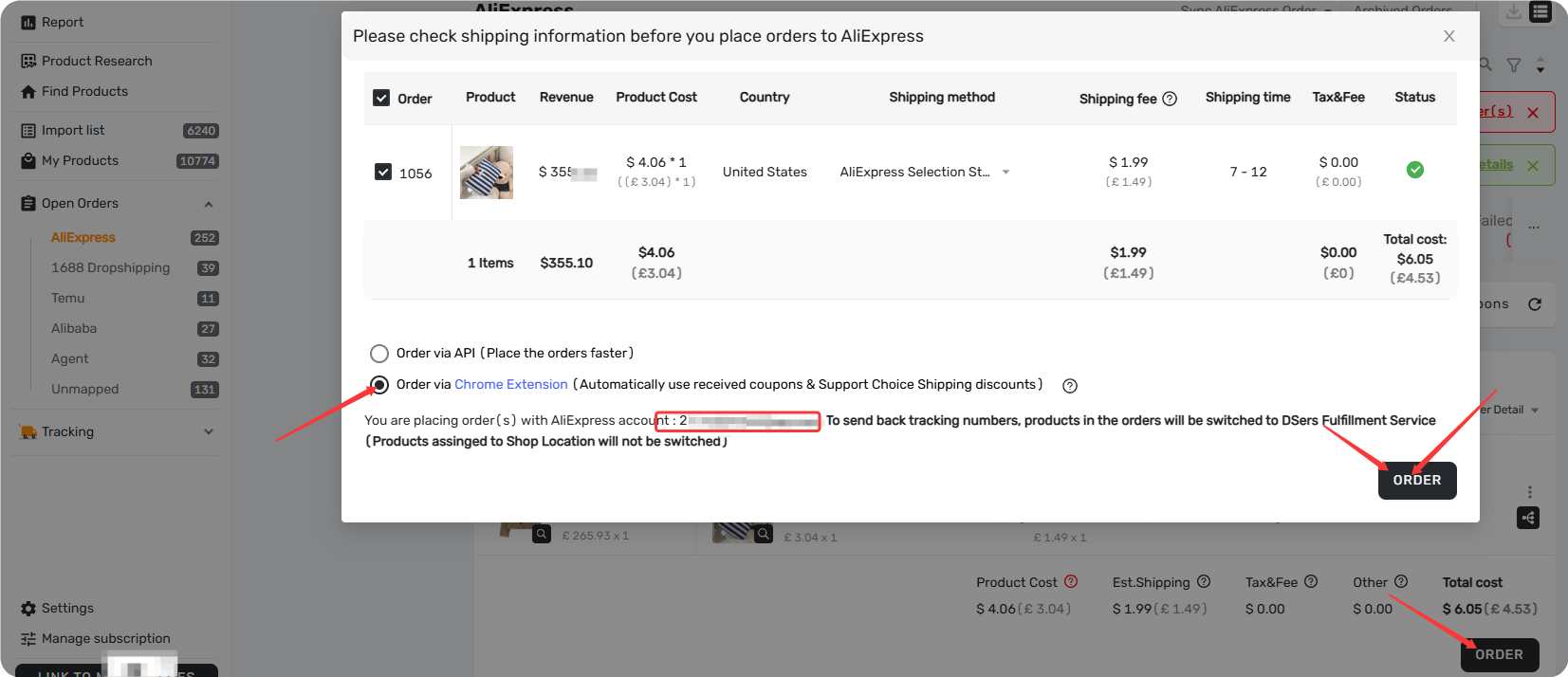
Tip: For full setup (currency, payment method) and step-by-step instructions, see [How to Place Orders Using DSers Chrome Extension].
After Placing an Order
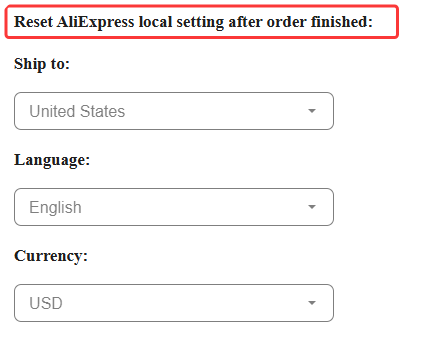
AliExpress page settings (country, language, and currency) may reset automatically after placing an order via the extension. You can control this behavior in Options → Order Settings:
- Do not reset – keeps your settings as they are
- Select a specific country, language, or currency to reset to
Key Things to Know
| What | Why It Matters |
|---|---|
| Claim coupons first | The extension applies coupons you've already claimed – it doesn't claim them for you |
| Promo Code not supported | The extension can't apply Promo Codes – use manual checkout if needed |
| Set currency in advance | Choose your preferred currency in Options before ordering. Note: supplier must support it, otherwise it defaults to USD |
| Order sync after plugin orders still goes through API | After placing an order via the extension, status updates and tracking sync still rely on the API and your linked AE account – keep your account linked |
| DSers order cost may not match AliExpress final payment | The extension doesn't return coupon data to DSers – check the financial details on AliExpress for the actual amount |
Part 2: Sync Order Status
Why Use This?
DSers syncs order status automatically, but sometimes you need updates faster. The extension gives you instant sync – and unlike the API (limited to 5 times per day), the extension has no limit.
How to Sync
- Log into your AliExpress account and keep the Order List page open.
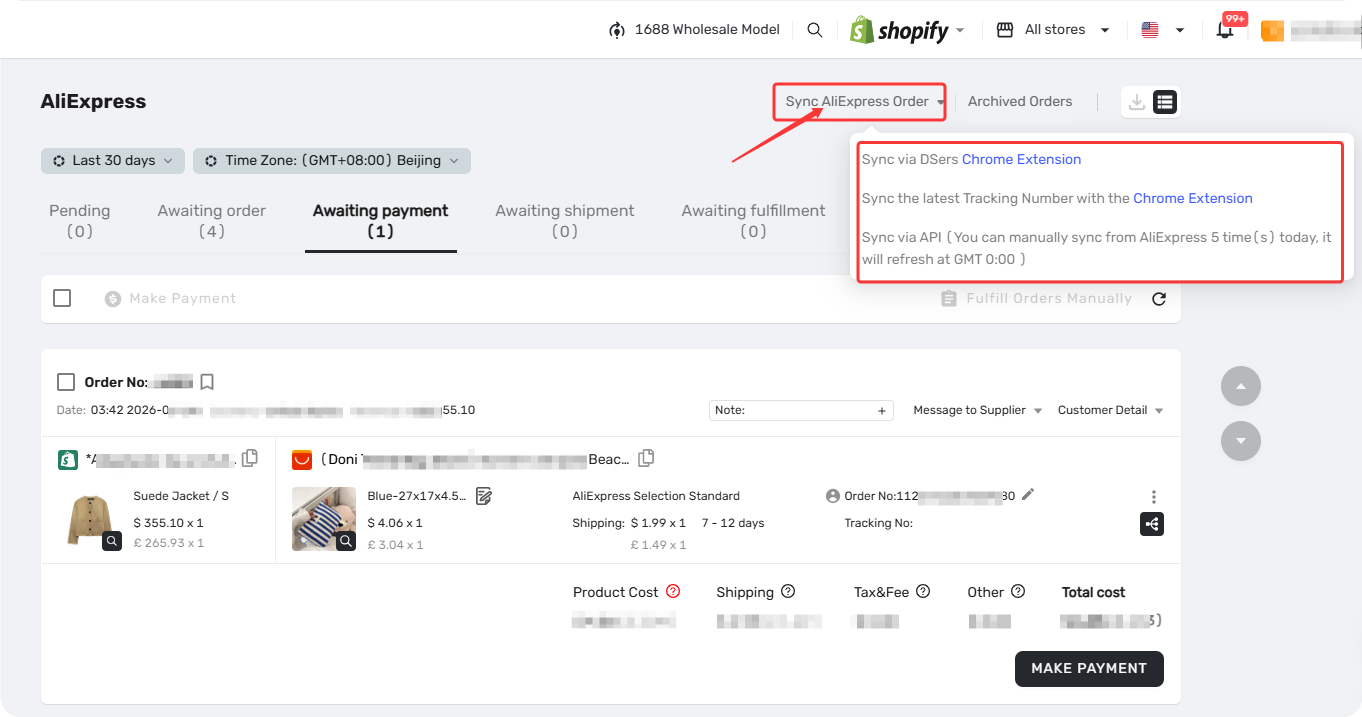
- In DSers, go to Open Orders → click Sync AliExpress Order.
- Select Sync via DSers Chrome Extension.
Part 3: Update Tracking Numbers
Why Use This?
Sometimes suppliers change tracking numbers after shipping. If this happens, your customers get inaccurate tracking info – which leads to confusion and complaints.
The extension fixes this by fetching the latest numbers and updating both DSers and Shopify.
Tip: For a dedicated step-by-step guide, see [Manually Updating Tracking Numbers via the DSers Chrome Extension].
Quick Steps
- Log into AliExpress and open the Order List page.
- In DSers, go to Open Orders → click Sync AliExpress Order.
- Select Sync the latest Tracking Number with the Chrome Extension.
Related Articles
- AliExpress Coupon AutoGrab: Save Money on Every Order
- How to Place Orders Using DSers Chrome Extension
- Manually Updating Tracking Numbers via the DSers Chrome Extension
- DSers Chrome Extension: Features and Capabilities Overview
- DSers Chrome Extension: Sourcing and Product Import Tools Guide
- Fulfill Your First Order: A Step-by-Step Walkthrough
- Auto-Sync Tracking Numbers to Your Store
FAQ Section
Everything you need to know about using the DSers Chrome Extension for order placement, status sync, and tracking updates.

Get Started Now to Grow Your Online Business with the DSers!