

Learn how to change your DSers account email, reset your password, and update your account name and time zone.
Note
In dropshipping, your DSers account stores sensitive business data—store connections, supplier info, and customer orders.Click here to start dropshipping now with DSers
Regularly updating your password helps prevent unauthorized access, while keeping a unified email ensures you never miss important notifications.
This guide also covers how to update your account name and time zone for a better daily experience.
Accessing Your Account Settings
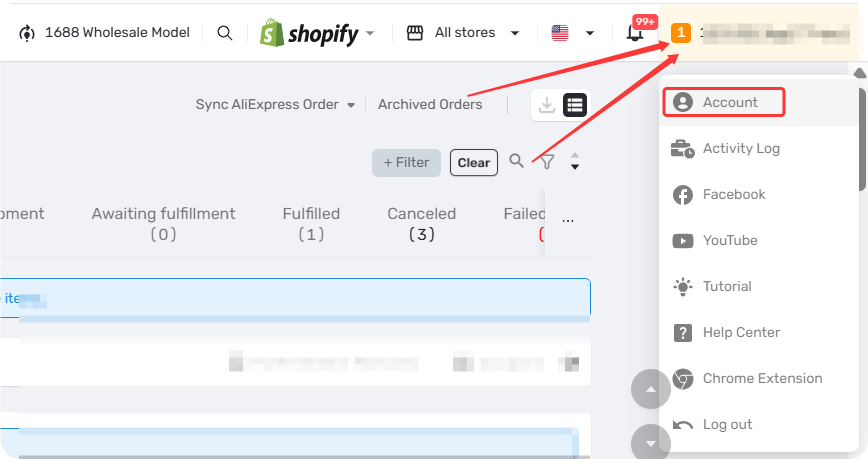
Hover over your account name in the top-right corner and click Account. From here, you'll see three tabs: General, Security and Program.
General Tab
Change Your Account Name
Your account name is your DSers display name—changing it won't affect your login credentials.
Important: You need to verify your current email before changing your account name. If your current email is no longer accessible, update it first to a working one.
Steps:
- In the General tab, click the edit icon ✎ next to your Account name.
- Enter your new name and click Save.
Account names do not need to be unique—multiple users can have the same name.
Change Your Login Email
Your login email is the address you use to sign in and receive all account communications.
Restrictions:
- Must be unique — cannot be used for any other DSers account or staff account
- Requires verification of your new email before the change takes effect
Steps:
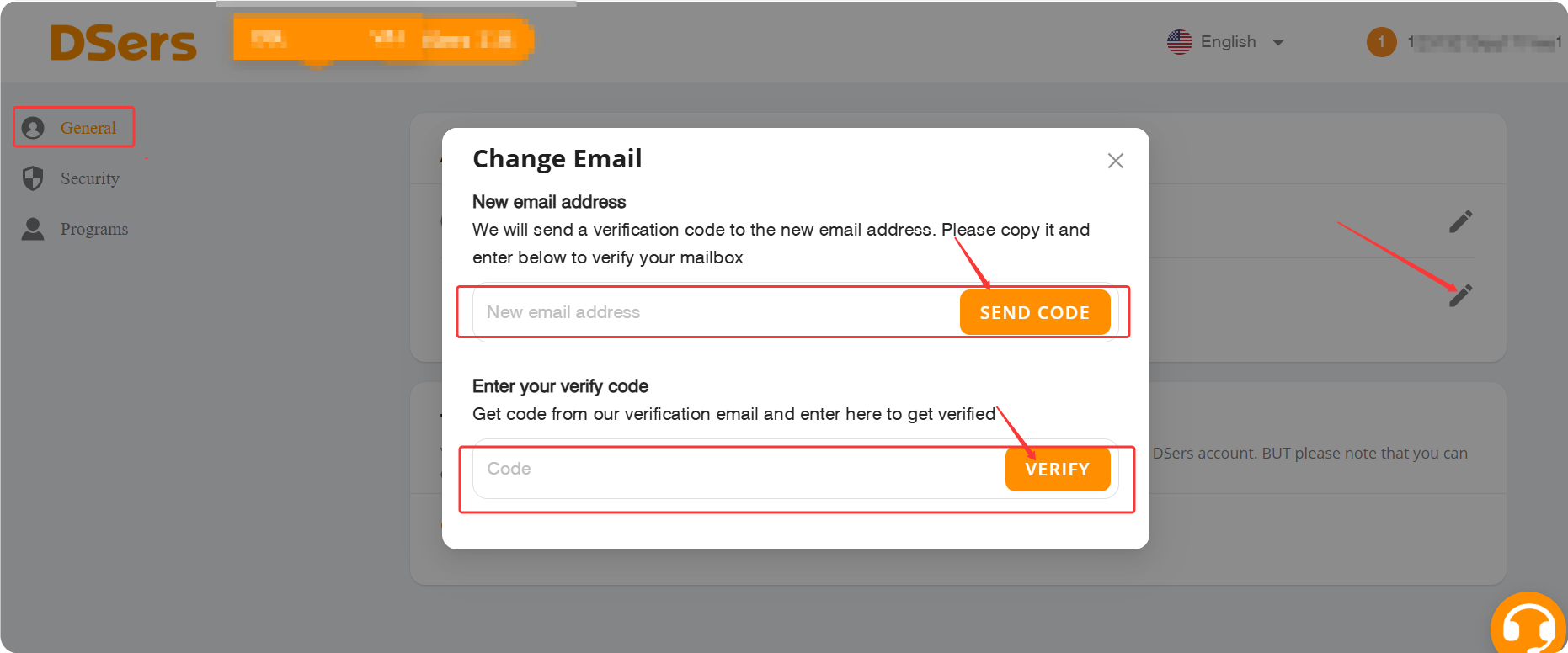
- In the General tab, click the edit icon ✎ next to your Account email
- Enter your new email and click SEND CODE
- Check your new inbox for the code, enter it, and click VERIFY
Set Your Time Zone
Your default time zone is based on your browser settings. You can change it here—this affects order display, notifications, and reports.
Important: You can only set this once to ensure data consistency across reports and order timelines. It cannot be changed after saving.
Steps:
- In the General tab, click the edit icon ✎ next to Time zone
- Select your time zone and click SAVE
If you need to change your time zone after saving, please contact DSers Support for assistance.
Security Tab: Change Your Password
If you're logged in:
- In the Security tab, click the edit icon ✎ next to Password
- Enter your old password and your new password (confirm it), then click SAVE
If you forgot your password:
- Go to the DSers Login page and click "Forgot password".
- Make sure your account email is active and accessible—you'll receive the reset instructions there.
- Enter your account email and click Email instructions.
- Check your inbox, click the reset link, enter your new password twice, and click RESET PASSWORD.
If you don't receive the verification email from DSers when resetting your password, please refer to this article: [Not Getting Verification Code Emails from DSers? Here's How to Fix It]
Program Tab: Switch Your DSers Role
By default, when you register for DSers, you're set as a dropshipper (DSers App account). You can also switch to and register for a DSers Partner account from this tab.
A Partner account is designed for developers and third-party platforms that want to integrate with DSers through our API. Switching to it gives you access to partner-specific features and developer tools. If you're not building an integration, stick with Dropshipper.
Related Articles
- Login Issues: Can't Access Your DSers Account
- Not Getting Verification Code Emails from DSers? Here's How to Fix It
- Create Your DSers Account: Sign Up Step by Step
- Partner Account Registration for Third-Party App Integrations
- Login Without Password: Can't Access Your DSers Account
- DSers Plans and Billing: A Complete Overview
FAQ Section
Everything you need to know about managing your DSers profile, login email, password, and time zone.

Get Started Now to Grow Your Online Business with the DSers!