

How do I link my Alibaba account to DSers? And where do I find the connection settings?
Note
As your dropshipping business scales, relying on a single supplier platform can limit your growth.Click here to start dropshipping now with DSers
Alibaba gives you direct access to manufacturers and wholesalers, often unlocking lower costs, private labeling options, and faster shipping through overseas warehouses.
Once connected, DSers automates the ordering and tracking sync process, so you don't have to manually place each order or copy tracking numbers. This guide walks you through connecting your Alibaba account step by step.
Why Connect Your Alibaba Account?
Connecting your Alibaba account to DSers unlocks several key features:
| What You Can Do | How It Helps |
|---|---|
| Place orders directly to Alibaba | No more switching between tabs — place orders from your DSers dashboard. |
| Auto-sync tracking numbers | DSers automatically pulls tracking numbers from Alibaba and updates your store. |
| Access overseas warehouse inventory | Some Alibaba suppliers offer faster shipping through overseas warehouses, reducing delivery times for your customers. |
Preparations Before You Start
Before you begin, make sure you have:
| Preparation | Details |
|---|---|
| An Alibaba buyer account | If you don't have one yet, head over to buyer.alibaba.com and create one for free. You need a standard buyer account, not a seller account. |
| Your DSers account | Make sure you're logged into the DSers account connected to your store. |
| The correct Alibaba account ready | DSers will link to whichever Alibaba account is active during authorization. Make sure you're signed in to the right one before you start |
Step-by-Step: How to Connect Your Alibaba Account
You can connect your Alibaba account at any time — even before you start placing orders. Here's where to go:
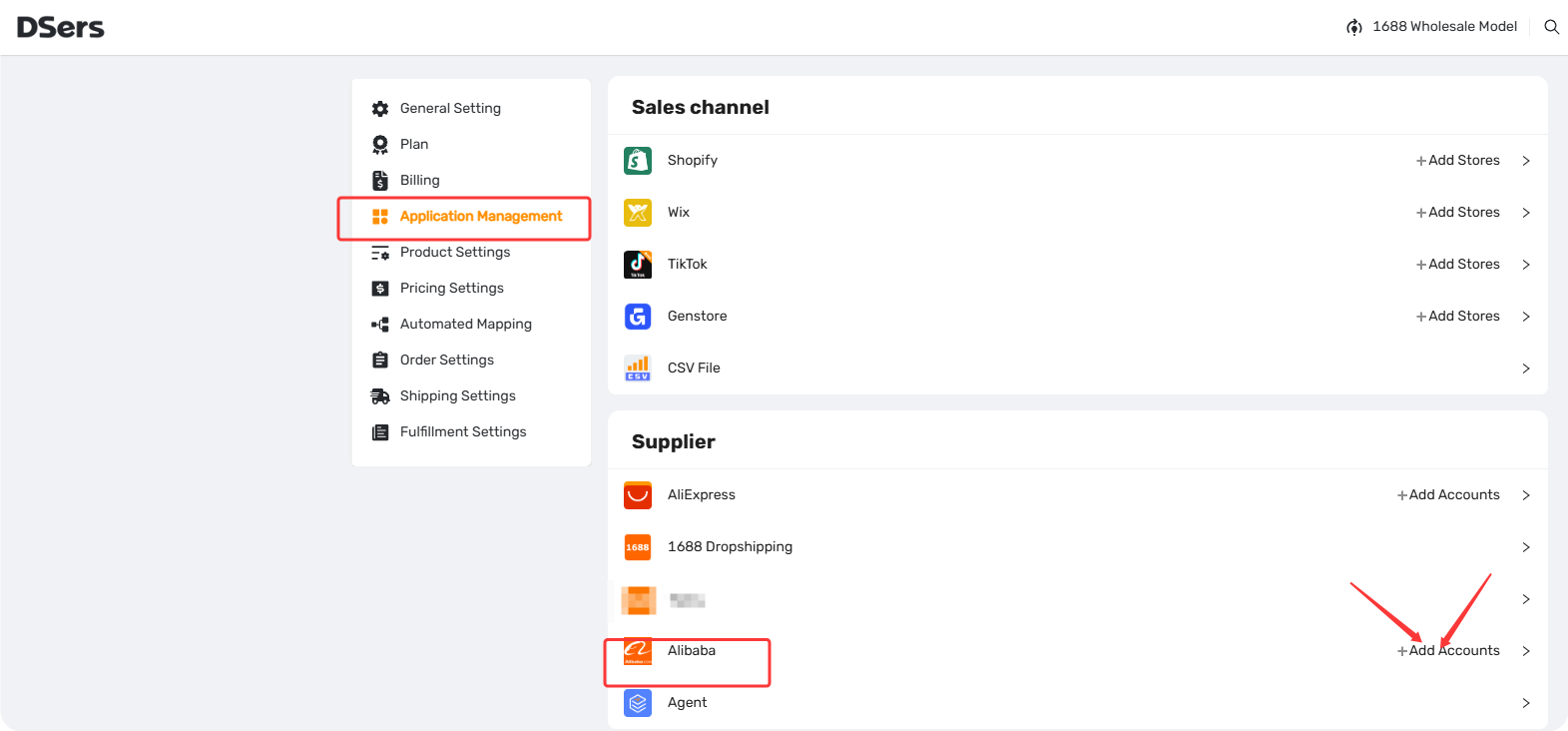
- In your DSers dashboard, go to Settings → Application Management.
- Find the Supplier section.
- Look for Alibaba in the list and click "+ Add Accounts" next to it.
- Review the permissions and click Authorize to grant DSers access.
Tip: If you're not logged in, you'll be taken to a new page where you can click Sign In. Just enter your credentials, log in, and you'll be redirected back to authorize.
Once connected, you'll see Alibaba appear in your connected accounts list under Application Management.
What If I Can't Connect?
If you run into issues during connection, here are a few things to check:
- Check your plan limit — Make sure you haven't reached the maximum number of supplier accounts allowed by your subscription.
See [Supplier Account Limits: Subscribe Plan Resource and Switching Guidance] for details.
- Make sure you're using a buyer account — You need a standard Alibaba buyer account, not a seller account.
- Try a different browser — Sometimes browser extensions can interfere with the authorization process. We recommend using Chrome or Edge, and try opening an incognito/private window if you run into issues.
- Check your Alibaba login credentials — Make sure your Alibaba account is active and you can log in successfully on buyer.alibaba.com.
Tip: To learn how to set up Auto-Place for Alibaba orders, refer to [Auto-Place Alibaba Orders: Set It and Forget It].
Related Articles
- Connect Your AliExpress Account to DSers
- Supplier Account Limits and Switching Guidance
- Supplier Optimizer: Find Better Suppliers in Seconds
- DSers Plans and Billing: A Complete Overview
- Auto-Place Alibaba Orders: Set It and Forget It
FAQ Section
Everything you need to know about connecting your Alibaba buyer account to DSers.

Get Started Now to Grow Your Online Business with the DSers!