

What happens to my products and orders if I disconnect my supplier account from DSers?
Note
Your supplier accounts (AliExpress, Alibaba, etc.) are the engine that powers your dropshipping orders through DSers.Click here to start dropshipping now with DSers
Sometimes, you might need to switch to a different account—perhaps you have multiple supplier accounts, or you're consolidating your business.
This guide walks you through the process safely, so you know exactly what to expect. The steps apply to both AliExpress and Alibaba.
Before You Disconnect: What Happens to Your Orders?
Don't worry—your products and order history inside DSers are perfectly safe. They won't disappear.
However, once you disconnect an account:
- Automatic order syncing stops for orders placed through that account. If a supplier updates a tracking number or cancels the order after you disconnect, DSers won't automatically pull that update. You'll need to track and update those orders manually.
- You cannot place new orders using the disconnected account. You'll need to connect a new supplier account to continue processing orders from your store.
Tip: Only disconnect an account after all orders placed through it are fulfilled—this way you won't miss any automatic tracking updates.
Quick Checklist Before You Start
- Fulfill your orders first.
Make sure all your orders in DSers are in a final state like "Fulfilled," "Awaiting Order," "Failed," or "Canceled."
If any orders are still "Awaiting Payment" or "Awaiting Shipment," wait for them to be completed. - Confirm the account you're about to delete.
In DSers Settings → Application Management, your connected supplier account is displayed as account email by default. Before disconnecting, make sure this is the account you intend to remove.
Tip: To confirm which email belongs to: If you can log in to the supplier platform account, go to your profile settings to see its linked email.
This extra step helps you avoid disconnecting the wrong account.
Step-by-Step: How to Disconnect Your Supplier Account
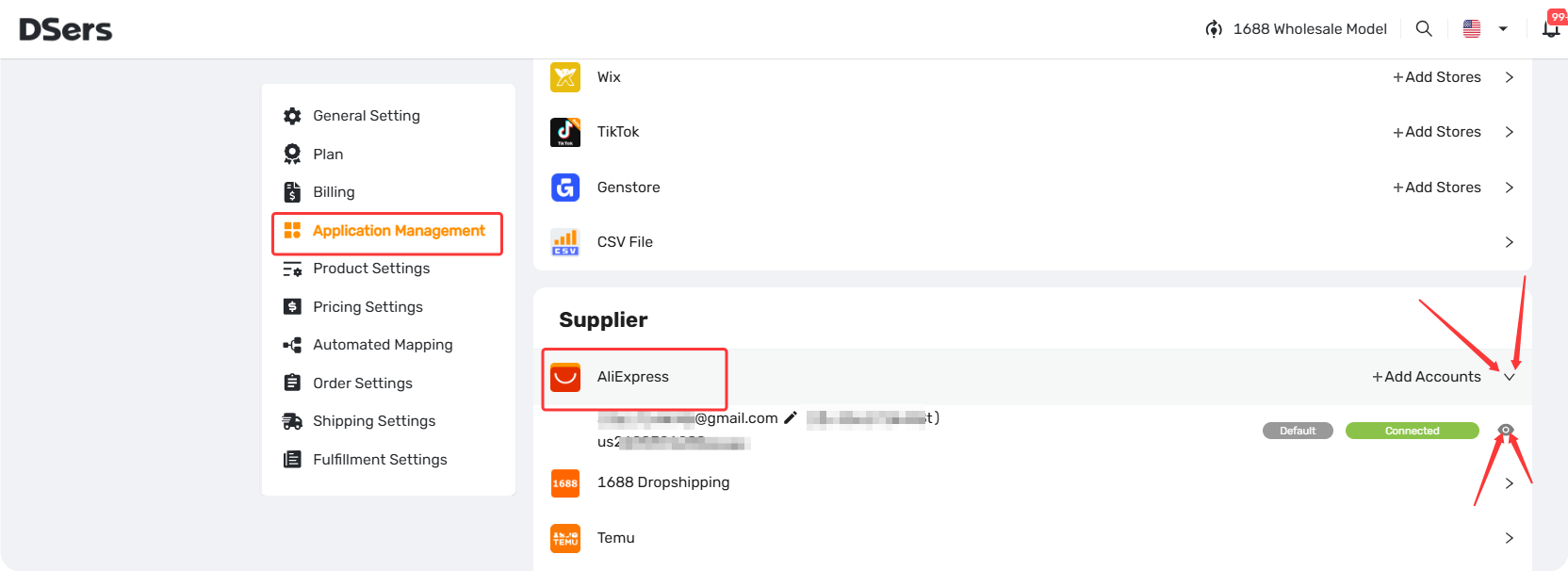
- Go to Settings → Application Management.
- In the Supplier section, click the dropdown arrow (▾) to expand the list.
- Find the account, double-check the account email, then click the eye icon (👁️) to open its details.
- Scroll down and click the red "Delete" button.
- Type "CONFIRM" in the pop-up to verify.
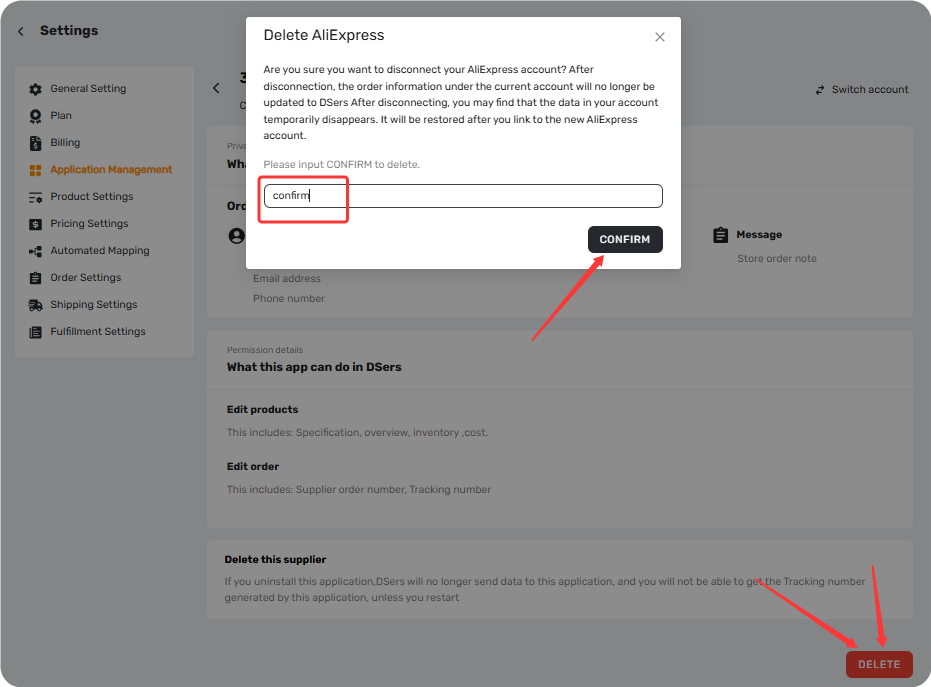
How to Connect with Supply Account
To link a new account, go to Settings → Application Management and click "+ Add Accounts" under the relevant platform section.
- For AliExpress: See [Connect Your AliExpress Account to DSers].
- For Alibaba: See [How to Connect Your Alibaba Account to DSers].
Related Articles
- Connect Your AliExpress Account to DSers
- How to Connect Your Alibaba Account to DSers
- Supplier Account Limits and Switching Guidance
- DSers Plans and Billing: A Complete Overview
FAQ Section
Everything you need to know about disconnecting a supplier account and managing your connections.

Get Started Now to Grow Your Online Business with the DSers!