

How many supplier accounts can I connect? And how do I switch between them?
Note
As your dropshipping business grows, you might want to source products from multiple supplier platforms.Click here to start dropshipping now with DSers
DSers allows you to connect multiple supplier accounts, but the number you can connect depends on your subscription plan.
This guide explains the limits and shows you how to switch between accounts.
What Are Supplier Account Limits?
Your subscription plan determines how many supplier accounts you can connect at the same time:
| Plan | Supplier Account Limit |
|---|---|
| Basic (Free) | 1 |
| Advanced | 3 |
| Pro | 5 |
| Enterprise | 10 |
Tip: Only AliExpress and Alibaba accounts count toward this limit. Other platforms listed in the Supplier section (like 1688 Dropshipping and Agent) don't require a linked account, so they won't affect your limit.
When to Connect or Switch Accounts
There are a few common scenarios where you might want to add or switch supplier accounts:
- You want to connect more accounts — If you're on a paid plan and haven't reached your limit yet, you can simply add more accounts directly.
- You've reached your limit but want to use a different account — You can either upgrade to a higher-tier plan with more slots, or switch a connected account to a new one.
- You're on the Basic plan and need to change accounts — Since Basic only allows one connection, you'll need to replace your current account with a new one.
Before You Switch Accounts
Important: Before you disconnect or switch a supplier account, make sure all orders placed through that account are fully fulfilled.
If you disconnect too early, you'll stop receiving automatic tracking number for those orders.
How to Link More Supplier Accounts without Upgrade
There are 2 ways to switch supplier accounts in DSers.
Option 1: Use the "Switch Account" Button
If you're simply want to switch which AliExpress/Alibaba account you're actively using, DSers provides a dedicated Switch Account button.
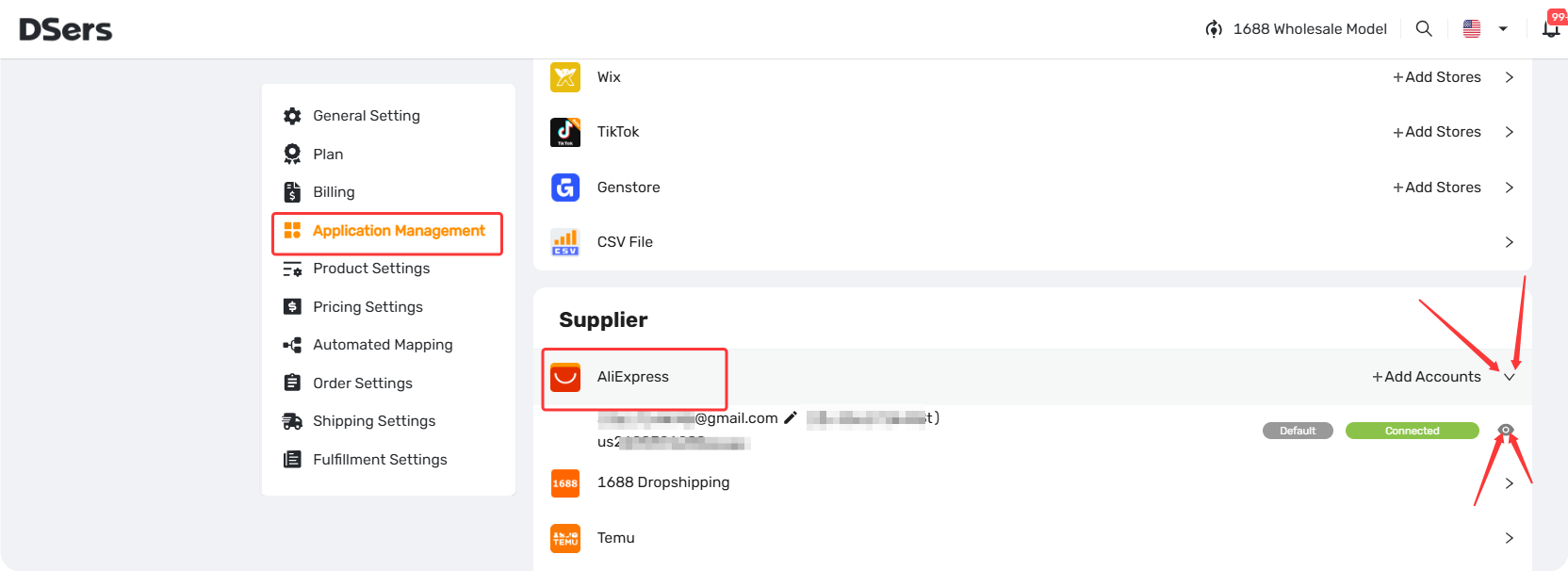
- Go to Settings → Application Management.
- In the Supplier section, find AliExpress/Alibaba and click the dropdown arrow (▾) to expand the list.
- Click the eye icon (👁️) next to the account you want to switch.
- On the account details page, click the Switch Account button.
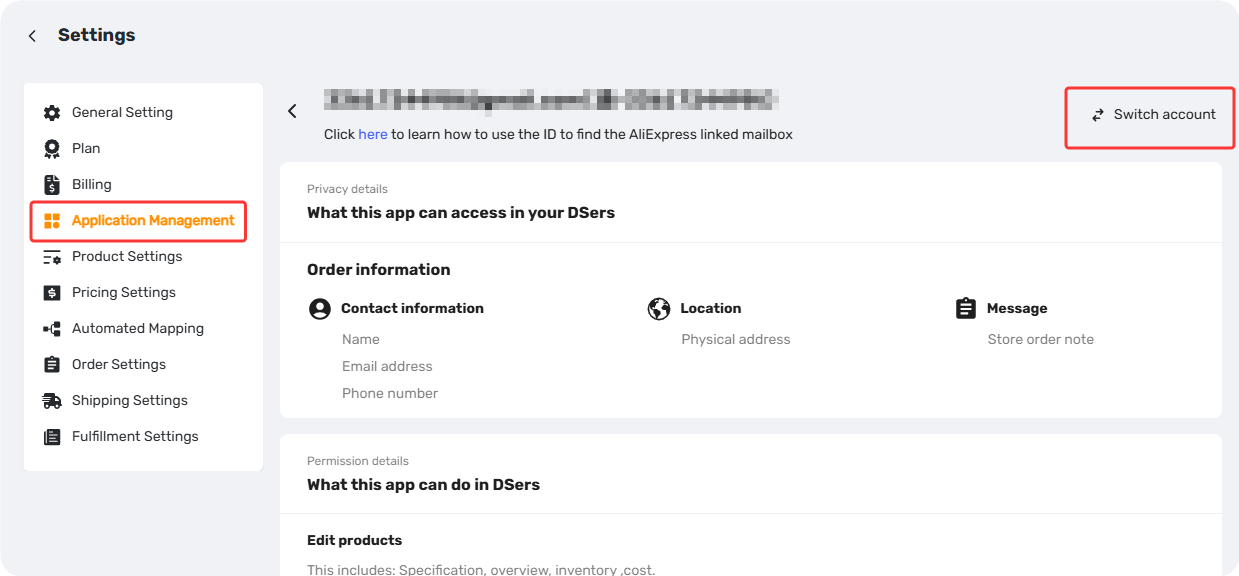
Tip: This switches your active account instantly. It's the quickest way to change which AliExpress account DSers uses for new orders.
Option 2: Delete and Reconnect
If you've reached your plan's limit and prefer to link a new supplier platform account, you can disconnect an existing supplier account you no longer use and connect a new one in its place.
For detailed step-by-step instructions, refer to: [Supplier Account Disconnection: Guide and Impact on Your Orders].
Related Articles
- Supplier Account Disconnection: Guide and Impact on Your Orders
- Connect Your AliExpress Account to DSers
- How to Connect Your Alibaba Account to DSers
- DSers Plans and Billing: A Complete Overview
FAQ Section
Everything you need to know about supplier account limits and how to manage your connected accounts.

Get Started Now to Grow Your Online Business with the DSers!