
Overview
Custom Connectors let you connect DSers AI to external tools and data sources. You can extend what DSers AI can do—beyond the built-in apps—by connecting to any MCP-compatible service.
Click here to start dropshipping now with DSers
What Are Custom Connectors?
- One-line definition: Connect DSers with external AI tools through the official MCP integration.
- What it does: Lets DSers AI read external data or trigger external actions.
- What it's based on: MCP (Model Context Protocol) is an open standard that gives AI applications a unified way to connect to external tools and data sources.
When Do You Need It?
- You want DSers AI Agent to read data from another system you use.
- You want DSers AI Agent to trigger actions in an external tool.
Connector Requirements
For a Connector to work with DSers AI Agent, it needs to meet all three conditions:
- Remote MCP Server
- Streamable HTTP transport
- OAuth authorization
Note: Custom Connectors require an Advanced plan or above. Upgrading unlocks a higher daily call limit.
How to Connect
Step 1: Go to the MCP Page
Path: Plugins → MCP
Step 2: Click Create Connector
This opens the configuration dialog.
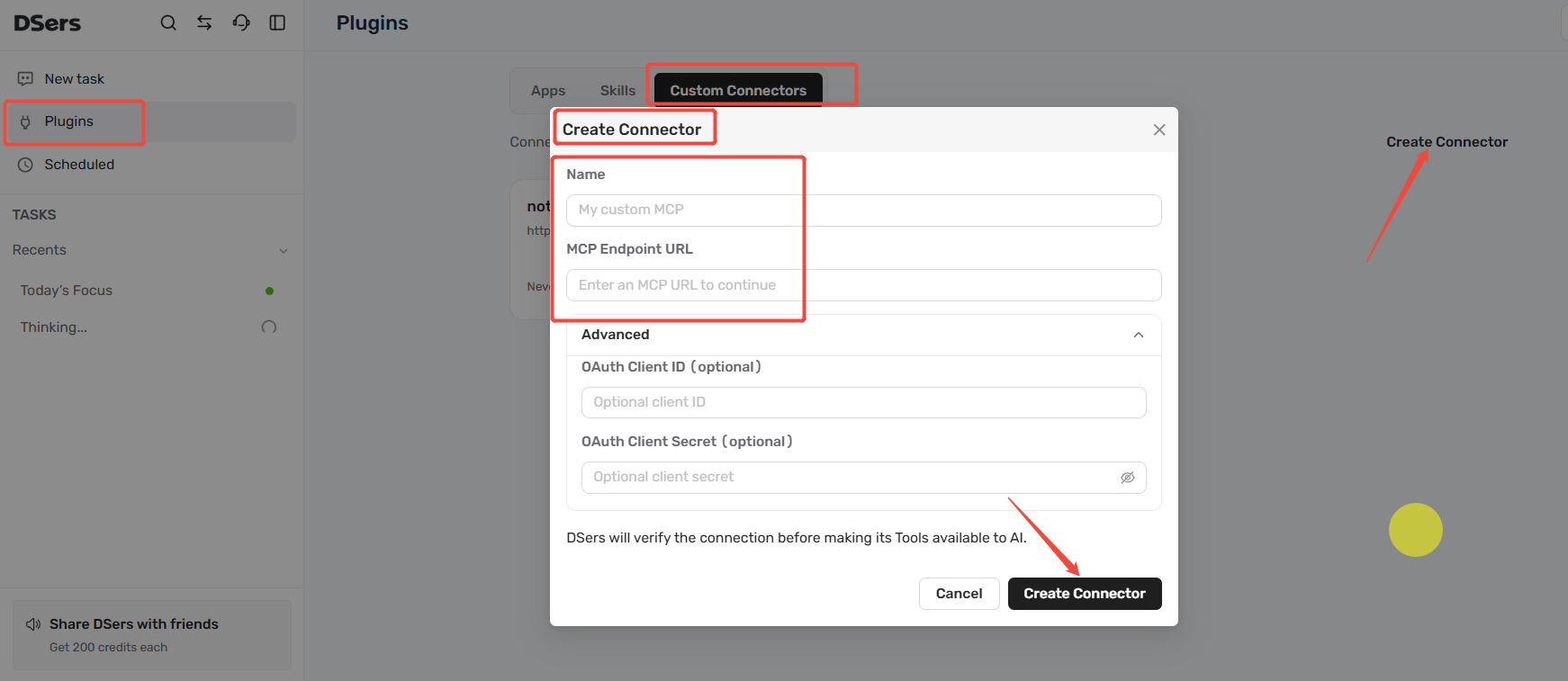
Step 3: Fill In the Connection Details
| Field | Description |
|---|---|
| Name | Give this connection a name so you can recognize it |
| MCP URL | The MCP service address provided by the external system |
| OAuth Client ID / Secret | Optional. Fill these in if the external system requires authorization |
Step 4: Save and Connect
Click Save and Connect. If authorization is required, follow the on-screen prompts to log in and confirm. Once connected, the status changes to Connected, and DSers AI can use the external tool.
How to Use It After Connecting
Once connected, just mention it in a Task conversation. For example:
"Use my database connection to check products added in the last 7 days."
DSers AI will automatically recognize and call the corresponding capability.
How to Manage It
- Enable / Disable: Pause a connection without deleting the configuration
- Reauthorize: If authorization expires, click Reauthorize and log in again
- Edit: Change the name or URL
- Delete: Remove the connection completely
Usage Limits
MCP tool calls are counted per calendar day (UTC) and reset at 00:00 UTC daily. The daily limit depends on your plan:
| Plan | Daily Calls |
|---|---|
| Advanced | 500 |
| Pro | 1,250 |
| Enterprise | 12,500 |
Related Articles
AI Agent
- DSers AI Agent Task: Getting Things Done in Dropshipping
- How to Use Skills with DSers AI Agent?
- Product Discovery: Find trending products with AI
- Product Management: Optimize and publish products with AI
- Order Management: Handle fulfillment and inquiries with AI
FAQ Section
Quick answers to the most common questions about Custom Connectors.

Get Started Now to Grow Your Online Business with the DSers!