

Earn cashback on AliExpress purchase you fulfill through DSers — a direct rebate that improves your margins without changing suppliers or prices.
Note
Before you start: The Admitad feature is available on Advanced plans and above. After completing Admitad registration, you must contact DSers Customer Support to activate the affiliate feature for your account.Click here to start dropshipping now with DSers
What This Feature Does
Admitad is an affiliate network. By integrating it with DSers, you earn a commission (cashback) on AliExpress order you place for your customers. Think of it as an automatic volume-based discount that accumulates with each fulfillment.
One account, all your stores: The integration works at the DSers account level, not per platform. Whether you use Shopify, WooCommerce, Wix, Jumpseller, or CSV, the setup and cashback behavior are identical across all connected stores.
Why This Matters for Your Store
| Your Situation | Benefit |
|---|---|
| High order volume | Cashback compounds into meaningful monthly savings |
| Tight margins | Recovered commissions directly boost net profit |
| Multiple stores | One Admitad account serves all your DSers-connected stores |
Activation Overview (4 Steps)
| Step | Action | Time |
|---|---|---|
| 1 | Register a new Admitad account via the DSers referral link | ~2 min |
| 2 | Join the AliExpress WW affiliate program in Admitad | ~1 min |
| 3 | Contact DSers Support to activate the feature for your account | ~2 min (after your request) |
| 4 | Paste your Admitad account name and affiliate code into DSers | ~1 min |
Step-by-Step Activation
Phase 1: Register a New Admitad Account (via DSers Link)
⚠️ Critical: Existing Admitad accounts will not work. DSers uses specific tracking parameters that only apply to accounts created through our referral link.
Steps:
- Access Admitad via the DSers referral link.
- Click "Get started".
- On the Admitad page, select "For creators, influencers and publishers".
- Complete all registration fields → accept the terms → click Sign up.
✔️ Done: You now have an Admitad account. Proceed to Phase 2 to join the AliExpress program.
Phase 2: Join the AliExpress WW Program
| Step | Action |
|---|---|
| 1 | Select your target country (multiple allowed) and Online Stores as Category → click Next |
| 2 | Select Website → click Next → then select Dropshipping → click Next |
| 3 | Enter your store name and URL → choose DSers Pro from the dropdown → click Ready |
| 4 | Find the AliExpress WW program on the main page → click Apply for moderation → accept terms |
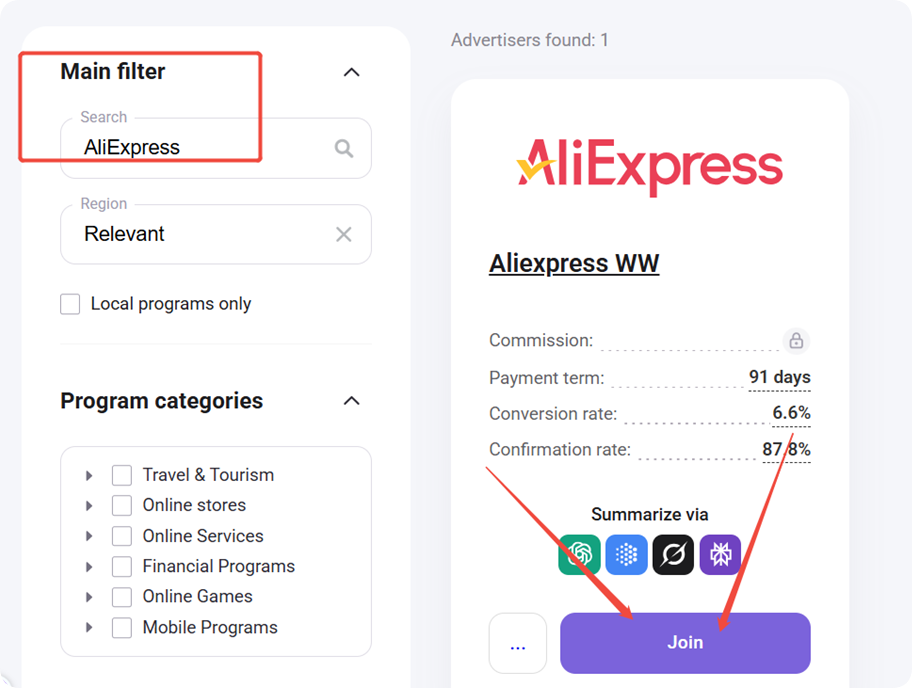
Review timeline: Admitad typically takes a couple of days to review your application. If rejected (often due to low store traffic), improve your sales volume and reapply.
✔️ Done: Your application has been submitted to Admitad for review.
Phase 3: Activate the Feature in DSers
Once Admitad approves your application, ensure you meet the requirements (Advanced plan or above, and account created via DSers referral link).
Then contact DSers Customer Support with your Admitad account name and DSers account email — they will verify your qualifications and enable the affiliate feature.
✔️ Done: You'll see it available in your DSers settings. Proceed to Phase 4 to add your affiliate code.
Phase 4: Add Your Affiliate Code in DSers
| Step | Action |
|---|---|
| 1 | In Admitad: go to Programs → My programs → find AliExpress → click Joined |
| 2 | In the pop-up, copy the part after https://wextap.com/ in the affiliate link |
| 3 | In DSers: go to Setting → General Setting → Affiliate Program, paste the code into the Affiliate Code box, and enter your Admitad account name |
| 4 | Click SAVE |
Tip: Find your Admitad account name in Admitad → Settings → General settings.
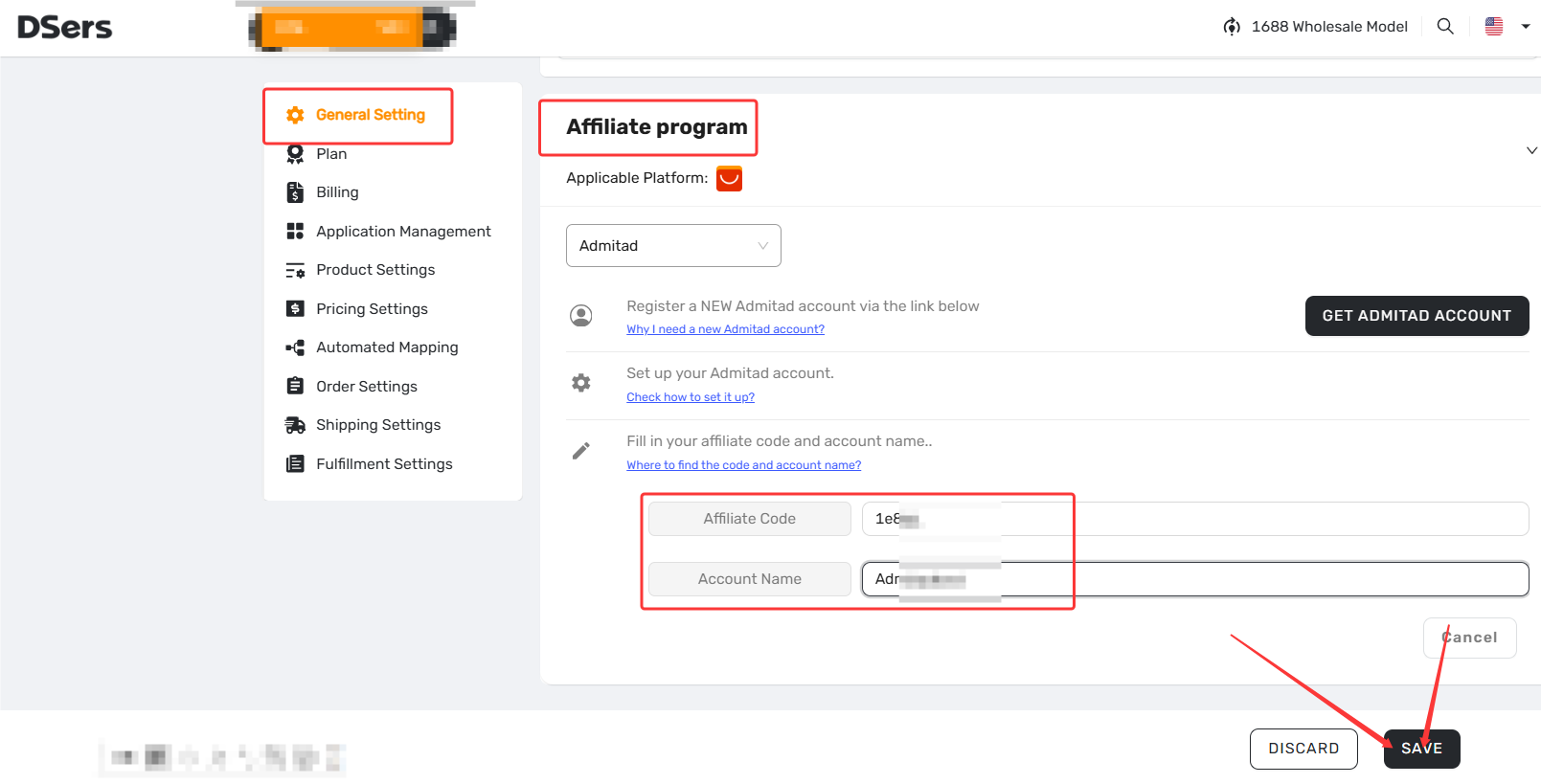
✔️ Done: Your Affiliate Code is saved. You're all set — place orders via the DSers Chrome Extension to start earning cashback.
Troubleshooting Quick Reference
| Issue | Most Likely Cause | Fix |
|---|---|---|
| Account suspended | Account not via DSers referral; wrong code or account name | Wait a few hours; verify code and account name match exactly |
| Clicks but no earnings | Browser extensions hijacking traffic; product not eligible | Disable all extensions except DSers during AliExpress payment; clear cookies |
| No clicks at all | Extensions blocking; not logged into Admitad; AliExpress not in a separate tab | Disable AdBlock and similar extensions (keep DSers); stay logged in; open AliExpress in a new tab |
| Cashback expired | Payment made after 3-day window | Complete AliExpress payment within 3 days of order placement |
How to confirm it's working: If you see any data (even just clicks) on your Admitad Dashboard after placing orders, DSers has successfully connected your order to Admitad.
Pro Tips for Maximum Cashback
- Disable all browser extensions except the DSers Chrome extension during AliExpress payment — this is the #1 reason earnings are lost. Keep only DSers active.
- Complete payment within 3 days of placing the order, or the cashback opportunity expires.
- Clear cookies before bulk orders — prevents traffic hijacking across multiple transactions.
- Test product eligibility through actual orders. There's no public list — you'll learn which products qualify by tracking your earnings over time.
- Check earnings weekly on your Admitad Dashboard — early detection prevents cumulative losses.
Tracking Your Earnings
After you've placed and paid for orders, monitor your cashback performance in Admitad:
| Where to Check | What It Shows | Timing |
|---|---|---|
| Dashboard → 30-Day Report | Clicks curve + Earnings curve | Clicks appear after order placement; Earnings after payment |
| Reports → on ad spaces (Top Bar) | Detailed data: Clicks, On-Hold amount, Confirmed amount | Use date range filters for specific periods |
Important: Some products are not eligible for the affiliate program and will generate clicks but zero earnings. There is no public list — you'll learn eligibility through actual order data.
Related Articles
- DSers Chrome Extension: Placing orders and Syncing Tools Guide
- AliExpress Coupon AutoGrab: Save Money on Every Order
- Fulfilling Customer Orders: How to Place & Pay for Supplier Orders
- Set Default and Override Phone Numbers for Orders
- How to Sync Tracking Numbers to PayPal for Faster Payment Release
- DSers Plans and Billing: A Complete Overview
FAQ Section
Everything you need to know about Admitad integration and earning cashback on AliExpress orders.

Get Started Now to Grow Your Online Business with the DSers!