

Apply Coupons, Use Your Preferred Currency & Save on Every Order
Note
The API is fast but can't use AliExpress coupons or support multi-currency payments. The Chrome Extension fixes both – it applies your coupons automatically and lets you pay in your chosen currency. This guide shows you how.Click here to start dropshipping now with DSers
Before You Start
- Install the DSers Chrome Extension
- Log in to your DSers account
- Log in to your AliExpress account (the one linked to DSers)
- Make sure your product variants are mapped and a shipping method is applied
- Settle your coupon and currency&payment preference(optional)
Collect AliExpress Coupons
The extension applies coupons you've already claimed – it doesn't claim them for you. To collect coupons:
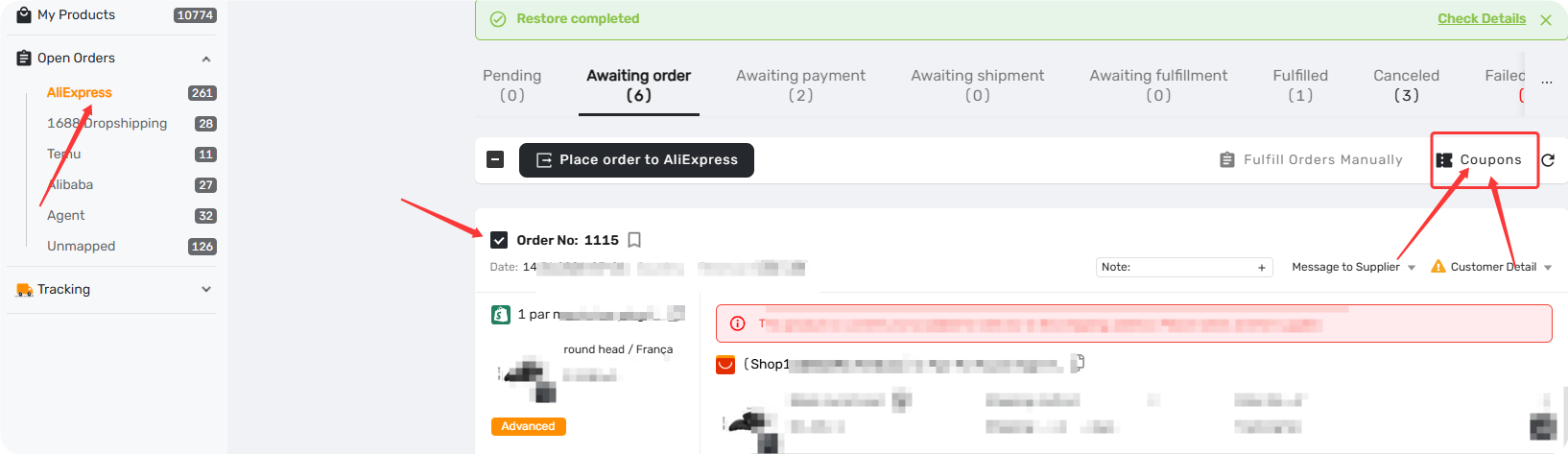
- Go to Open Orders → select up to 5 orders
- Click the coupon icon on the navigation bar
- Confirm your AliExpress account and follow the prompts to extract available coupons
📖 Related: [AliExpress Coupon AutoGrab: Save Money on Every Order]
Set Up Currency & Payment Method First
Before placing orders, set your preferred currency and payment info in the extension options. This ensures orders go through smoothly – especially when suppliers don't accept your default payment method.
How to set it up:
- Right-click the DSers extension icon in Chrome → select Options
- Go to Order Settings part
Choose Your Currency
Under "Select the currency to use when placing the order," choose:
- Currency set on AliExpress – uses whatever currency you've set on AliExpress
- A specific currency – if this differs from your AliExpress setting, DSers will use your chosen currency instead.
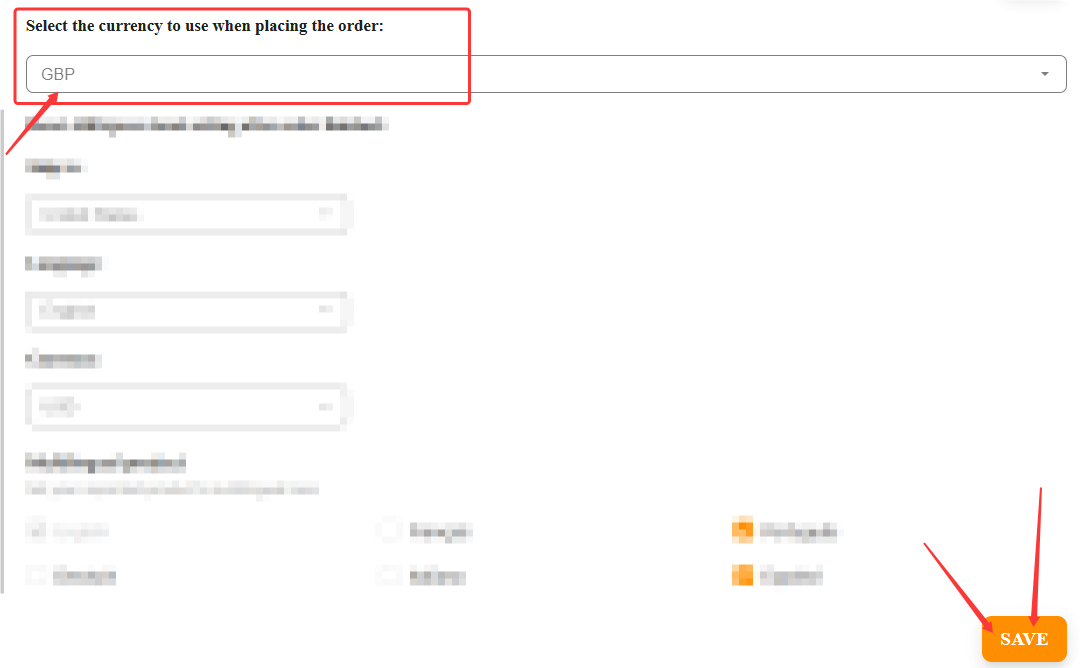
Important: if the supplier does not support the currency you set to checkout, it will default to USD.
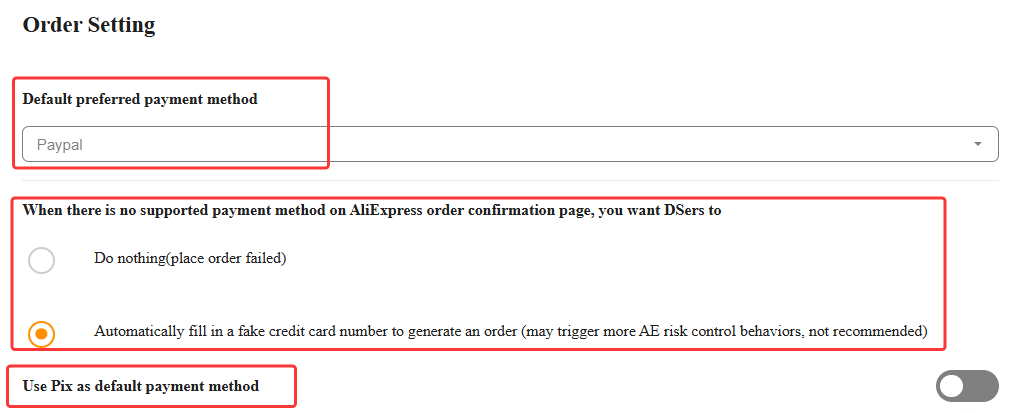
Choose Your Payment Method
Select one of the following options:
| Option | What It Does |
|---|---|
| PayPal | Default – works for most orders |
| Credit card | Enter your card number + fake CVV (stored locally, not transmitted online) |
| Do nothing | Orders will fail when payment info is required |
| Automatically fill fake credit card | May trigger risk controls – not recommended |
| Use Pix as default payment method | Will work if your supplier offers Pix payment method |
- Click SAVE
How to Place the Order via extension
1. Go to Open Orders
In your DSers dashboard, go to Open Orders → Awaiting Order.
2. Select Orders
- For a single order: click the Order button on that order.
- For multiple orders: check the boxes, then click the Place order to AliExpress button on the nav bar.
3. Select "Order via Chrome Extension"
A pop-up will appear. Switch to "Order via Chrome Extension (Automatically use received coupons)". This applies any coupons you've already claimed on AliExpress.
4. Click Order
The extension will handle the rest. A progress bar will show the status.
Once order is placed, please do not forget to pay for the order.
Tip: Keep the order page open and your network stable during the process. Don't close the page or switch tabs until it's done.
Need Help?
If you run into issues while placing orders – like payment method errors or currency problems – we've got you covered.
📖 Related: [Placing Order Failed via Chrome Extension? Fix it Here]
Related Articles
- DSers Chrome Extension: Features and Capabilities Overview
- DSers Chrome Extension: Placing orders and Syncing Tools Guide
- Manually Updating Tracking Numbers via the DSers Chrome Extension
- Placing Order Failed via Chrome Extension? Fix it Here
- DSers Chrome Extension: Sourcing and Product Import Tools Guide
FAQ Section
Everything you need to know about placing orders via the DSers Chrome Extension and saving on shipping and coupons.

Get Started Now to Grow Your Online Business with the DSers!