
Stop leaving money on the table. Learn how DSers automatically finds and applies AliExpress coupons to your unpaid orders so you can boost your margins with zero extra effort.

Note
Profit margins in dropshipping can be razor-thin. While most sellers focus on product selection or ad spend, the smart ones look for small wins in the operational process. AliExpress coupons are a hidden gem—often providing flash sales, store-specific discounts, or site-wide promos. But hunting for them manually across 50 orders? That is a time killer.
This article covers: how to use the Coupon AutoGrab feature step by step, what to expect after grabbing coupons, and where to find help if something goes wrong.
Click here to start dropshipping now with DSers
Before You Start
To use this feature, you need to meet a few requirements:
- Active Paid Plan: The Coupon feature is not available on the Basic plan .
- Usage Limits: Depending on your subscription, you have a set number of "grabs" (e.g., 10 times per 30 days for Advanced, 20 for Pro). Enterprise users get unlimited grabs .
- DSers Chrome Extension: You must have the latest version of the DSers Chrome extension installed and logged in.
- AliExpress Account: You need to be logged into your personal AliExpress account in the same browser.
How to Grab Coupons in 5 Steps
Follow this process to secure discounts for your pending orders:
Step 1: Select Your Orders
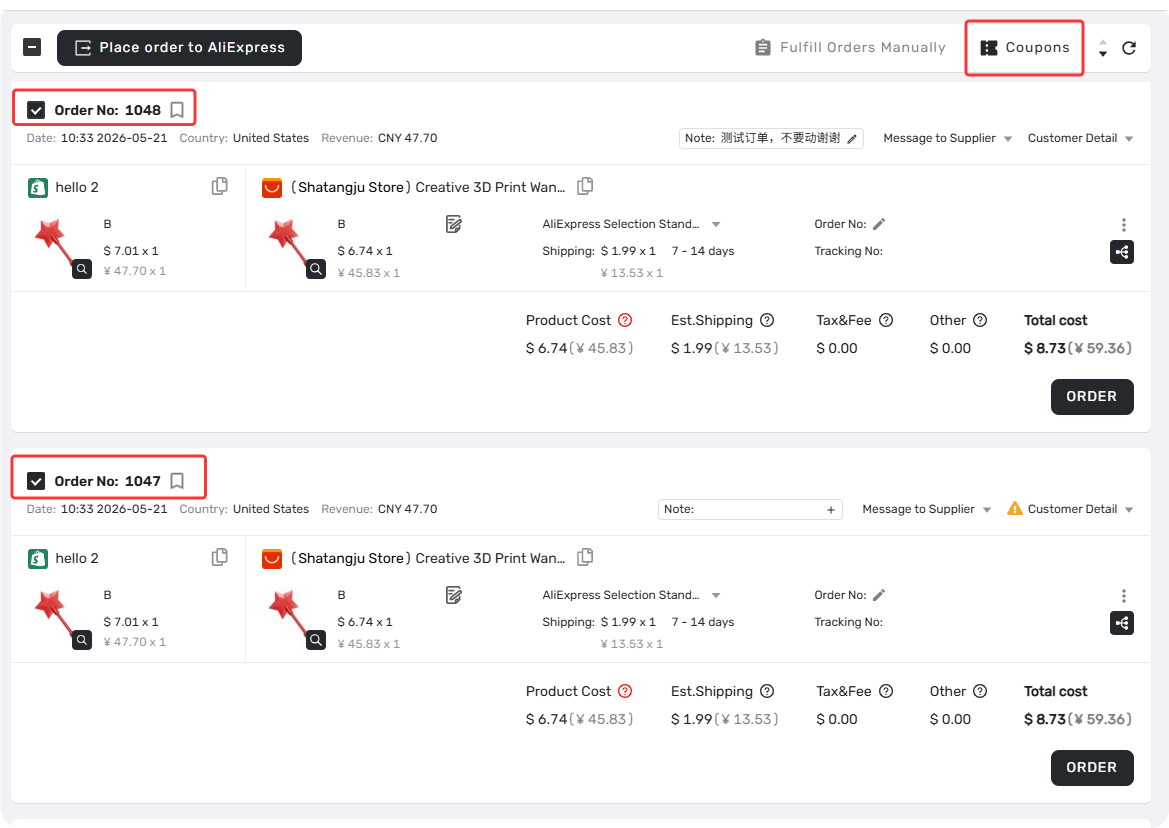
Go to the AliExpress Order Tab in DSers. You can select up to 5 orders at a time to process to ensure stable processing speed.
Step 2: Initiate the Grab
Click the
Coupon button
 in the navigation bar.
- Good to know: The moment DSers starts grabbing, it deducts one usage from your plan limit.
Step 3: Confirm Your Account
A pop-up will appear showing you which AliExpress account you are currently logged in with. Verify this is the correct account where you want the coupons stored.
Click Get Coupon

Step 4: Wait for the Magic
You will be redirected to AliExpress in the background. The DSers extension will start scanning the products. You will see a status screen:
- If you close the pop-up: The process stops immediately.
- Handling Captchas: If AliExpress throws a Captcha (verification slider) at you, simply solve it manually in the browser tab, and DSers will resume automatically.
Step 5: Return to DSers
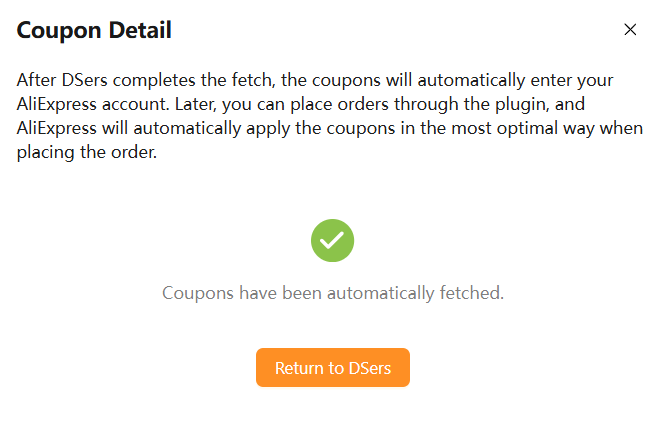
Once finished,
click Return to DSers
 . You will be taken back to your order list, you will see
Coupon in a red blank
. You will be taken back to your order list, you will see
Coupon in a red blank
 .
.
-
No Coupons Found? Don't worry. If a specific item had no available discounts, the button for that order will simply show
No coupon
 (grayed out) instead of the active Coupon button.
Understanding the Results
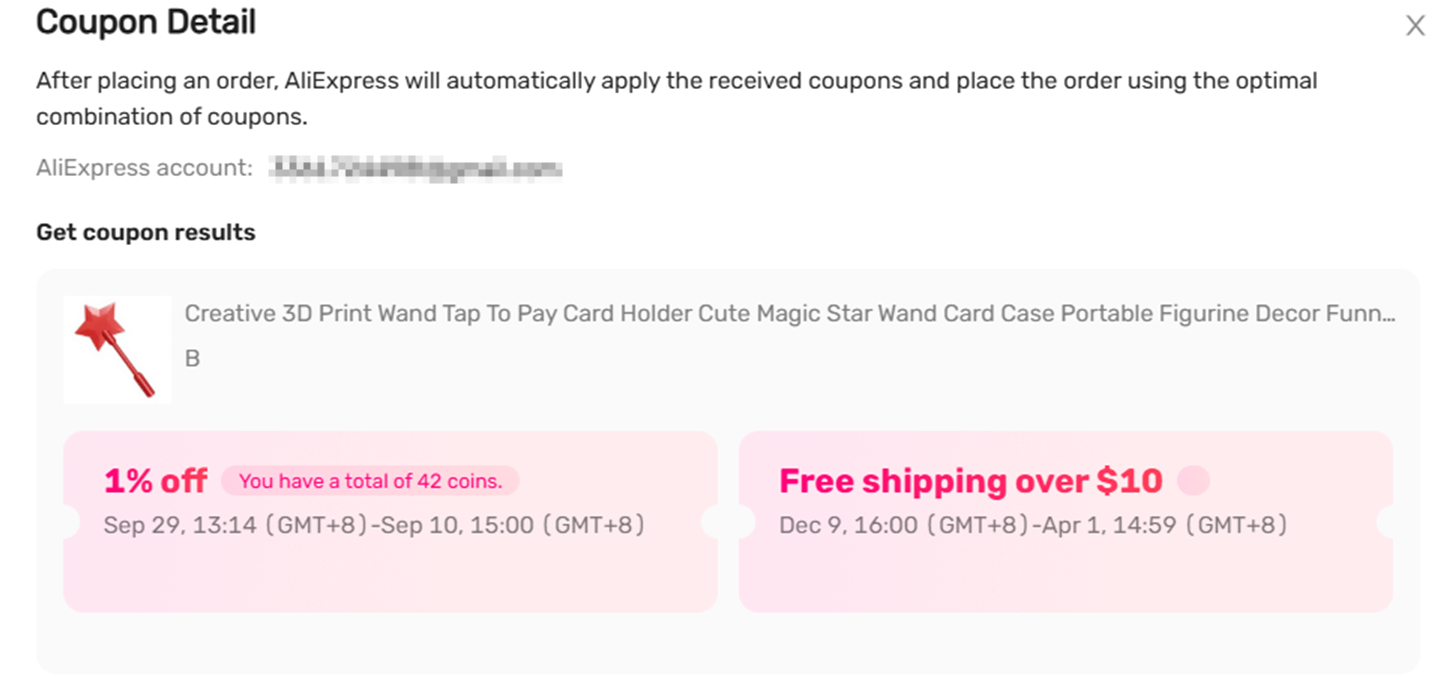
After the grab is complete, you can click the
Coupon button
on a specific order to view the "Coupon Detail" page.
- The Results: You will see a list of coupons found for each product.
- The Logic: AliExpress will automatically apply the best combination of these coupons when you proceed to checkout. You do not need to manually enter codes.
- Price Display: The order price in DSers will not change immediately. Because AliExpress ultimately decides which coupons apply at the moment of payment. This prevents price discrepancies if a coupon expires or no longer meets the application conditions.
Related Articles
- AliExpress Coupon AutoGrab: Troubleshooting & Common Fixes
- Supplier Optimizer: Find Better Suppliers in Seconds
- Understanding Your Dashboard: Orders Overview
- Fulfill Your First Order: A Step-by-Step Walkthrough
- Fulfilling Customer Orders: How to Place & Pay for Supplier Orders
- Tracking & After-Sales: What Happens Next
FAQ Section
Quick answers to the most common questions about DSers AliExpress Coupon AutoGrab.
| Get Started Now to Grow Your Online Business with the DSers! |
