

A detailed walkthrough of the two core steps – placing the order on DSers and paying on AliExpress – in less than 2 minutes.
Note
This guide covers how to place an order in DSers, how to pay on AliExpress, common issues and solutions, and what happens after payment (auto-sync, tracking numbers, Shopify fulfillment).Click here to start dropshipping now with DSers
Article overall content:
- How to place an order in DSers (select shipping method + Place Order)
- How to pay for the order on AliExpress (Make Payment → Pay Now)
- Common issues and how to resolve them
Step-by-step: Placing and paying for a supplier order
Once your customer pays on Shopify, start in DSers.
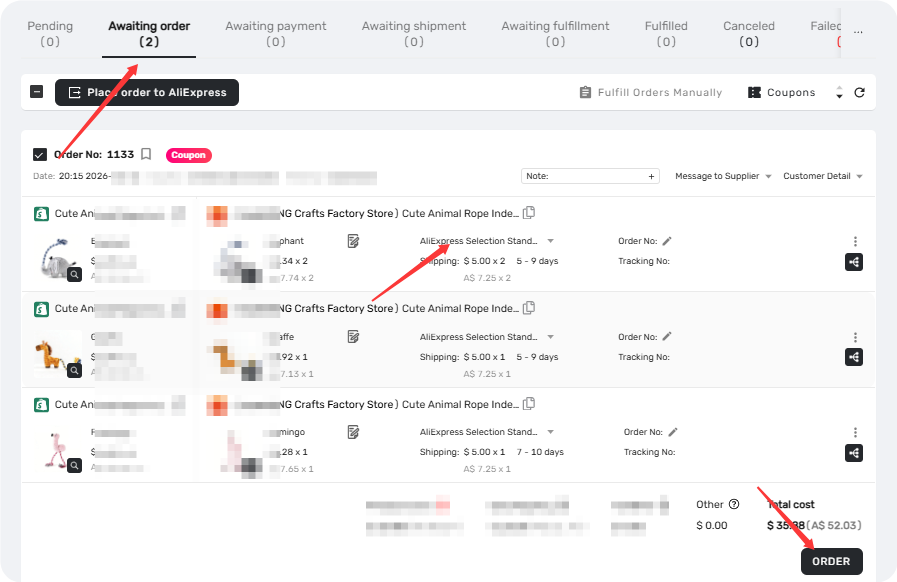
Step 1 – Go to DSers → Awaiting Order
Open DSers in your Shopify admin. The new customer-paid order will appear automatically in the Awaiting Order tab
Step 2 – Select a shipping method and click "Place Order"
Before placing the order, choose a shipping option provided by your supplier.
Once selected, click "Place Order" – DSers will immediately create an unpaid order on AliExpress for you.
Step 3 – Click "Make Payment" in DSers
After placing the order, it moves to the Open Order-Awaiting payment tab. Locate the order and click "Make Payment".
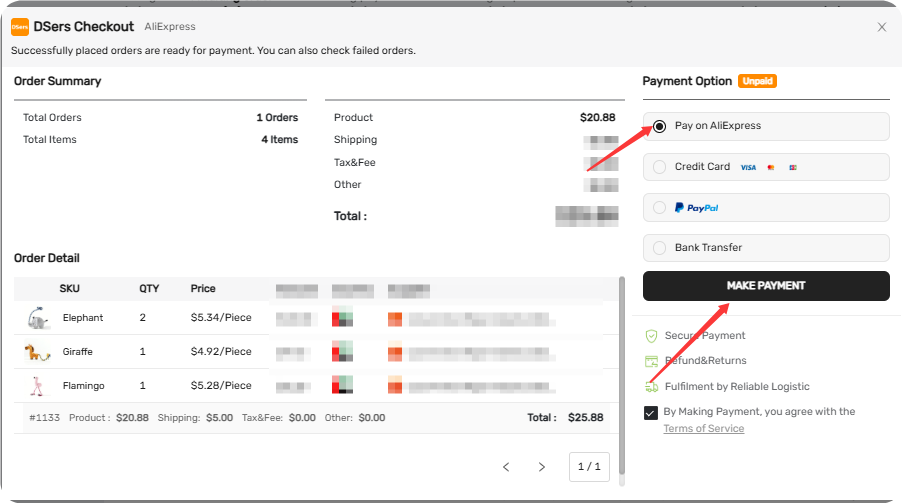
📸 [Screenshot: Open Order DSers Checkout pop-up with Make Payment button highlighted]
DSers will redirect you to your AliExpress Unpaid Order tab.
Step 4 – Pay on AliExpress
On AliExpress, locate the order and click "Pay Now" to complete the payment.
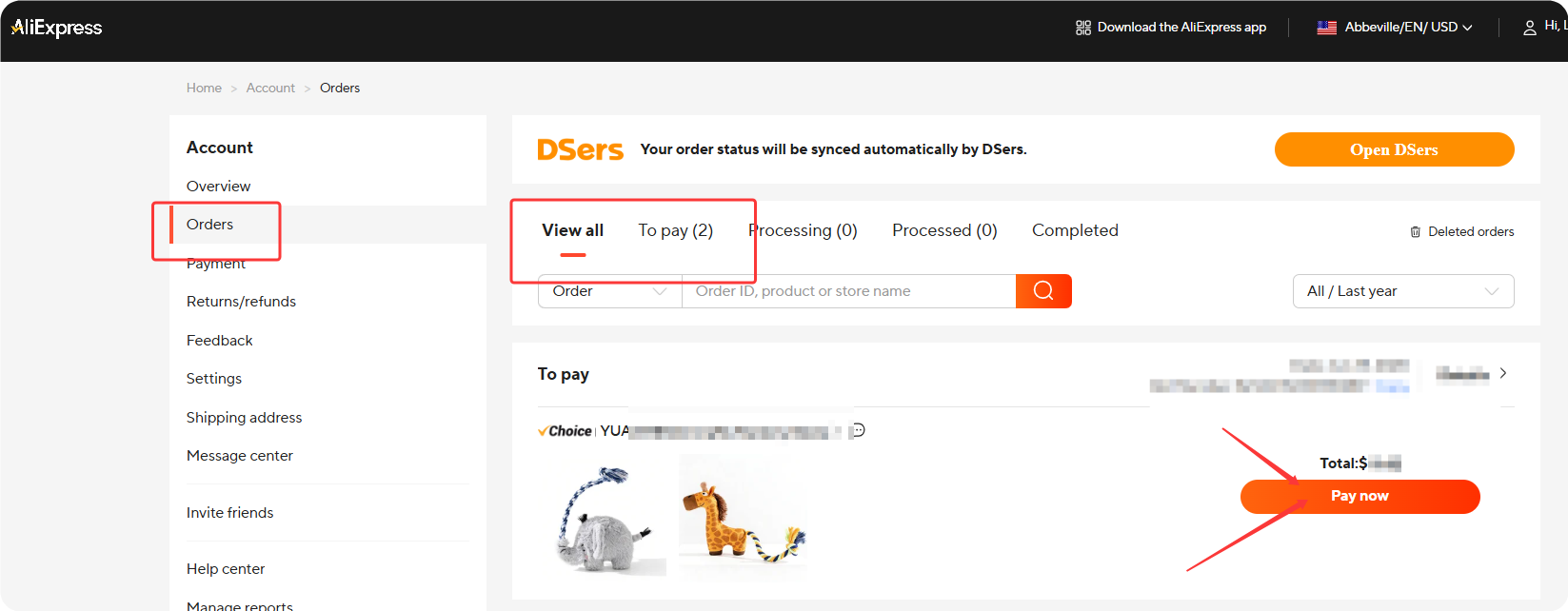
📸 [Screenshot: AliExpress Unpaid Order tab with Pay Now button highlighted]
That's the last manual step. After payment, the supplier will be notified to ship the order.
What happens after you pay
Once you've paid on AliExpress, DSers handles the rest automatically:
- ✅ DSers syncs the tracking number from AliExpress (5x daily – usually within minutes of supplier shipping)
- ✅ DSers sends it to Shopify
- ✅ Shopify marks the order as Fulfilled
- ✅ Shopify triggers the tracking email to your customer
Need the tracking number sooner?
First, check if your supplier has shipped the order:
- Go to AliExpress → find the order → check if a tracking number is available.
If the supplier has shipped but DSers hasn't synced the tracking number yet:
- Go to DSers → Open Order tab
- Find the order and click "Sync AliExpress Order"
- Click "Sync via API" – DSers will immediately pull the tracking number from AliExpress
⚠️ This only forces DSers to check for the tracking number now instead of waiting for the next scheduled sync (5x per day).
It does not make the supplier ship faster.
If the supplier hasn't shipped yet, there won't be a tracking number to sync.
In that case, the fastest way is to contact the supplier directly on AliExpress and politely ask when they'll ship.
Related Articles
- Fulfill Your First Order: A Step-by-Step Walkthrough
- Understanding Your Dashboard: Orders Overview
- Auto-Sync Tracking Numbers to Your Store
- Payment Failed: AliExpress Checkout Errors
- Order Not Showing in AliExpress Unpaid Tab – What to Do
- AliExpress Coupon AutoGrab: Save Money on Every Order
FAQ Section
Everything you need to know about the order fulfillment workflow in DSers and how to manage orders across channels.
| Get Started Now to Grow Your Online Business with the DSers! |
