

Diagnose and Fix Account Mismatch Issues When Paying for Orders
Note
Placed an order to AliExpress but can't find it in your Unpaid tab? This usually means you're logged into the wrong account.Click here to start dropshipping now with DSers
Here's how to identify which account was used and get your order back on track.
Why This Happens
When you place an order from DSers to AliExpress, it goes to a specific AliExpress account. If you can't find it in Unpaid, it's almost always because:
- The account used is a seller account (no buying privileges)
- You're logged into the wrong account
First: Identify the Accounts
Check which account the order was placed to:
- In DSers, go to Open Orders > AliExpress and click the button next to the AliExpress Order Number—this shows the member ID used for that order
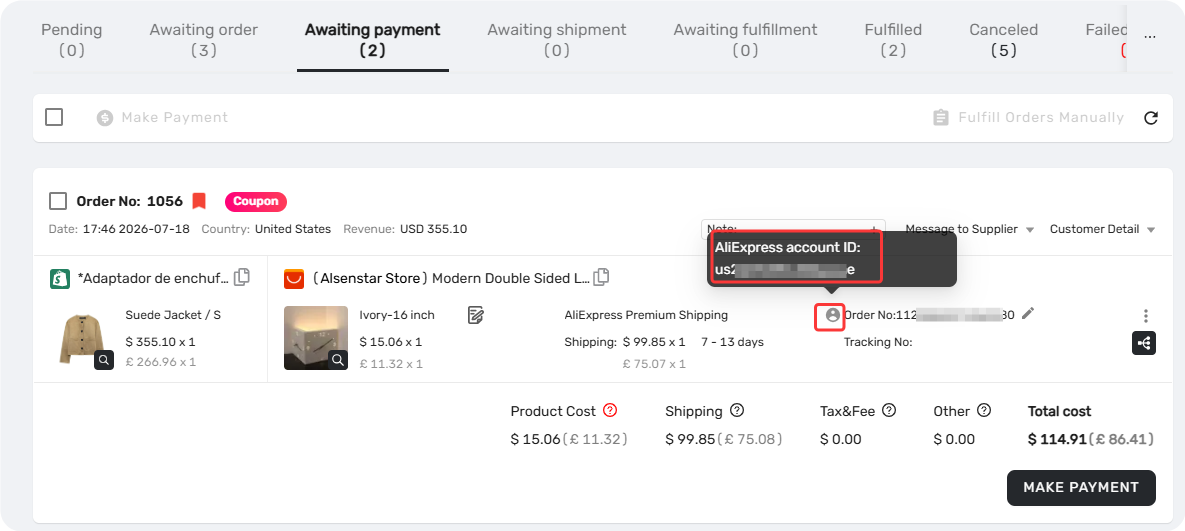
Check which account you're currently logged into:
- Visit the AliExpress-Settings-Personal information-Edit Profile to see your active account's member ID, email, and phone number
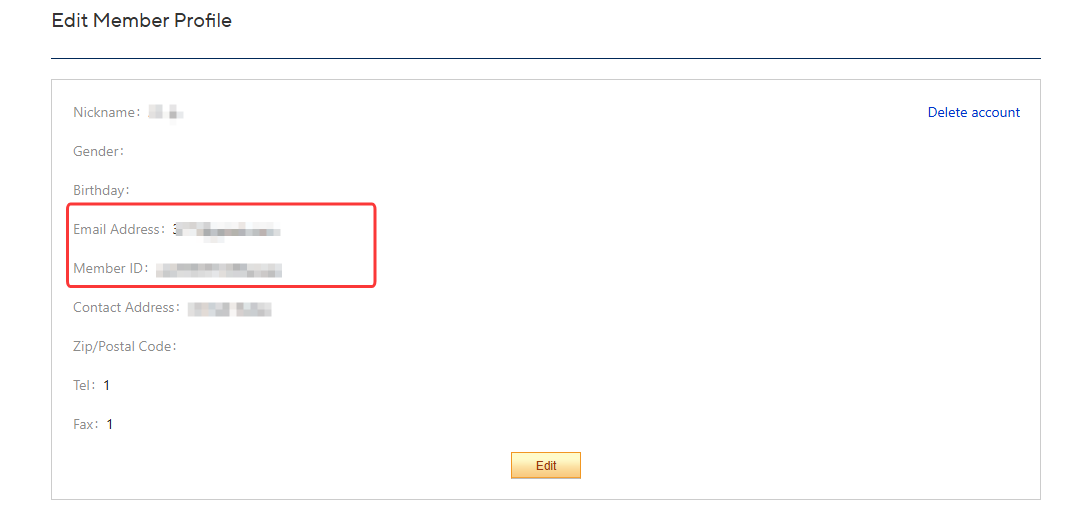
Compare the member IDs – if they match and you still can't find the order, proceed to Scenario 1. If they don't match, proceed to Scenario 2.
Scenario 1: Member IDs Match – Account Is a Seller Account
You're logged into the same account used to place the order, but it's a seller account, which doesn't support purchasing for dropshipping.
Fix:
- Register a new AliExpress buyer account
- Switch your connected account in DSers to this new buyer account – see [Supplier Account Limits and Switching Guidance] for detailed steps and important pre-switch requirements
- You need to make the order be placed to AliExpress again.
Mark the order as fulfilled on DSers' Awaiting Payment tab, then roll it back to the Awaiting order tab from fulfilled. For more details, see [How to Roll Back and Reorder Unfulfilled Orders] - Go to Awaiting Order, find the order, and place it again to the buyer account
Scenario 2: Member IDs Don't Match – Logged Into Wrong Account
You Can Still Log Into the Correct Account
Log in with the account that matches the member ID shown in DSers
If you don't know which AliExpress account email belongs to the member ID :
- Use the AliExpress password recovery page to find associated email/phone
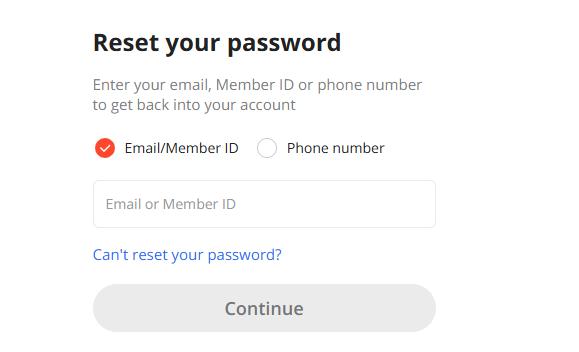
Find and pay the order in your Unpaid tab
You've Lost Access to the Account Used
Fix:
- Switch your connected account in DSers to this new buyer account – see [Supplier Account Limits and Switching Guidance] for detailed steps and important pre-switch requirements
- You need to make the order be placed to AliExpress again.
Mark the order as fulfilled on DSers' Awaiting Payment tab, then roll it back to the Awaiting order tab from fulfilled. For more details, see [How to Roll Back and Reorder Unfulfilled Orders] - Go to Awaiting Order, find the order, and place it again to the correct account
⚠️ Important: Before switching accounts, ensure all pending orders are either completed or rolled back to Awaiting Order. Orders in Awaiting Payment or Awaiting Shipment will cause issues during the account switch.
Still Need Help?
If you've tried everything above and still can't find your order, contact DSers Support with these details ready:
- DSers account email
- Store name
- DSers order number(s)
- Screenshot of your logged-in AliExpress account (from the account center)
💡 Tip: Having these on hand helps our support team resolve your issue much faster.
Related Articles
- Supplier Account Limits and Switching Guidance
- How to Roll Back and Reorder Unfulfilled Orders
- Fulfilling Customer Orders: How to Place & Pay for Supplier Orders
- Manual Order on AliExpress? How to Sync It to DSers
- Order Failed? How to Fix Failed Orders Caused Products
- Shipping Address Issues: Customer Address Causing Errors
FAQ Section
Quick answers to the most common questions about missing AliExpress orders and account mismatches.

Get Started Now to Grow Your Online Business with the DSers!