

How do I connect my Amazon store to DSers?
Note
Amazon has strict fulfillment requirements and zero tolerance for delays. DSers helps you meet these standards by automating your dropshipping workflow.Click here to start dropshipping now with DSers
This guide walks you through connecting your Amazon store to DSers so you can start importing products and processing orders.
By the end, your store will be linked and ready to go.
Before you start
| ✅ Check | What to verify |
|---|---|
| Amazon seller account | You have an active Amazon Seller Central account with valid login credentials |
| Store status | Your account is active and not already linked to another DSers account |
How to connect your Amazon store
Tip: Amazon connections only start from DSers. You cannot start this connection from Amazon Seller Central.
Step 1: Log in to your DSers account. On the platform selection page, click Amazon.
New to DSers? Learn how to create your account here: [Create Your DSers Account: Sign Up Step by Step]
Connecting another store? Check out: [How to Connect Multiple Stores to a Single DSers Account]
Step 2: Enter a store name (3–30 characters, no spaces).
This name only appears inside your DSers account and won't affect your Amazon store.
Step 3: Select your Amazon region (North America, Europe, or Far East). This authorizes all active country sites within that region at once.
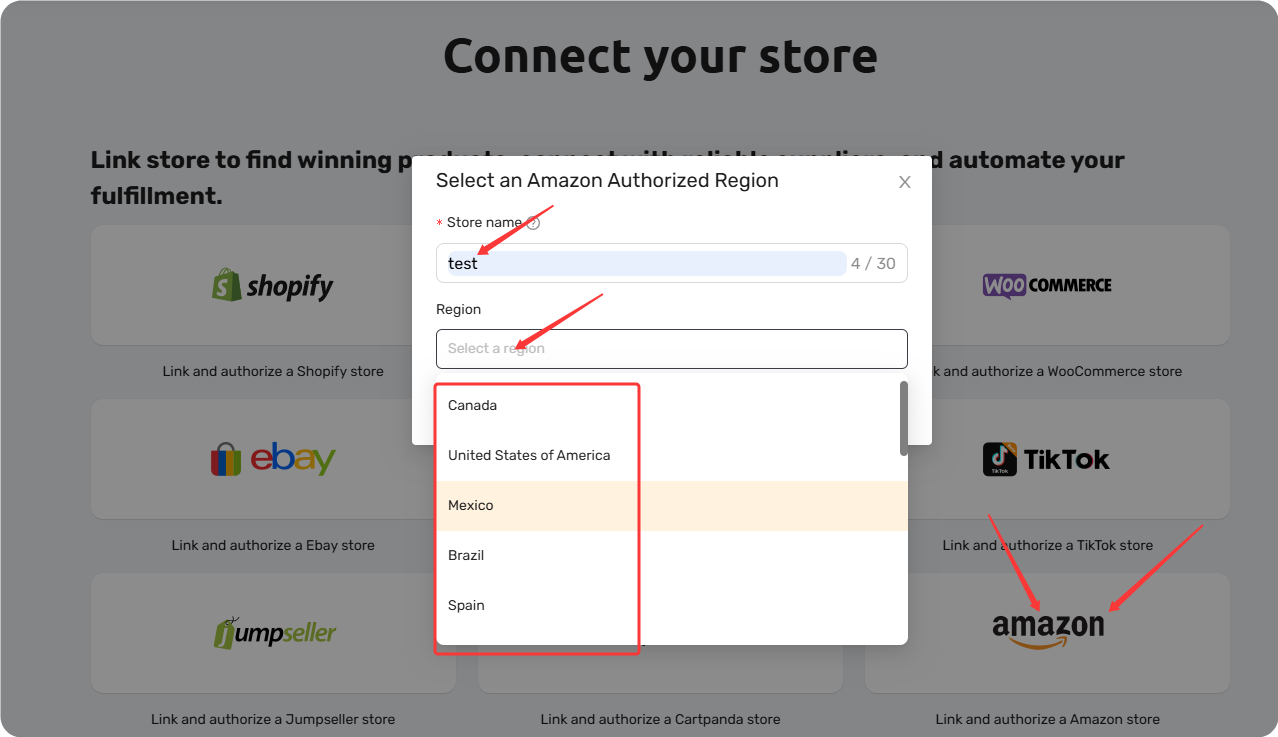
Step 4: Click Link Store.
Step 5: You'll be redirected to Amazon. Sign in with your Amazon Seller Central credentials.
Step 6: Review the permissions request and click Confirm to authorize DSers.
Step 7: Once redirected back to DSers, click UPDATE to sync your store.
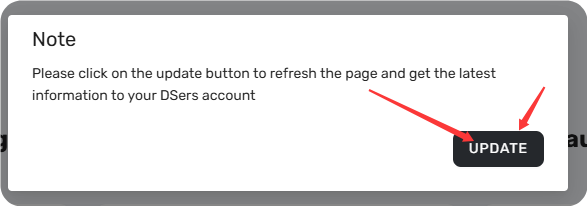
Your store is now linked!
Common issues and how to fix them
| Issue | Why it happens | How to fix |
|---|---|---|
| "The store name already exists" | Someone else has already used that store name | Enter a different store name (3–30 characters, no spaces) |
| "Your Amazon store has been deactivated" | Your Amazon seller account is inactive (e.g., unpaid fees, account suspension) | Log in to Amazon Seller Central, resolve any account issues, then try authorizing again |
| Store already linked to another account | Each Amazon store can only connect to one DSers account | Log in to the DSers account already linked to this store |
What's next?
Once your Amazon store is connected, you'll be prompted to choose a subscription plan. The Basic plan is free and works great to get started – no credit card needed.
After that, you can start importing products and processing orders right away. The most common next step is connecting your supplier account.
💡 Ready to connect a supplier? Check out our guide: [ Connect Your AliExpress to DSers]
Related Articles
- How to Connect Multiple Stores to a Single DSers Account
- Create Your DSers Account: Sign Up Step by Step
- Connect Your AliExpress Account to DSers
- eBay Authorization: Connect Your eBay Store to DSers
- TikTok Shop Authorization: Connect Your TikTok Shop to DSers
- Wix Authorization: Connect Your Wix Store to DSers
FAQ Section
Everything you need to know about connecting your Amazon store to DSers.

Get Started Now to Grow Your Online Business with the DSers!