

Get started with DSers in just a few clicks
Note
Note: Starting your dropshipping journey with DSers is quick and straightforward. This guide walks you through everything you need to create your DSers account.
About DSers
DSers is an all-in-one dropshipping automation tool that helps you find products, import them to your store with one click, and manage order fulfillment with linked suppliers—so you can focus on growing your business.
Create Your DSers Account
DSers provides multiple sign-up entry points across its website to make registration as smooth as possible. No matter where you start, the registration process is the same.
How to start your registration
You can get started right away by visiting our registration page directly:
➡️https://accounts.dsers.com/accounts/register
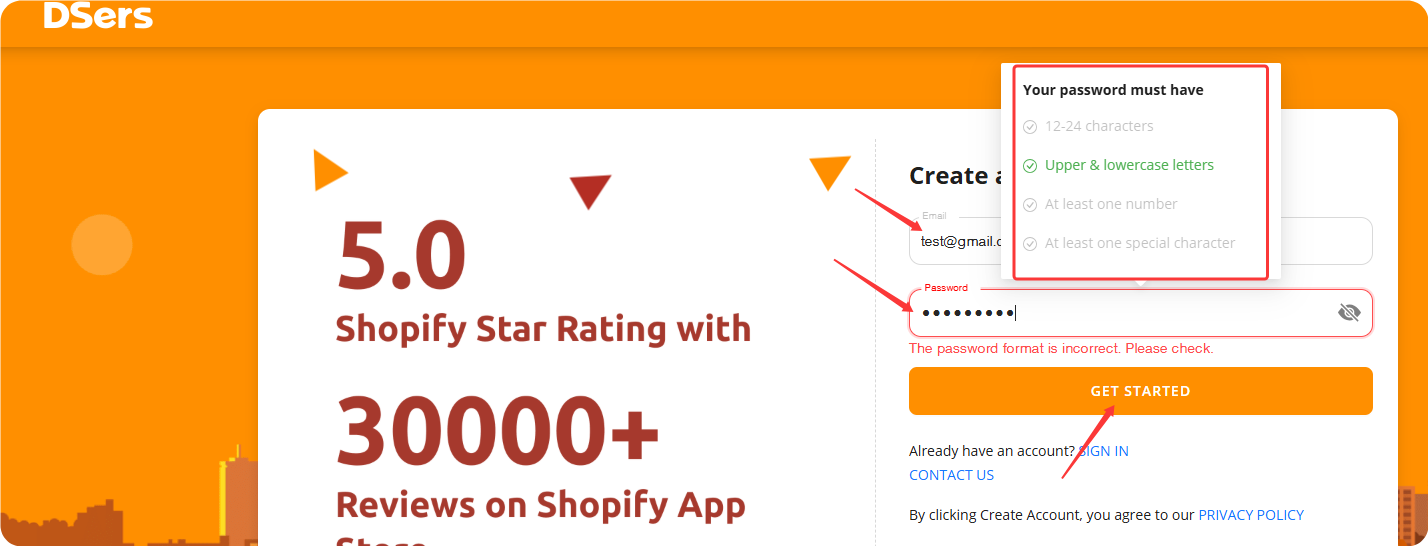
In the registration pop-up, enter:
- Email address – Must be in a valid format. (DSers does not verify whether the email actually exists.)
- Password – Must be 12–24 characters, containing a mix of uppercase and lowercase letters, numbers, and special characters
Click GET STARTED  to complete the registration.
Error Messages You May Encounter
- "email has been registered, please sign in." – Each email can only be used once. Please sign in with the existing account or use a different email to register.
- "The password format is incorrect. Please check." – Your password must be 12–24 characters long, with a mix of uppercase and lowercase letters, numbers, and special characters.
What's Next?
After creating your account, you'll be guided to connect your sales channel and choose a subscription plan.
For a complete walkthrough, check out:
➡️ Binding: Get Started in 3 Minutes — Connect DSers to Your Store
Related Articles
- What is DSers? — A Quick Overview for Beginners
- Binding: Get Started in 3 Minutes: Connect DSers to Shopify Store
- Importing: How to Bring Products from AliExpress
- Fulfill Your First Order: A Step-by-Step Walkthrough
- How to Connect Multiple Stores to a Single DSers Account
- DSers Plans and Billing: A Complete Overview
FAQ Section
Everything you need to know about creating a DSers account and getting started with your dropshipping journey.

Get Started Now to Grow Your Online Business with the DSers!