

Cannot Edit Customer Detail in DSers?—Here's the Right Way to Fix a Wrong Address
Note
Once an order is placed to the supplier, DSers no longer controls the address—AliExpress/Alibaba does.Click here to start dropshipping now with DSers
Editing it in Shopify only changes your local record, not the actual shipment. This guide shows where and how to update the address based on your order status.
Quick Decision Table
| DSers Order Status | Can You Fix It? | Action |
|---|---|---|
| Awaiting payment (not paid) | ✅ Yes | Cancel the unpaid order on AliExpress/Alibaba and reorder with correct address |
| Awaiting shipment (paid, not shipped) | ✅ Yes | Contact supplier via AliExpress/Alibaba message to request address change |
| Awaiting fulfillment / Fulfilled (shipped) | ⚠️ Limited | Try supplier/carrier intercept; if fails, AliExpress/Alibaba cancel & reorder |
Scenario 1: Awaiting Payment—Not Yet Paid
- Go to AliExpress/Alibaba → Account → Orders.
- Find the unpaid order and click Cancel Order.
- Return to DSers and click Sync AliExpress/Alibaba Orders to sync the latest order status.
- Go to the Canceled (AliExpress/Alibaba) tab. The canceled order will now appear there.
- Click Customer Detail on the order card, update the shipping address, and click Save.
- Click Order Again to place the corrected order. DSers will use the updated address you just saved.
Scenario 2: Paid Orders (Awaiting Shipment, Awaiting Fulfillment, or Fulfilled)
Once an order is paid, the only way to change the shipping address is to contact the supplier directly on AliExpress/Alibaba. The supplier will check the current status of your package:
- If the order has not been shipped yet, they can update the shipping address directly.
- If the order has already been shipped, they may contact the carrier to intercept and redirect the package.
How to request the change:
- Go to AliExpress /Alibaba→ Account → Orders.
- Find the order and click Contact Seller.
- Send a message requesting the address change with the correct address.
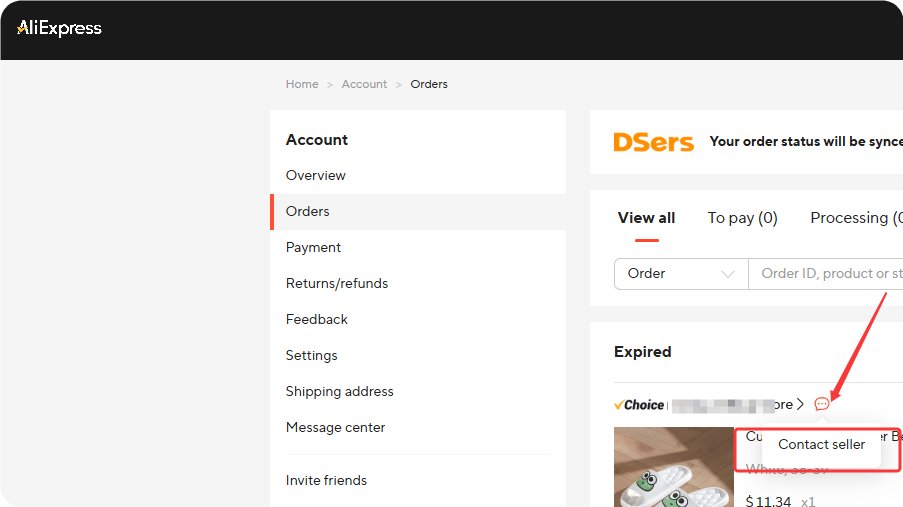
Sample message:
"Hi, I need to change the shipping address for order #[AliExpress Order Number]. The correct address is: [Full Address]. Please check the package status and update the address if possible, or contact the carrier to redirect it. Thank you!"
Important: Most suppliers are based in China. Due to the time difference, they may not reply to you immediately.
Send your message and allow some time for their response.
Tip: If the supplier is unable to change or redirect the shipment, you may need to cancel and reorder. See the Cancel and Reorder on AliExpress section below.
What Happens If an Order Is Canceled on AliExpress/Alibaba?
The cancellation happens on AliExpress/Alibaba (supplier side) . This action only changes the order status in DSers and does not affect the order status in your Shopify store.
DSers will sync and move the order to the (AliExpress/Alibaba) Canceled tab automatically.
Alternative: Roll Back and Reorder
If you want to reorder directly through DSers without waiting for AliExpress/Alibaba cancellation:
⚠️ Financial Warning:[Roll Back]does NOT cancel the order on AliExpress. You must still go to AliExpress and cancel the original order separately.
Confirm the refund before placing the new order to avoid double-paying.
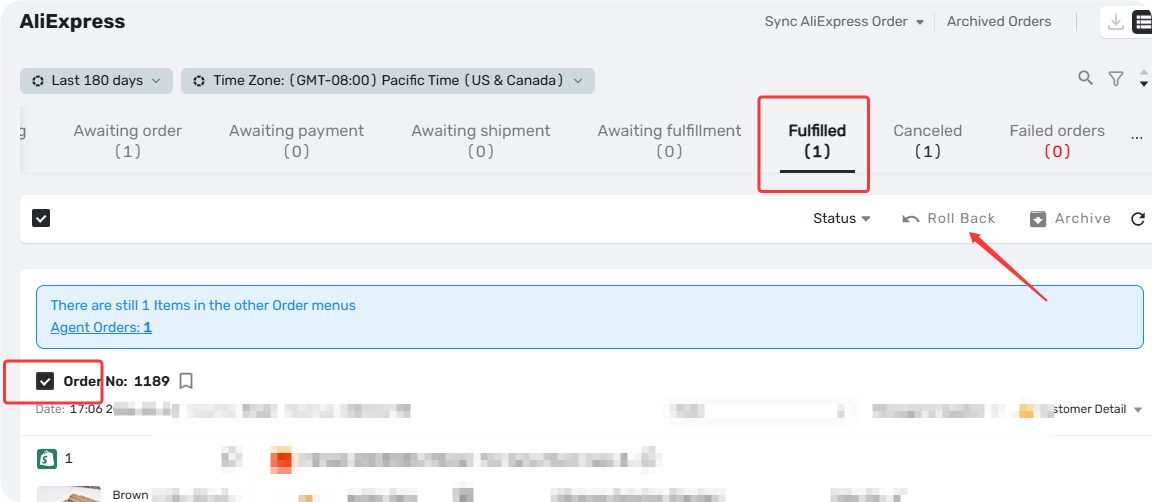
| Step | Action |
|---|---|
| 1 | Go to DSers → locate the order in Awaiting order, Awaiting shipment, or Canceled tab |
| 2 | Manually mark it as Fulfilled (if not already), then click Roll back orders |
| 3 | Enter CONFIRM → click OK |
| 4 | Order moves to Awaiting order tab → edit Customer Detail |
| 5 | Place the order again |
Contact DSers Support
If you need to change the shipping address for a 1688 order, or if you've tried the steps above and still need help, contact DSers support via the Live Chat
Have this info ready:
- DSers account email address
- Store order number+Supply Order Number
Related Articles
- Cancelled Order Notification: How to Handle Supplier Cancellations
- Canceling an Order in DSers: What You Need to Know
- How to Roll Back and Reorder Unfulfilled Orders
- How to Roll Back a Fulfilled Order and Reprocess It
FAQ Section
Everything you need to know about changing a customer's shipping address after an order has been placed.

Get Started Now to Grow Your Online Business with the DSers!