

Manage your store connections by removing the ones you no longer need
Note
Disconnecting a store permanently removes all associated data. This guide walks you through the removal process and covers what to do if your store is already inactive.Click here to start dropshipping now with DSers
What Happens When You Disconnect a Store
Attention: Disconnecting a store from DSers is permanent and cannot be undone. Once disconnected, all product data, supplier mappings, and order history for that store will be permanently deleted.
The Free plan supports up to 3 stores — please do not delete a store unless absolutely necessary. Check [How to Connect Multiple Stores to a Single DSers Account]
How to Disconnect a Store
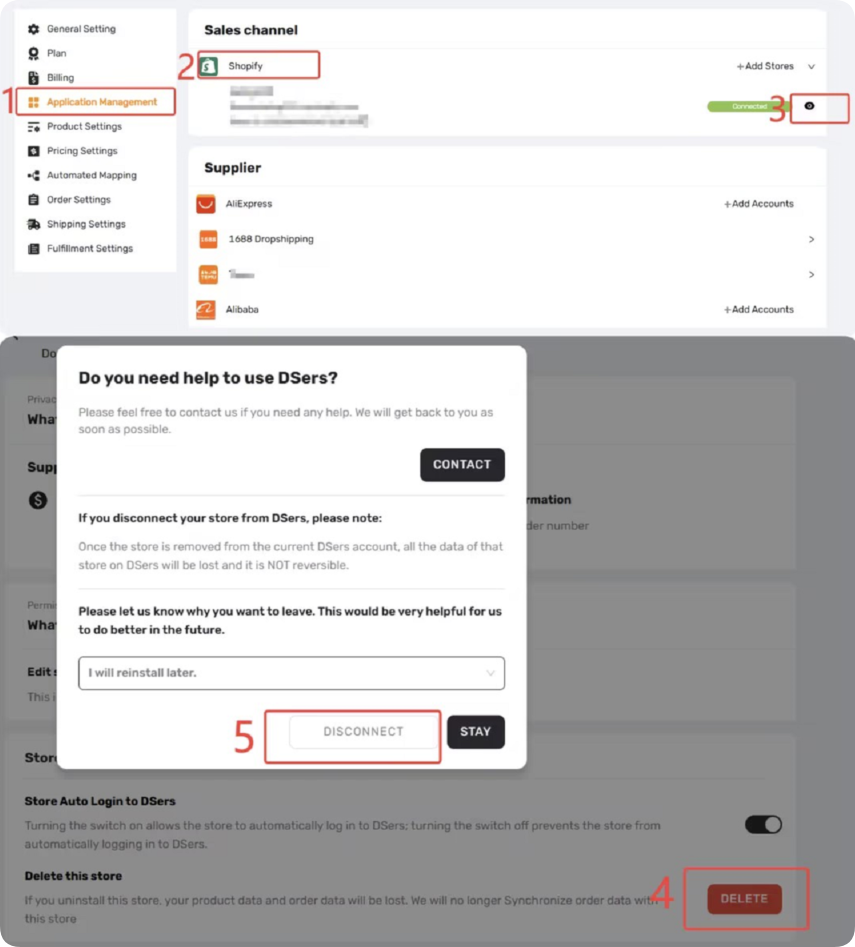
- Go to Settings > Application Management in DSers.
- Expand the relevant sales channel (e.g., Shopify, Wix, TikTok) and locate the store you wish to remove.
- Click the eye icon to view the store details.
- Scroll down and click the red DELETE button.
- Select a reason for disconnection, then click DISCONNECT.
- You’ll be redirected to your sales channel. Uninstall the DSers app from your installed apps.
- Return to DSers and click Update to confirm.
The store will be removed from your list.
How to Disconnect Inactive or Frozen Stores
If the store you want to disconnect is already deactivated, frozen, or otherwise inaccessible, you won't be able to complete the removal yourself
In this case, contact DSers Customer Support with your DSers account email and the store name. The support team will help remove the inactive store from your account.
For a broader overview of how store connections work in DSers, see our guide on [Store Authorization Failed? How to Relink Store].
Related Articles
- How to Connect Multiple Stores to a Single DSers Account
- Binding: Get Started in 3 Minutes: Connect DSers to Shopify Store
- WooCommerce Connection Guide: Website Verification, Authorization & Webhook Setup
- Store Binding: How to link with Shopline store
- Store Authorization Failed? How to Relink Store
- Connection Failed: Why DSers Can't Bind to Your Store
FAQ Section
Quick answers to the most common questions about disconnecting stores from DSers.

Get Started Now to Grow Your Online Business with the DSers!