

A complete guide to syncing order instructions and notes to suppliers
Note
When running a dropshipping business, suppliers must not include invoices, flyers, or QR codes in customer packages — receipts showing your costs can break trust and reveal your business model.Click here to start dropshipping now with DSers
For customizable products, customer instructions or uploaded images must also reach suppliers accurately.
DSers automates supplier message syncing, eliminating manual order messaging.
Overview of DSers Supplier Message Features
DSers provides four main ways to send messages to supplier,Choose the one that fits your needs:
| Feature | What It Does | When to Use |
|---|---|---|
| Leave a message to suppliers | Set default store or product-level instructions | You have standard instructions for all orders (e.g., "no invoices, no QR codes") |
| Synchronize store order notes | Auto-sync customer checkout notes | Customers leave special instructions at checkout (gift messages, delivery notes) |
| Synchronize Shopify order customization information | Sync per-item custom text or images | POD products with different customizations per item |
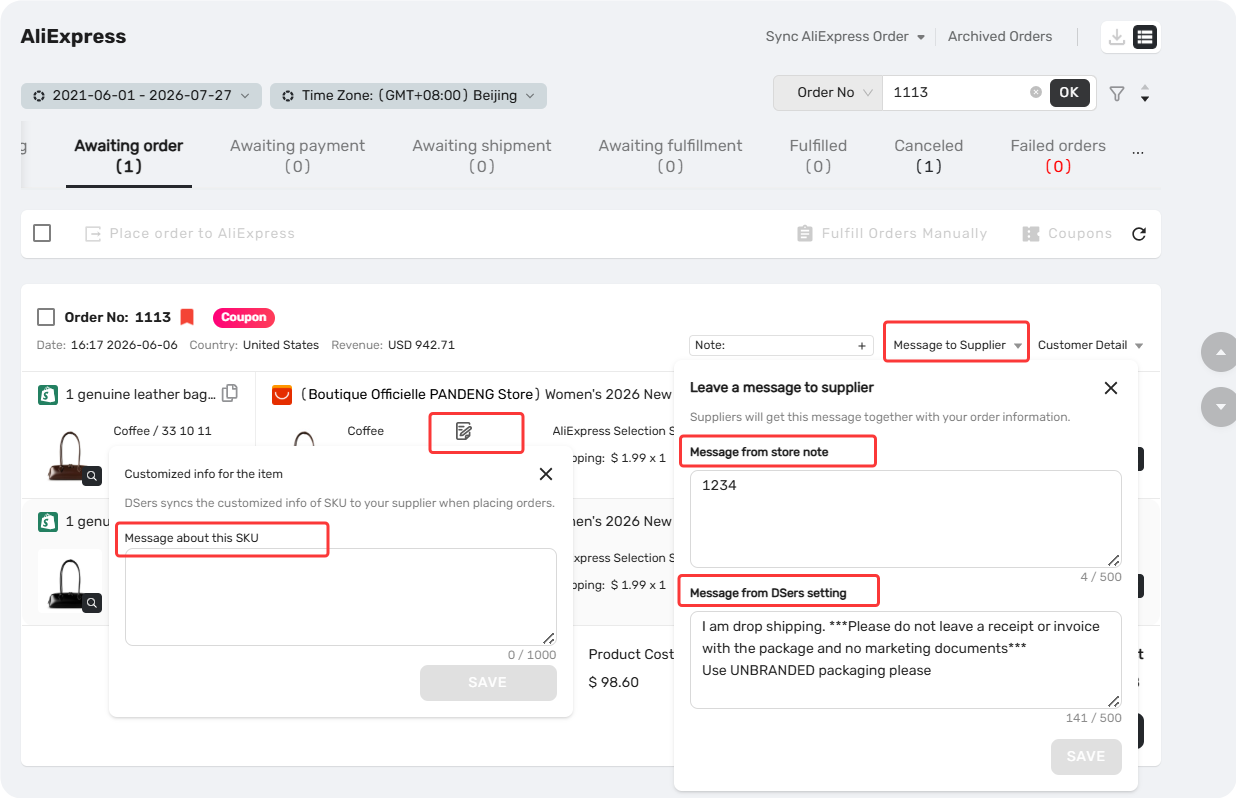
| Message to Supplier & Customized info for the item | Add a one-off message to a specific order | You need to add a special note for a single order without changing defaults |
📖 Detailed guides for each feature:
Leave a Message to Suppliers: Store and Per-Order Settings
How to Sync Customer Checkout Notes to Suppliers
How to Sync Per-Item Customization Notes from Shopify to Suppliers
How These Features Work Together
The final message your supplier receives combines your DSers template + customer checkout notes (if any) + Shopify customization info (if enabled) — all automatically.
Supported Supplier Platforms
This feature works across all major supplier platforms supported by DSers: AliExpress, Alibaba, 1688 Dropshipping, and Agent.
Before you start: If you have special requirements for a supplier, it's best to ask them first whether they actually support your request before leaving a note.
Related Articles
- Leave a Message to Suppliers: Store and Per-Order Settings
- How to Sync Customer Checkout Notes to Suppliers
- How to Sync Per-Item Customization Notes from Shopify to Suppliers
- Fulfilling Customer Orders: How to Place & Pay for Supplier Orders
FAQ Section
Quick answers to the most common questions about DSers supplier message features.

Get Started Now to Grow Your Online Business with the DSers!