

Add an AliExpress order number to sync status and tracking — even for orders placed outside DSers.
Note
Sometimes you place orders directly on AliExpress (e.g., to use coupons or before connecting your AliExpress account) but still want DSers to track them.Click here to start dropshipping now with DSers
This article walks you through how to manually add that AliExpress order number to an existing order on DSers, so you can keep your fulfillment data accurate and save time on manual tracking entry.
When You Need to Do This
| Scenario | What Happened |
|---|---|
| Order failed to place via DSers | You tried to place an order through DSers but it failed. You then placed the order manually on AliExpress and need DSers to track it. |
| Manual fulfillment broke the sync | You manually fulfilled an order from the Awaiting Payment or Awaiting Shipment tab. This stops DSers from syncing data for that order — adding the AliExpress number can restore the connection. |
| You placed an order directly on AliExpress | For whatever reason (coupons, account issues, etc.), you ordered directly on AliExpress without using DSers, but still want DSers to manage tracking and status updates. |

Important: The AliExpress order number must belong to the AliExpress account currently connected to your DSers account. Otherwise, sync will fail.
How to Add an AliExpress Order Number
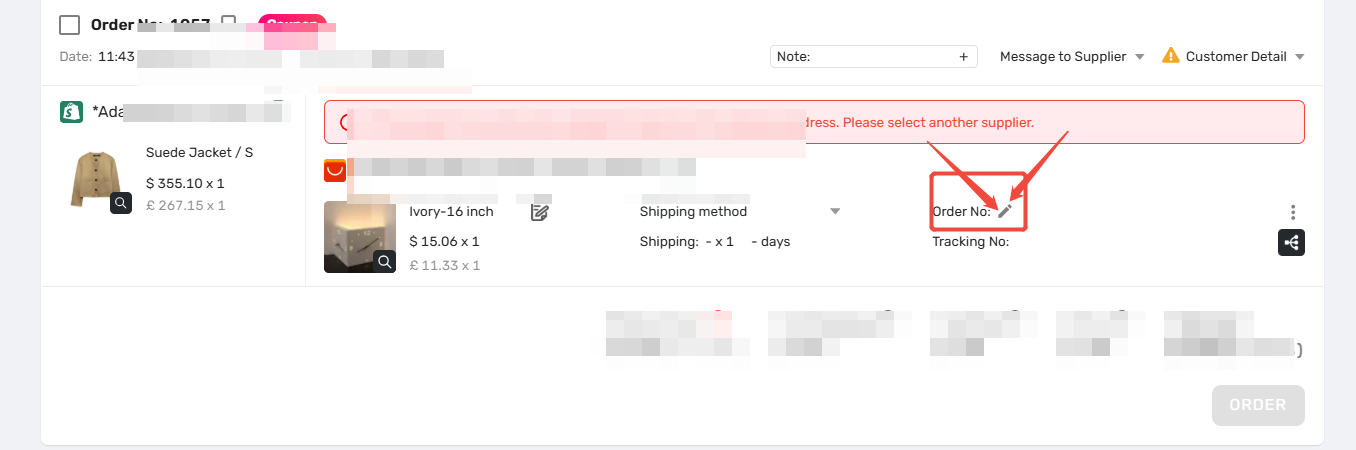
1. Go to Open Orders and find the target order.
2. Click the pencil icon
 next to Order No.
3. Paste the AliExpress order number and click the save icon

4. In the pop-up "Do you confirm saving the entered Order number?", click OK
 .
.
Where You Can Add It — and What Happens
| Tab | Can Add? | Result |
|---|---|---|
| Pending | ❌ No | Not supported |
| Awaiting order / Awaiting payment / Awaiting shipment / Awaiting fulfillment / Failed / Canceled | ✅ Yes | Syncs latest status and tracking to your store |
Advanced Tip: Fix a Fulfilled Order with Missing Tracking
If a fulfilled order has tracking in DSers, but not in your store:
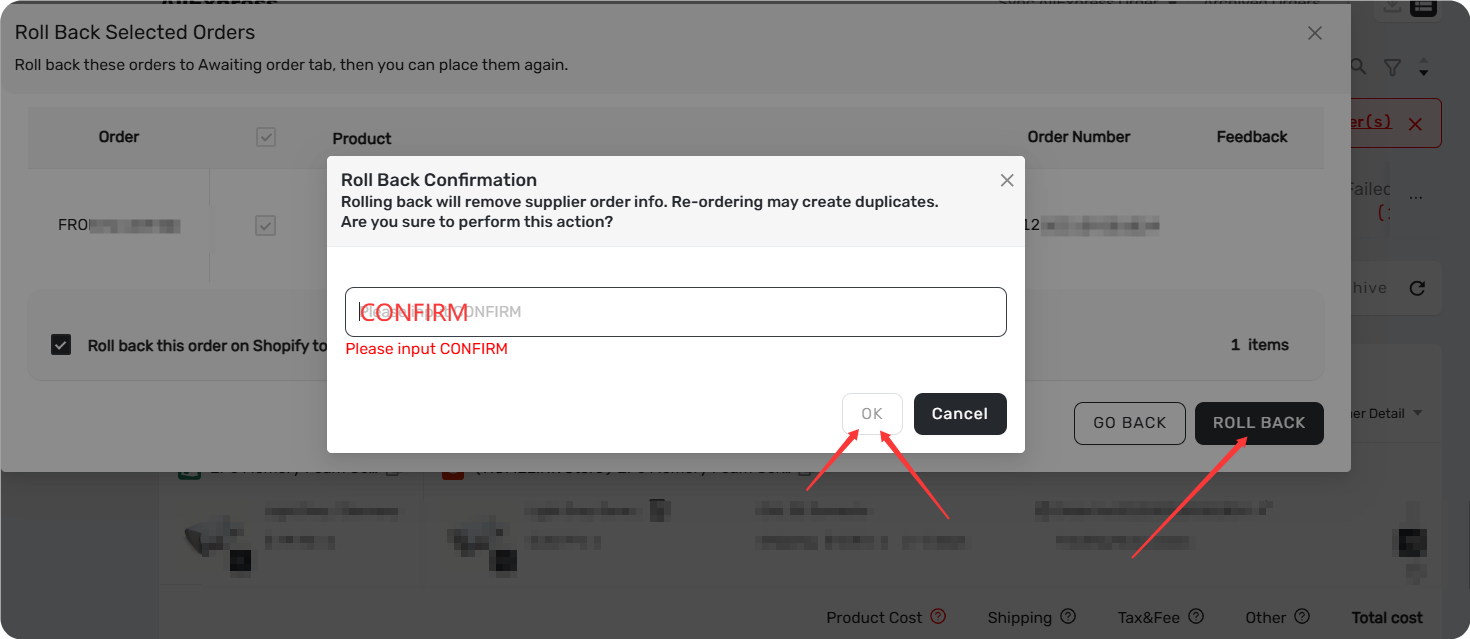
- Roll the order back to Awaiting order (click the order card > Roll back orders > type "CONFIRM")
- Add the AliExpress order number again using the steps above
- DSers re-processes fulfillment and syncs tracking to your store
Errors & Filters
| Issue | Solution |
|---|---|
| "Order No not found, please check again." | The AliExpress number is invalid or belongs to a different AliExpress account. Check Settings > Application Management > Suppliers > AliExpress Account. |
| "The orders filled are being risk controlled." | AliExpress-side review. Wait for it to clear — DSers can't bypass this. |
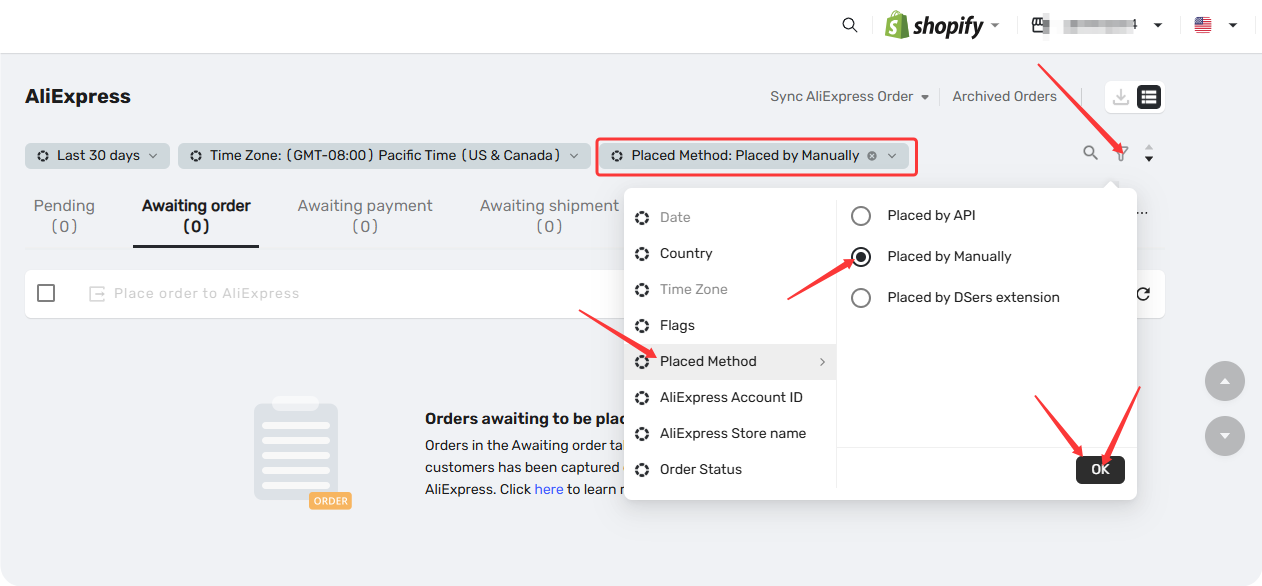
| Find manually added orders | Hover the Order No — tooltip shows "Placed by Manually". Or filter by Placed Method > Placed by Manually in Open Orders. |
Related Articles
- How to Roll Back a Fulfilled Order and Reprocess It
- Order Stuck in "Awaiting Payment"? How DSers Sync Works and What to Do
- DSers Chrome Extension: Placing orders and Syncing Tools Guide
- Supplier Account Limits and Switching Guidance
FAQ Section
Everything you need to know about manual order sync and how to add AliExpress order numbers to DSers orders.

Get Started Now to Grow Your Online Business with the DSers!