

Paid on AliExpress but DSers not updating? No tracking number even though AliExpress says "Shipped"? Here's how to fix both.
Note
Don't worry if your order status doesn't match between DSers and AliExpress right away—it takes time to sync.Click here to start dropshipping now with DSers
In this guide, you'll learn why this happens, two ways to manually sync your order, and what to do if the tracking number changes later.
Why Your Order Status Doesn't Match Between DSers and AliExpress
Here's why your order might not have updated yet:
- The supplier just updated the status—it hasn't been pulled into DSers yet. Just wait for the next sync time.
- AliExpress is reviewing the payment—some orders show "under risk control" and need a few hours to clear before we can get the data.
- The supplier hasn't taken action yet—if they haven't confirmed payment, shipped the order, or uploaded a tracking number, DSers has nothing new to pull.
So if you check right after paying, your update might still be waiting. You didn't do anything wrong.
Two Ways to Sync Your Order Right Now
| Method | Best For | Time | Setup Needed? |
|---|---|---|---|
| Sync via API | Fastest way to sync—no login required, but limited to 5x/day | Seconds | ❌ None |
| Sync via DSers Chrome Extension | When you've used up your API attempts, or need the latest tracking number | Seconds | ✅ Install extension + log into AliExpress (Desktop only) |
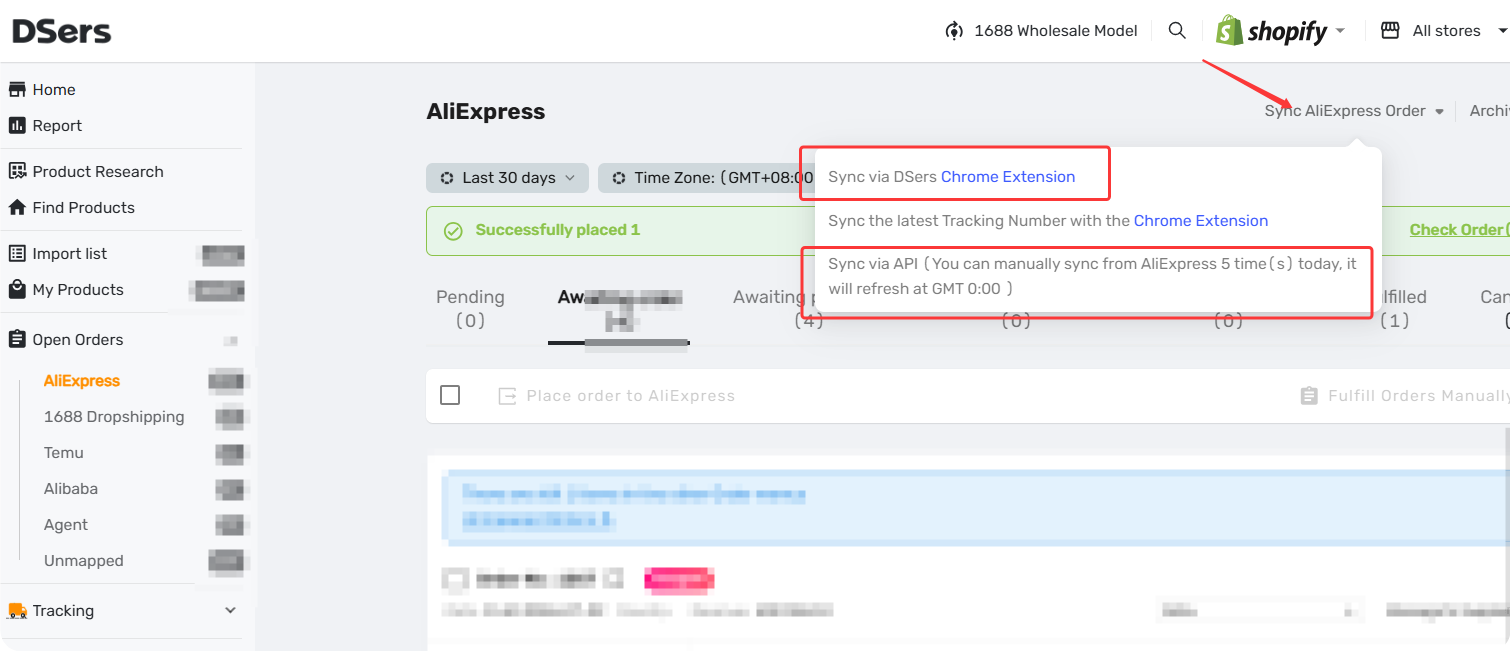
Tip: The Chrome Extension also offers "Sync the latest Tracking Number with the Chrome Extension" —this option pulls the newest tracking number if your supplier changed it after fulfillment.
How to Sync Your Order status
Method 1: Sync via API
Steps:
- Go to Open Orders in your DSers dashboard.
- Click Sync AliExpress Order and select Sync via API from the dropdown menu.
Tip: You can use this up to 5 times per day.
Method 2: Sync via DSers Chrome Extension
Tip: Before you start, make sure you have:
- The DSers Chrome Extension installed (if you don't have it, clicking the button will take you to the install page)
- The same AliExpress account you used for this order logged in
Steps:
- In DSers, go to Open Orders
- Click Sync AliExpress Order and select Sync via DSers Chrome Extension.
Sync Not Working? Check Here
| Symptom & Most Likely Cause | What to Do |
|---|---|
| You've used all 5 daily API attempts | Wait until tomorrow, or use the Chrome Extension |
| Order status did not update—you're likely logged into the wrong AliExpress account | Log out and log in with the account you used for this order-related articles |
| Extension not installed or on an old version | Install the latest version from the Chrome Web Store |
| Tracking number still missing after sync—supplier hasn't generated one yet | Some suppliers take 1–3 days to ship—check back later |
Related Articles
- Fulfill Your First Order: A Step-by-Step Walkthrough
- Auto-Sync Tracking Numbers to Your Store
- Manually Updating Tracking Numbers via the DSers Chrome Extension
- Customize Shipping Confirmation Email Settings
- Manual Order on AliExpress? How to Sync It to DSers
FAQ Section
Everything you need to know about order sync and how to keep your order status and tracking information up to date.

Get Started Now to Grow Your Online Business with the DSers!