

From "Incomplete Pre-Settings" to Policy Violations—Fix Every eBay Push Error Fast
Note
This guide covers push errors you may encounter when clicking "Push" in your Import List.Click here to start dropshipping now with DSers
Errors fall into two categories: Pre-push setup issues (missing required fields that block the attempt) and Post-push rejections (eBay API policy or account violations).
Use this guide to self-diagnose and fix 80%+ of errors in minutes.
Part 1: Pre-Push Errors
These appear before the push reaches eBay. The fix is immediate once you complete the missing data.
1.1 Incomplete eBay Pre-Settings
You see: "Incomplete eBay pre-settings will block item push. Complete them now."
In the eBay Pre-setting section of your Import List product editor, one or more dropdowns show "please select."
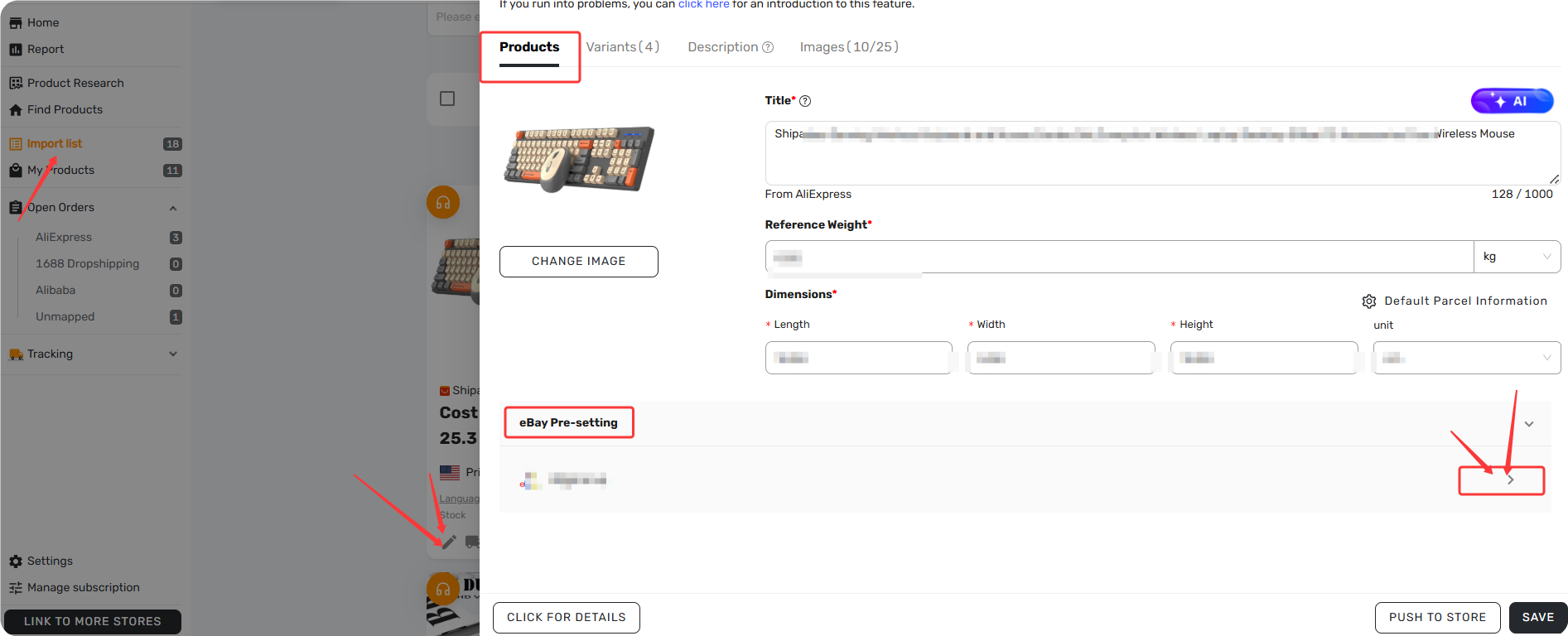
1-Minute Fix:
- Go to Import List → open the product editor
- Scroll to eBay Pre-setting
- Complete each dropdown showing "please select"
- Click Save, then retry the push
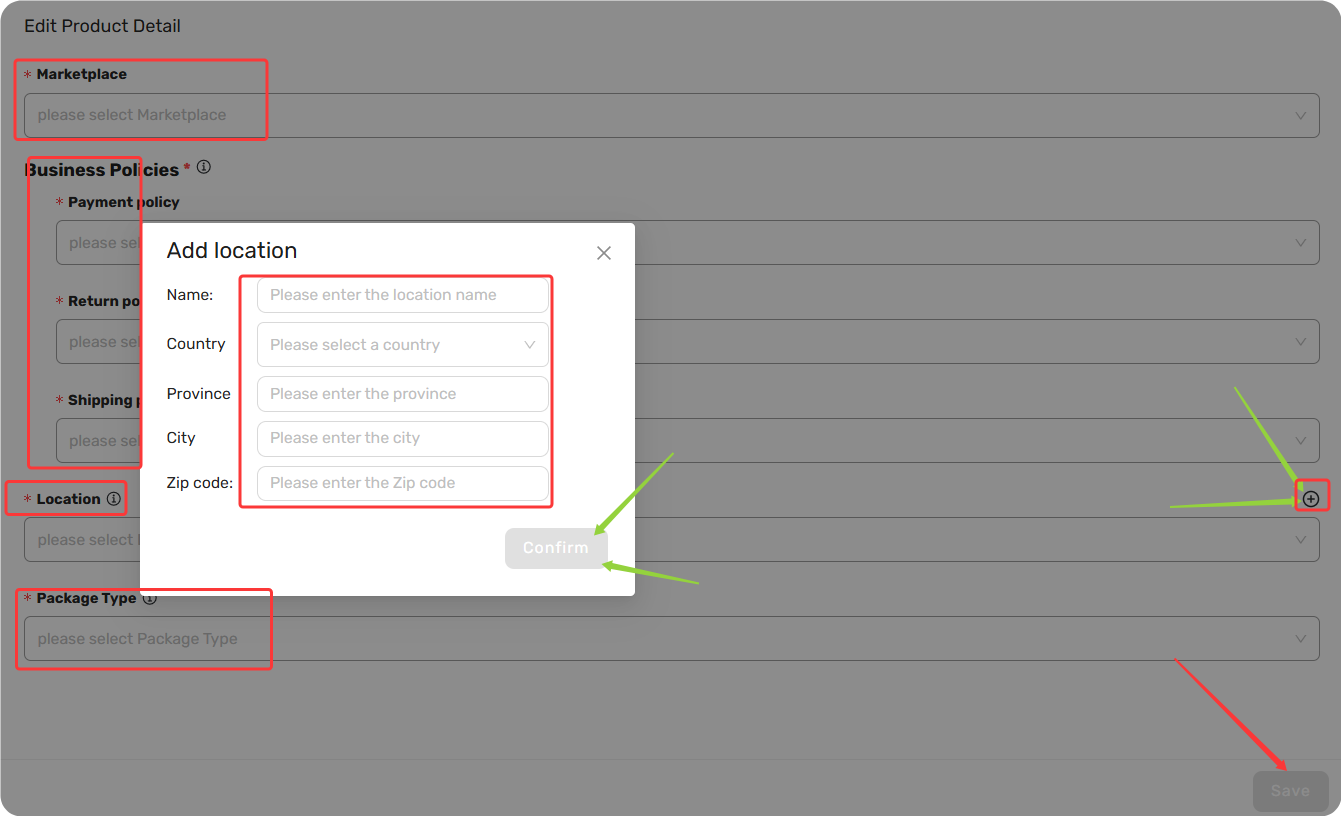
Pre-Setting Fields Reference:
| Field | What It Defines | If Empty, Try This |
|---|---|---|
| Marketplace | eBay site you're pushing to (US, UK, DE, etc.) | Select the correct eBay site first—this determines which Business Policies apply |
| Payment policy | Accepted payment methods | Create one in eBay, or switch the product's Target Market to match the site where your policies exist |
| Return policy | Return window, who pays return shipping | Same as above |
| Shipping policy | Shipping service, handling time, cost type | Same as above |
| Location | Zip code/city/country item ships from | Create a new location with complete address details in DSers |
| Package Type | Packaging type (Parcel, Letter, Large Envelope) | Letter is a safe default for most dropshipping products |
Tip: Different categories may show extra required fields below Pre-Setting—fill them all in before saving.
If Your Business Policy Dropdown Is Empty:
- Policies are site-specific—they won't sync across different eBay sites
- Fix: Either create policies on the target site, or switch the product's Marketplace to match. eBay's policy pages don't always display country labels clearly, so double-check which site you're actually on
- For step-by-step policy setup, contact Ebay team for further help.
1.2 The Product Dimension or Weight Is Empty
The Problem: Error: "The product dimension or weight is empty." The push is blocked.
1-Minute Fix:
- In Import List, open the product editor
- Locate the Dimensions and Weight fields
- Fill in all three dimensions and weight, select the correct unit (INCH or CENTIMETER, LB or KG)
- Click Save, then retry
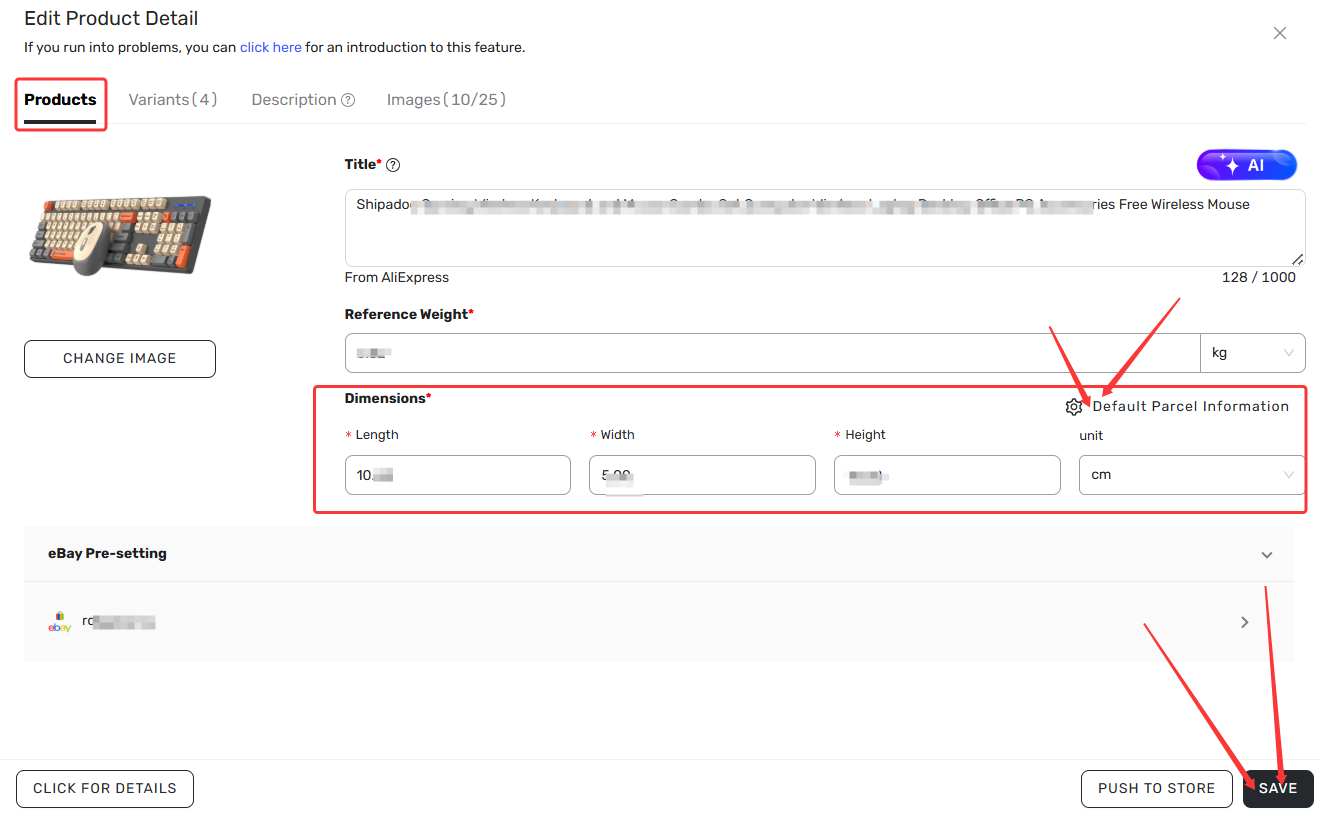
Deep Dive: For AliExpress imports, DSers typically pulls AliExpress supplier dimensions automatically. If missing:
- Set a default dimension value in DSers Settings for all products without supplier data
- Or enter manually based on actual packaging size
Part 2: Post-Push Errors
These occur after the push reaches eBay. Error messages come directly from eBay.
2.1 Image, Title, or Description Limits
| Issue | eBay Limit | Error Message | 1-Minute Fix |
|---|---|---|---|
| Images | Maximum 24 per listing (including variant images) | Product variants images or product main image exceeds 24, you can use the "split into multiple products" feature or delete the image. |
Uncheck images in the push dialog so you select ≤24 |
| Title | 80 characters or less in the target market's language | TITLE_OVER_LIMIT The title has to be 80 characters or less. |
Edit in Import List—ensure you're editing the correct language version (e.g., Italian title vs English title) |
| Description | Under 4,000 characters (including HTML) | DESCRIPTION_OVER_LIMIT |
Shorten description or use DSers AI Description Generator to rewrite |
2.2 Category Doesn't Support Multi-Variant Products
The Problem: "The selected category does not support multi-variant products. Please choose a category that allows variants."
Root Cause: Categories like Vehicles, Antiques, Media, Services, and most Electronics categories only allow "simple" products (one variant with one option).
1-Minute Fix:
Change eBay category to one that supports variations
Tip: If your product is from a Variable Supplier, deleting variants won't help—switch to a category that supports multi-variant listings instead.
2.3 eBay Account Limits
The Problem: Push fails with a limit-related error.
Root Cause: eBay applies monthly limits based on account performance—total inventory quantity, free listings count, or total dollar value.
1-Minute Fix:
- Reduce the product quantity
- Lower the price temporarily
- Wait for the next monthly cycle
Deep Dive: Request a limit increase from eBay's Selling Limits dashboard if your performance metrics are strong.
For detailed guidance on eBay limits and how to manage them, see [Understanding eBay Selling Limits].
2.4 Currency Mismatch
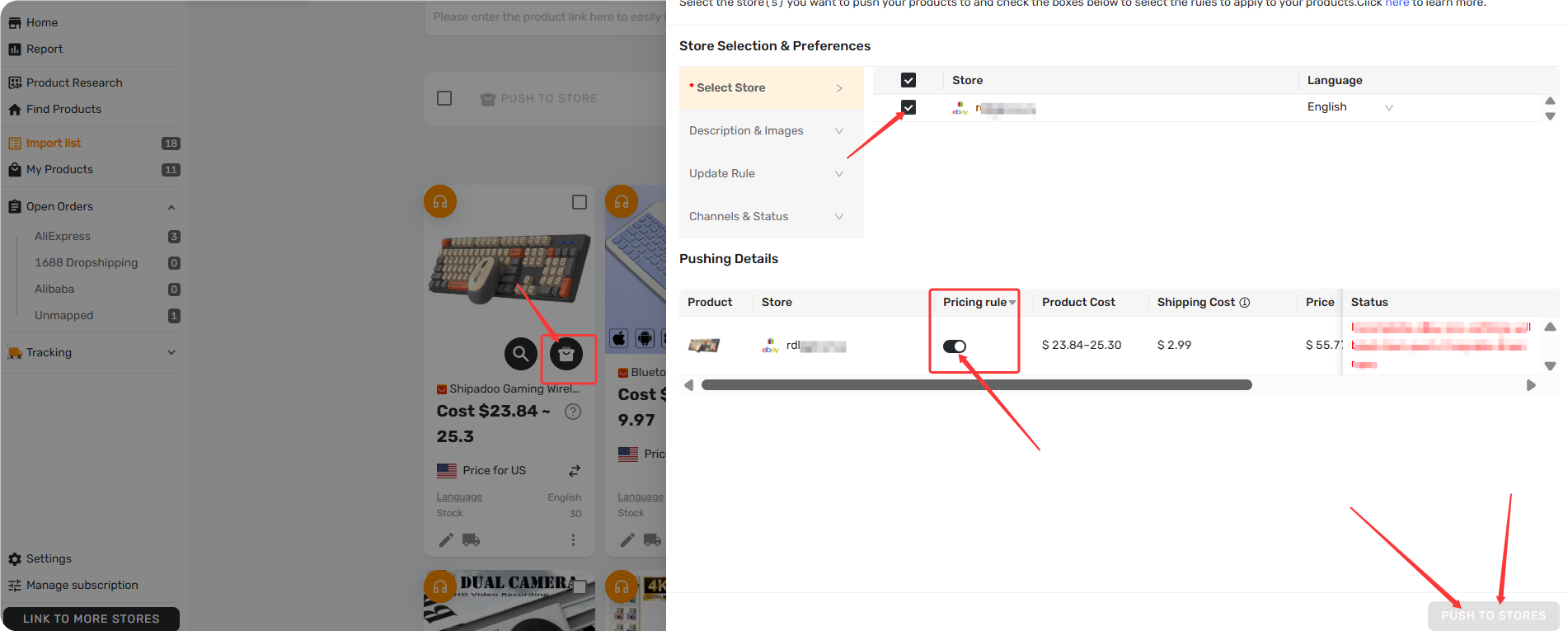
The Problem: "Shop currency doesn't match target market currency. Please enable Pricing Rule and try again."
Root Cause: Your DSers store currency doesn't match the target eBay site's currency, and Pricing Rule is disabled.
1-Minute Fix:
- Enable Pricing Rule in DSers Settings → Pricing Settings
- Turn on pricing setting when pushing to store
2.5 Location Mismatch with Shipping Service
The Problem: "Your item Location indicates that your item is in the United Kingdom, but you've chosen a postage service that posts from outside the UK."
1-Minute Fix:
- Change the item location to match the shipping service's origin
- Or change the shipping service to one that ships from your selected location
2.6 Other eBay API Errors
The following errors occur less frequently. Brief fixes are provided below.
| Error | Quick Fix |
|---|---|
Package Type mismatch — "Invalid request" error when changing Package Type doesn't help |
Switch to a standard option like Parcel and retry |
| Product already exists — error indicating the title already exists on eBay | Modify the title slightly (add a SKU code or unique identifier) and retry |
| EAN/Product identifier required — EAN, UPC, or ISBN missing (common on EU sites) | Switch to a different category that doesn't require identifiers |
2.7 Policy Violation or Generic "Cannot Revise Listing"
The Problem: "Cannot revise listing. The item can't be listed or modified. The title and/or description may contain improper words, or the listing or seller may be in violation of eBay policy."
Root Cause: Multiple possibilities:
- Title or description contains prohibited, misleading, or flagged keywords
- Account has unresolved violations or temporary restrictions
- Location-based restrictions (e.g., Puerto Rico triggering overseas warehouse policies)
1-Minute Fix:
- Scan title and description for brand names, misleading terms, or policy violations—remove flagged keywords
- Review eBay's Prohibited and Restricted Items and Listing Policies
- If location is flagged, you may need to apply for eBay approval
Deep Dive: If the issue persists, contact eBay support directly with the error code—they can identify the specific policy violation.
Still Can't Fix It? Get Help
Contact DSers support with:
- DSers account email
- Product name from your Import List
- Full error message and error code
- eBay site and category you're pushing to
Live chat available 24/7 via Messenger, or email support@dserspro.com.
Related Articles
- Push Failed: Common Errors When Publishing Products to Shopify Store
- eBay Authorization: Connect Your eBay Store to DSers
- Edit & Push: Customize Products Before Publishing
- AI Description Generator: Turn Specs into Benefits
- Basic Mapping: How to set Backup Suppliers
- Master Pricing Settings: 2 Ways to Automate Your Product Pricing
FAQ Section
Everything you need to know about pushing products from DSers to your eBay store.

Get Started Now to Grow Your Online Business with the DSers!