


Automatic alerts when shipments stall or suppliers cancel — so you can take action before customers complain.
Note
You have shipped an order and received a tracking number. Days pass with no update. Eventually, you discover the supplier cancelled the order or the package is lost. DSers Tracking Status solves this by automatically flagging delayed shipments and supplier-caused exceptions — all in one dashboard.Click here to start dropshipping now with DSers
What Is Tracking Status?
Tracking Status is a paid feature in DSers that centralizes all shipment tracking data into a single table view. It automatically syncs logistics updates and proactively alerts you when something requires attention.
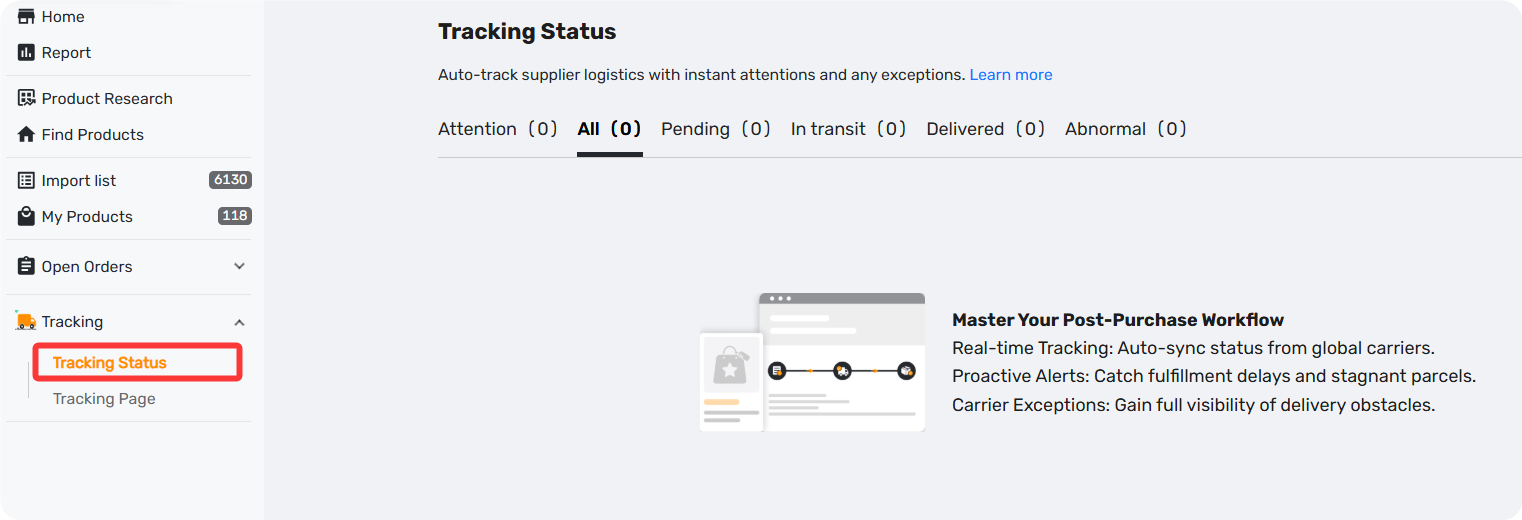
Location: Tracking - Tracking Status
How to Use Tracking Status
- Navigate to DSers - Tracking - Tracking Status
- Review shipments by tab:
- Attention — Delayed shipments (no TN for 7+ days, or no update for 2+ days)
- Abnormal — Carrier exceptions (delivery failed, returned, customs issues)
- Pending / In Transit / Delivered — Normal flow
3. Click any Tracking Number to view detailed timeline
4. Optionally, manually adjust status or mark as Attention
Note on manual changes: After manually changing a tracking status, DSers stops auto-updates for that shipment. Click Retrack to resume. Manual changes do not affect customer-facing emails or store tracking pages.
How to enable the Tracking Status feature?
After upgrading to a Paid Plan in Manage Subscription, DSers will automatically enable the Tracking Status feature for you.
It will also automatically sync orders placed through DSers to your supplier within the last 15 days that have a tracking number — and display them on the Tracking Status page, where you can track the package information.
Tips: To better understand what each tracking status means, please check out the article: "Tracking Status Explained: Know Where Every Package Is"
FAQ Section
Quick answers to the most common questions about DSers Tracking Status feature.
| Get Started Now to Grow Your Online Business with the DSers! |



 Company
 Why Choose DSers
 Blog
Blog
 Help Center


