

The effectiveness of your pricing rule is directly tied to the shipping data it uses.
Note
Selecting "Total Cost" in your pricing rule is a smart move—but it only works if your shipping settings are complete and accurate.Click here to start dropshipping now with DSers
If DSers doesn't have the correct shipping cost for a product, it will calculate your selling price based on a shipping cost of $0.
So make sure your "Shipping settings" are properly set up—that way, you can avoid pricing errors that eat into your profits.
The One Setting That Makes or Breaks Your Pricing
When you set your pricing rule to use Total Cost on Basic Pricing Rule, DSers calculates it as:
Total Cost = Product Cost + Shipping Cost
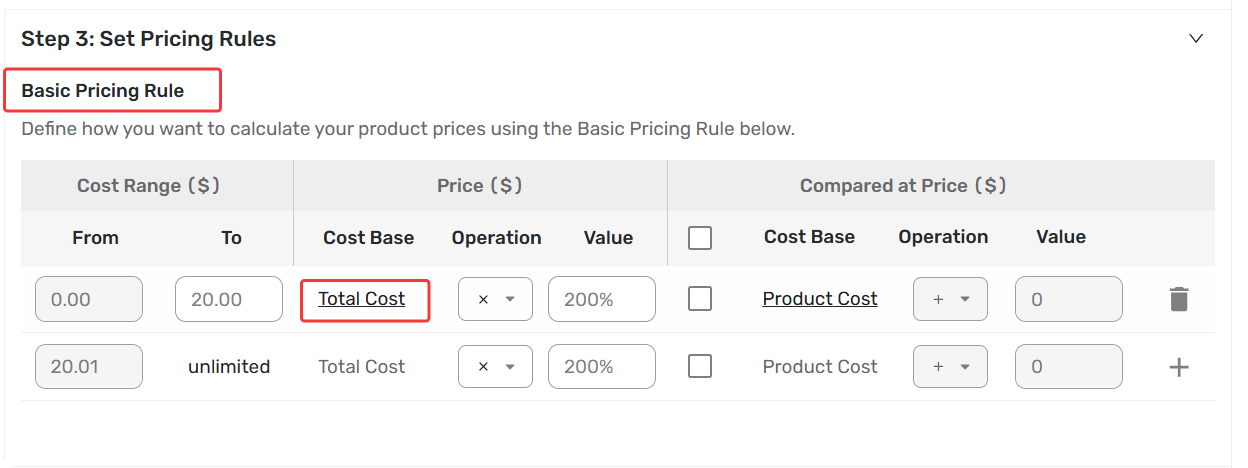
However, DSers can only pull the shipping cost if you have configured your shipping methods correctly in DSers - Shipping Settings. Otherwise, shipping cost defaults to $0, and your prices will be too low.
Before you configure anything, first check what shipping options your supplier actually offers for your products. Let us start there.
How to check what shipping method your supplier offers on Import List
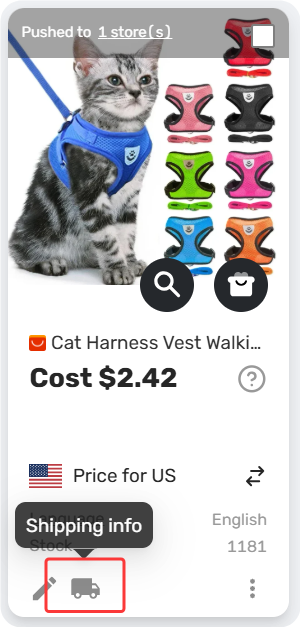
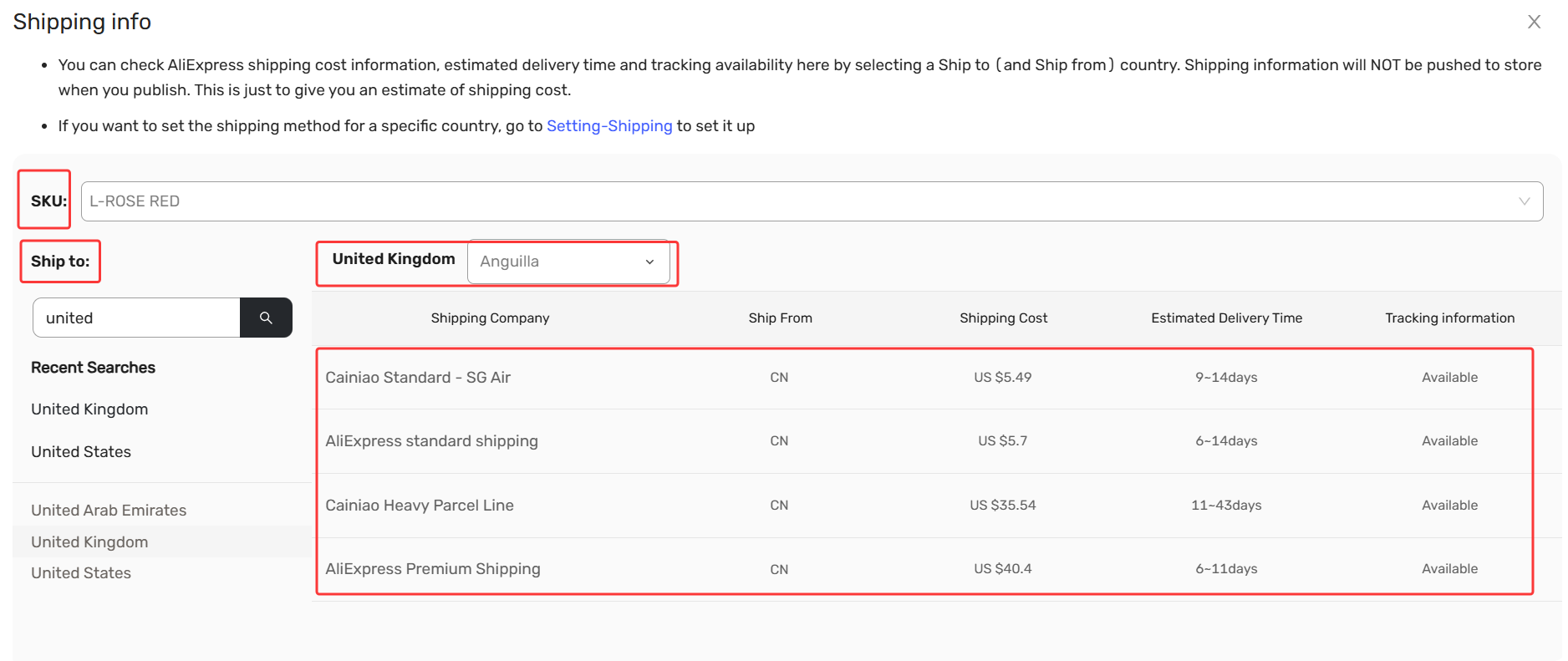
Before you start, review the shipping methods name your supplier offers, the shipping cost and shipping time. This helps you choose the right ones in the next steps.
- Import List -Product Card - Shipping Info.
- Look for the shipping information—switch the SKU and ship to country to view available Shipping methods for each product
How to Set Up Shipping Methods
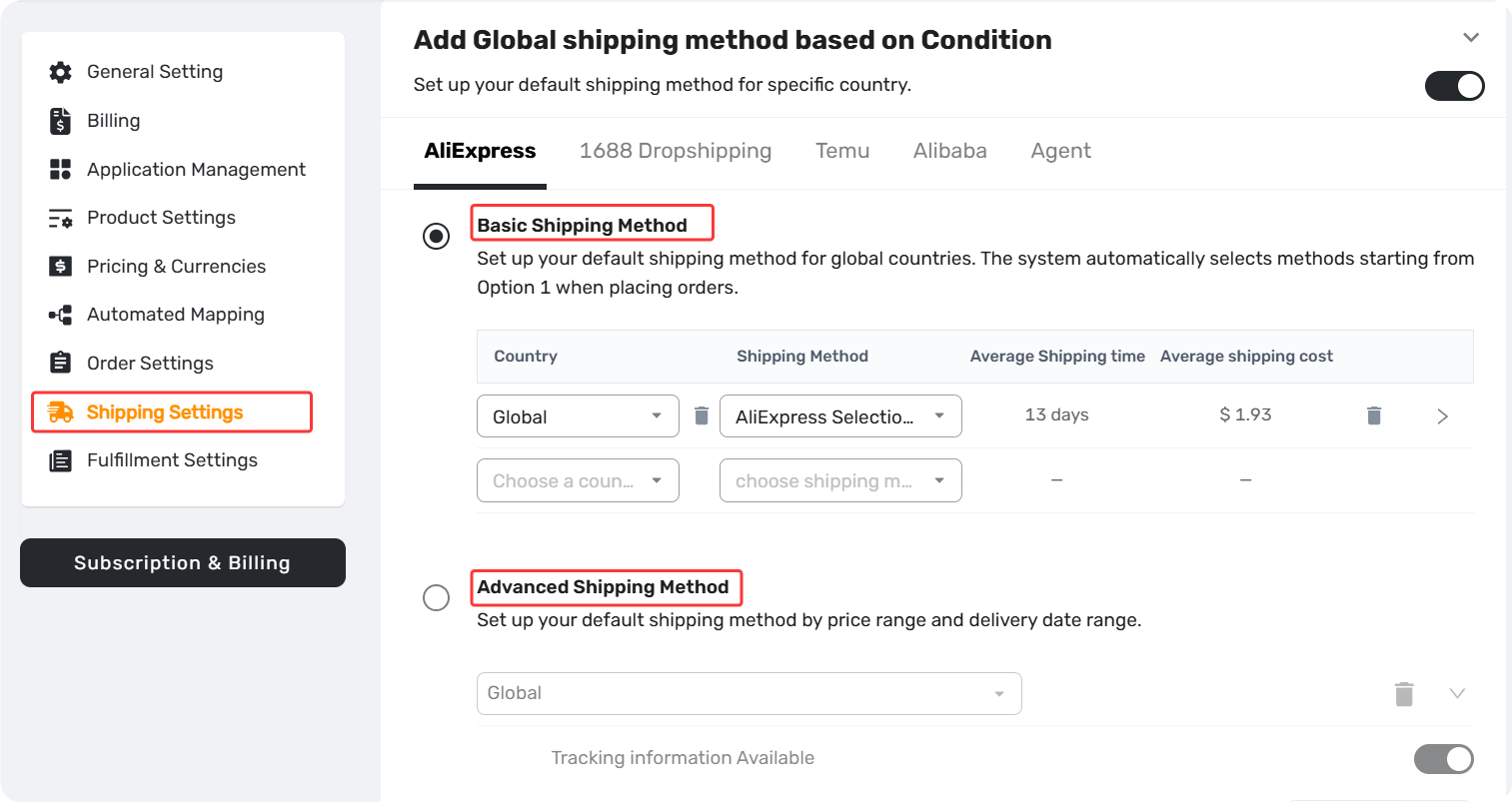
Global shipping method based on conditions
– Set a default shipping method for a specific country (works for most products).
Two options under this dimension:
- Basic – Prioritized list of shipping methods per country.
- Advanced – Set conditions (e.g., cost, delivery time); DSers auto-selects the best fit.
Full guide: Shipping Settings: How to Set Your Default Shipping Method
Pricing Calculation Simple Example:Basic Shipping Method
Setup on Basic Shipping Setting:
Country: the United States -Shipping Method: AliExpress Selection Standard
Product Cost: $50, Pricing rule: Total Cost + $20
Supplier-supported shipping methods when ship to the United States:
| Shipping Method name | Cost | Configured |
|---|---|---|
| AliExpress Selection Standard | $1.99 | ✅ |
| AliExpress Standard Shipping | $5.00 | ❌ |
DSers pulls AliExpress Selection Standard $1.99 automatically.
Selling Price =Product Cost $50 + Shipping Cost $1.99 + $20 = $71.99
Want to go further?
The example above shows a simple setup with Basic Shipping Method. You can also use Advanced Shipping Method to set shipping conditions and let DSers handle the selection for you.
For more details, see: [Shipping Settings: How to Set Your Default Shipping Method]
Related Articles
- Master Pricing Settings: 2 Ways to Automate Your Product Pricing
- Basic Pricing Rule: Automate Your Product Pricing in Minutes
- Advanced Pricing Rules: Automate Your Profit Margins
- Advanced Pricing Rules: How to Add Shipping & Tax to Your Pricing Rule
- Store Currency & Exchange Rates: How to Price Across Different Currencies
- Assign Cents: Make Your Product Prices Look Clean and Professional
- Manually Change Store Products Price: Bulk Refresh with Your Latest Rules
- Automatic Price Update: Keep Store Prices in Sync with Suppliers
- Manual Price Sync Failures: Causes & Troubleshooting Solutions
- Shipping Settings: How to Set Your Default Shipping Method
FAQ Section
Everything you need to know about Basic Pricing and how to set up simple pricing rules.

Get Started Now to Grow Your Online Business with the DSers!