

Turn your DSers account into a revenue stream by referring new users
Note
This guide walks you through registering for the DSers Affiliate Program directly from your DSers account. For DSers-native users, registration is auto-approved—no manual review or waiting period.Click here to start dropshipping now with DSers
Once registered, you'll earn commissions when users sign up or subscribe to DSers through your unique referral link.
This program is separate from the Admitad cashback program, which earns cashback on AliExpress purchases.
What Is the DSers Affiliate Program?
The DSers Affiliate Program rewards you for referring new users to DSers.
Share your unique referral link, and earn commissions when referred users complete qualifying actions:
| Reward Type | Condition | Commission |
|---|---|---|
| Subscription Commission | Referred user subscribes to a paid DSers plan (14-day free trial included; commission starts after successful subscription) | First 3 months: 10% of platform revenue (after Shopify fees) |
| Registration Reward | Not offered in this program | — |
Example: A referred user subscribes to the $19.9/month plan.
DSers receives $15.9 after Shopify fees. You earn $15.9 × 10% = $1.59 per month for the first 3 months.
Key points:
- Commission applies to the first 100 subscription referrals per affiliate (subject to adjustment as the program grows)
- Payouts are processed manually on an annual cycle; data updates daily
- All referrals must be unique—self-referrals are not allowed
How to Register
Tip: Don't have a DSers account yet? You can start by signing up through our Affiliate Program introduction page to learn more and register.
Step 1: Navigate to the Affiliate Section
- Log in to your DSers account
- Go to Settings > General Settings
- Locate the DSers Affiliate section
Note: If your email already has an affiliate account (registered via the external flow), the system automatically syncs it, and you'll see your existing dashboard link.
Step 2: Start Registration
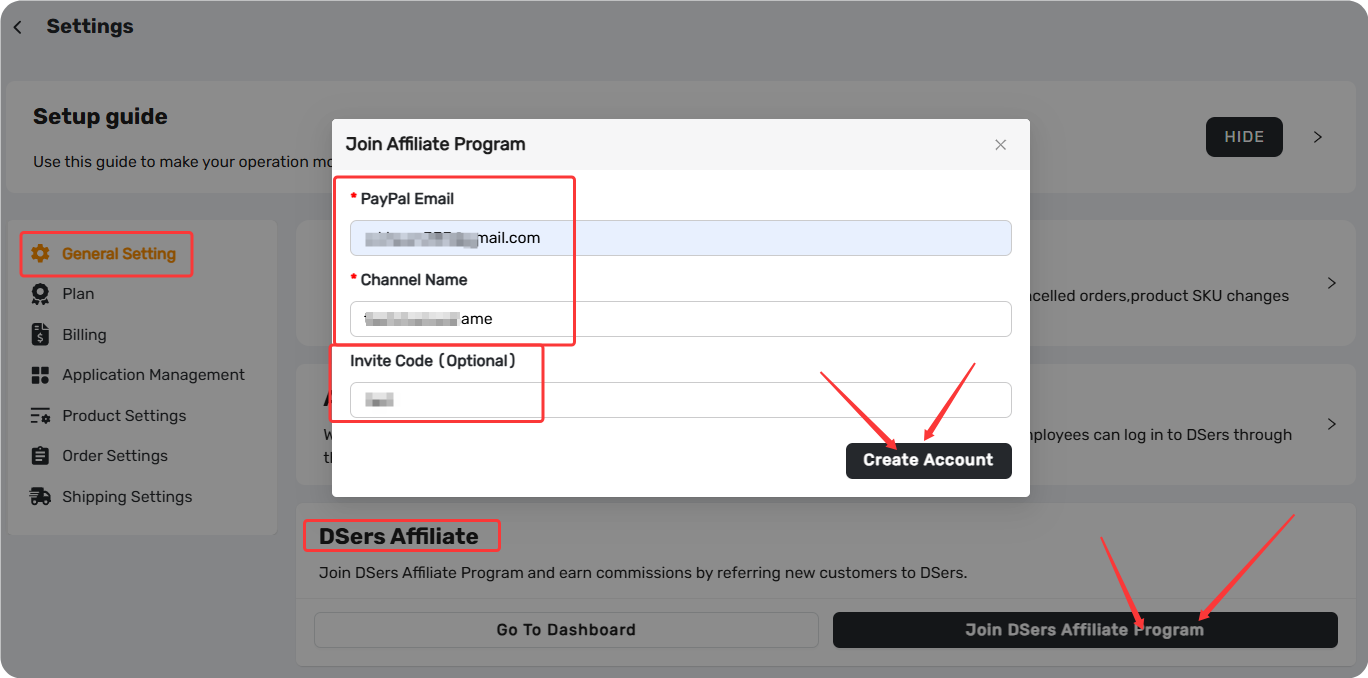
Click Join DSers Affiliate Program to open the in-app registration pop-up.
Step 3: Fill In the Form
| Field | Required | Rules |
|---|---|---|
| PayPal Email | Yes | Must be a valid email format (max 254 characters) |
| Channel Name | Yes | 3–50 characters, generates your Affiliate ID, must be unique |
| Invite Code | optional | Max 30 characters; provided by DSers team members for tracking purposes |
The following fields are auto-filled from your DSers account and can be modified before submission: Login Email, Name, Contact Email, Country, and Tell Us More.
Step 4: Submit & Get Auto-Approved
Click Submit. The system validates your inputs. For DSers-native users, the account is automatically approved immediately.
Step 5: Access Your Credentials
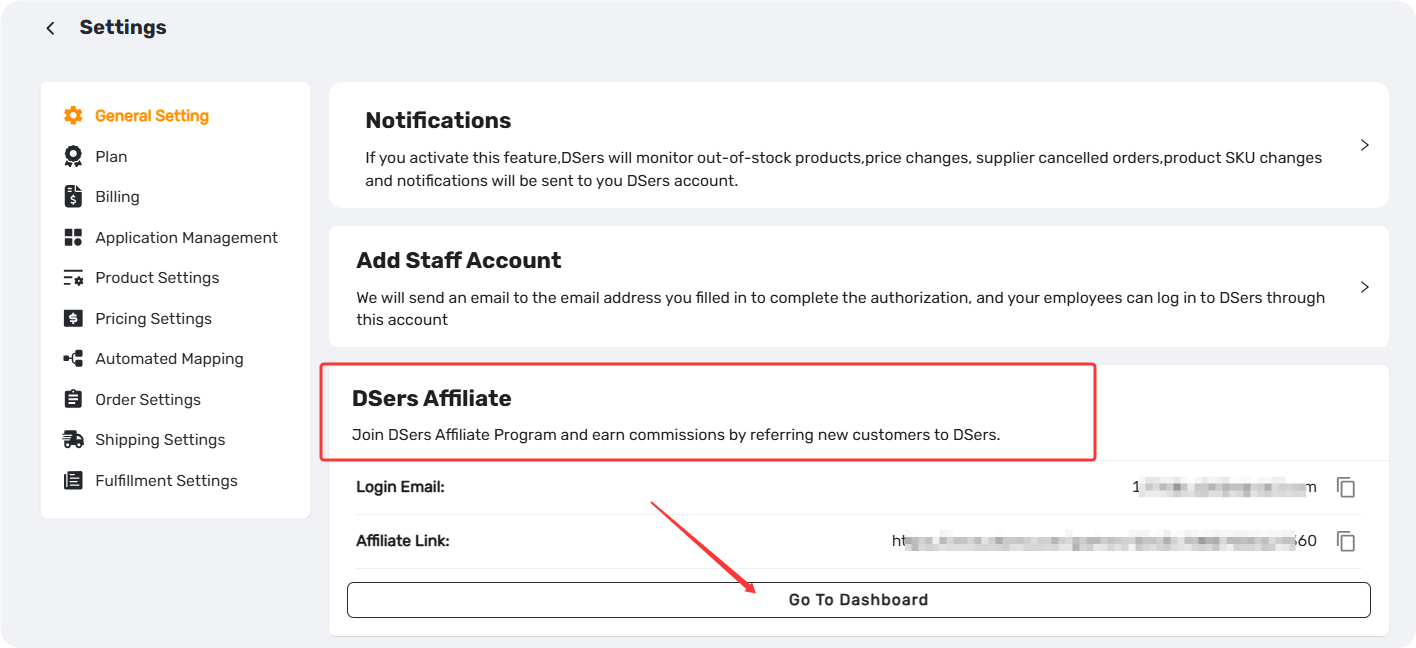
The success pop-up displays:
| Field | Description |
|---|---|
| Registration Email | Your DSers account email |
| Initial Password | Auto-generated: DSers#9Pa$$w0 (hidden, one-click copy available) |
| Affiliate Link | Your unique referral link—copy and start sharing |
Important: If you modify your password in the affiliate dashboard, it won't sync back to your DSers account—the password field will be hidden in DSers.
Click Go to Dashboard to log in to the affiliate portal ataffiliate.dsers.com.
Using Your Affiliate Link
Share your referral link with fellow dropshippers, social media followers, clients, or anyone who could benefit from DSers. The link includes tracking parameters that attribute new users to your account.
Commission tracking: Referred users are considered valid if they:
- Register through your link
- Bind a third-party store (CSV imports don't count)
- Log in within 30 days of binding
- (For subscription commission) Complete the 14-day free trial and subscribe to a paid plan without refunding
Invite Code System (For Partner Tracking)
Invite codes allow DSers team members and partners to track campaign performance.
If you received a code from a DSers representative, enter it during registration. Leaving it blank does not affect auto-approval or your ability to earn commissions.
Setting Check
| Check | Action |
|---|---|
| Log in to affiliate portal | Visit affiliate.dsers.com with your DSers email and initial password |
| Locate your Affiliate Link | Find your unique link in the dashboard |
| Test the link | Open in a private/incognito window to verify functionality |
Platform Availability
The affiliate account registration is platform-agnostic—it works across Shopify, TikTok, eBay, and Wix.
Your affiliate account is tied to your DSers account, not to any specific e-commerce platform.
Quick Tips
💡 For New Affiliates
- Start by sharing your link with one or two trusted contacts to test the process
- Add your link to your email signature or social media bio
- Combine with the Admitad program to maximize earnings
💡 For Experienced Affiliates
- Track performance in the affiliate dashboard and optimize your channels
- Create content (tutorials, reviews) that naturally includes your link
- If you work with a team, use invite codes to differentiate channels
💡 Account Security
- Change your password in the affiliate dashboard if needed
- For support, contact DSers via live chat (24/7) or email support@dserspro.com
Related Articles
- How to Register a DSers Affiliate Account and Track Your Referral Rewards
- Admitad Integration: What It Is and How to Connect Your Account
- DSers Profile Management: How to Update Your Email and Password
FAQ Section
Everything you need to know about the DSers Affiliate Program and how to earn commissions by referring new users.

Get Started Now to Grow Your Online Business with the DSers!