

Send tracking number to PayPal: Automate PayPal order tracking to get your funds released sooner
Note
When customers pay via PayPal, the platform holds funds until a valid tracking number is provided.Click here to start dropshipping now with DSers
By using DSers to send tracking numbers directly to PayPal, you can skip the waiting time for Shopify to sync tracking info to PayPal. This guide walks you through the setup and key considerations.
How to Set Up
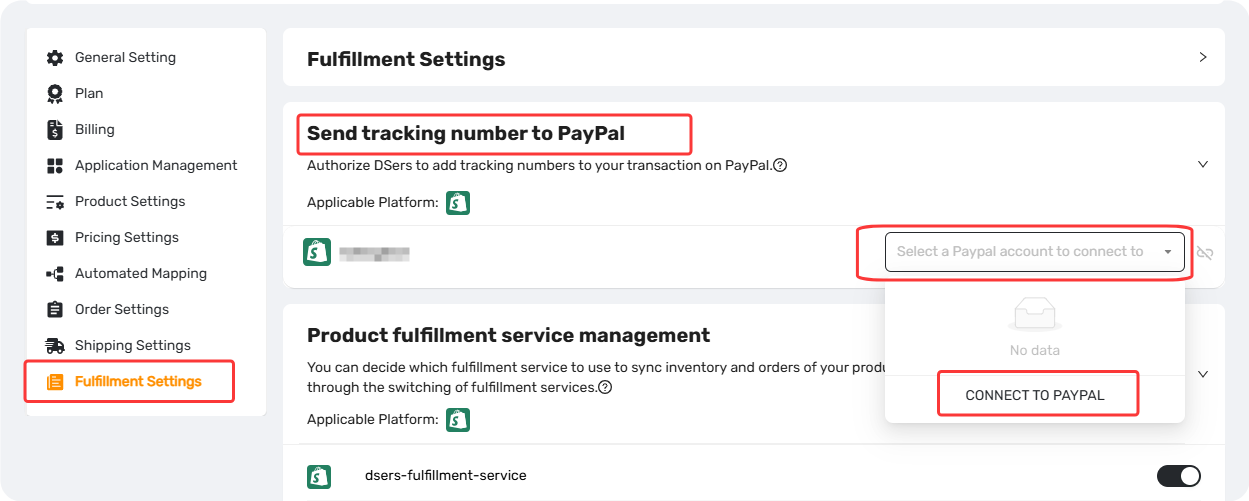
Step 1: Authorize DSers to Access Your PayPal Account
- Go to Settings > Fulfillment Settings.
- In the Send tracking number to PayPal section, click the dropdown Select a PayPal account to connect to.
- Click CONNECT TO PAYPAL.
- Log in to your PayPal account and authorize DSers.
Step 2: Bind the PayPal Account to Your Store
- Return to DSers and click the dropdown again.
- Select the authorized PayPal account you want to use for the current store.
- The selected account will display the connected PayPal email address.
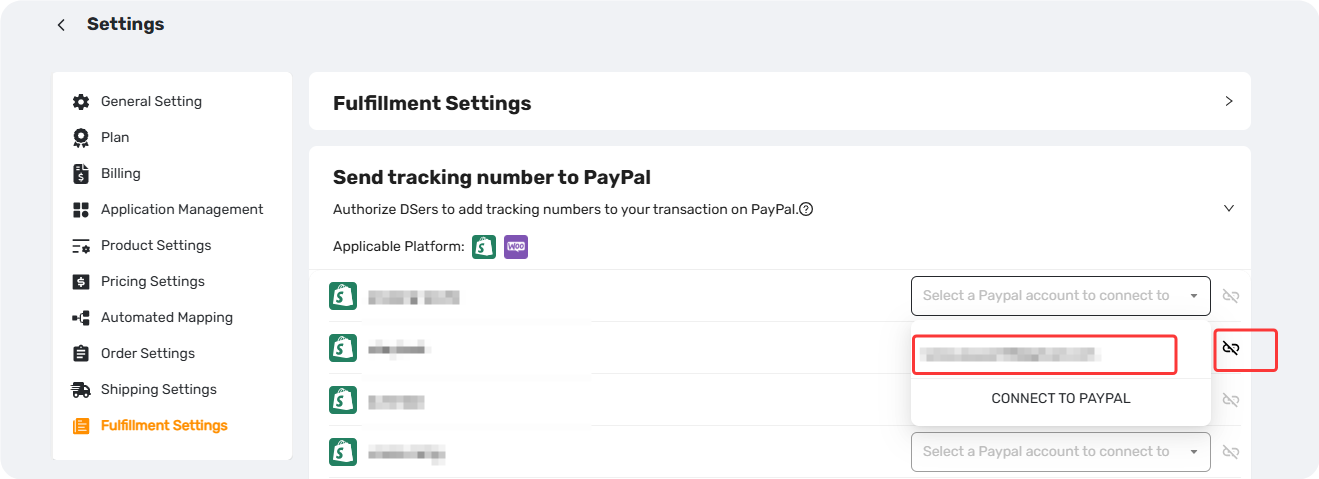
Each store in your DSers account can be bound to a different PayPal account.
Connection Limits by Plan
| Plan | PayPal Accounts Allowed |
|---|---|
| Basic / Custom Basic | 1 |
| Advanced | 2 |
| Pro | 5 |
| Enterprise | 10 |
- Downgrading your plan may deactivate excess PayPal accounts. Reactivation requires upgrading again.
- Disconnecting a store stops tracking sync but does not revoke PayPal's authorization of DSers.
Key Points to Keep in Mind
The PayPal account you bind in DSers must exactly match the one that received the customer's payment. If they don't match, DSers won't find the transaction and the tracking number won't sync.
One PayPal account can only be authorized by one DSers account.
Tracking info sent: Only the tracking number and shipping carrier are sent to PayPal. Tracking URLs are not included.
How Tracking Sync Works
- Once an order is Fulfilled with trcking number in DSers, the tracking number and shipping carrier are automatically sent to PayPal.
- PayPal will then update the transaction status to "Shipped" and release the hold on your funds. Release timing may vary depending on PayPal's policies.
Related Articles
- Fulfilling Customer Orders: How to Place & Pay for Supplier Orders
- Bulk Order Processing: Handle Hundreds of Orders in Seconds
- Customize Shipping Confirmation Email Settings
FAQ Section
Quick answers to the most common questions about DSers PayPal tracking sync.