

Set pricing rules once, push instantly — and fix sync failures when they happen.
Note
Manual Price Sync updates hundreds of products in one click — but sometimes, a few variants get left behind. This guide covers the 5 most common sync failures and exactly how to fix them.
Understanding Sync Failures
When you trigger a manual price sync, DSers attempts to update the price for every selected product in your store. If a product fails, it's almost always because:
- The product can't be matched to a valid supplier mapping
- The product no longer exists in your store
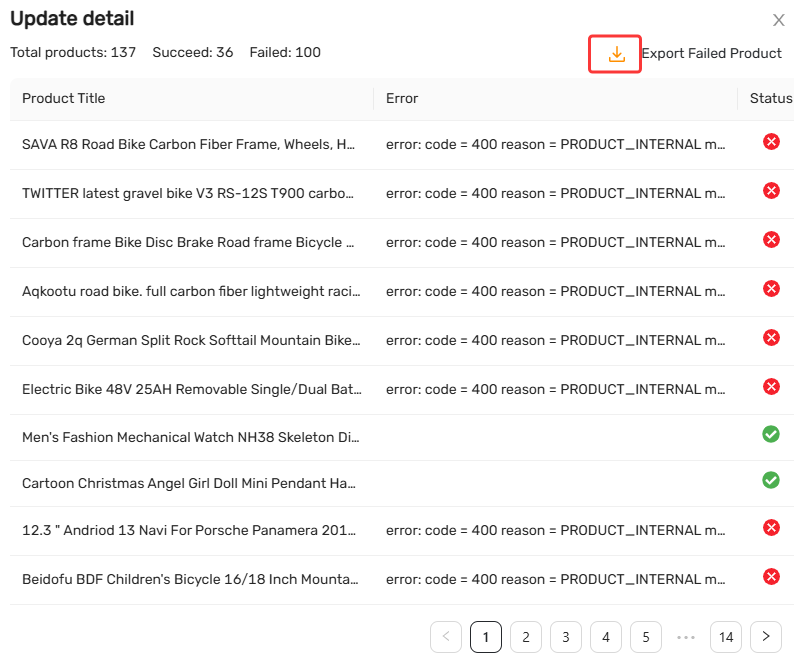
Failures fall into 3 categories:
- 1: Unsupported Mapping Types — Products using Advanced Mapping or Bogo mapping.
- 2: No Usable Supplier Found — Missing, invalid, or temporarily unavailable mappings.
- 3: Product Deleted from Store — The product no longer exists on your sales channel.
Category 1: Unsupported Mapping Types
1. Mapping Type is Multi-Country-Based or Bundle (Advanced Mapping)
What this means: The product uses a legacy mapping type (Country-based) or (Bundle) Advanced Mapping, which are not compatible with manual price sync. Advanced Mapping may involve multiple suppliers per variant, multiple SKUs per supplier, or country-specific supplier assignments.
Solution: Update the price manually in your store backend.
Category 2: No Usable Supplier Found
2. This Product is Unmapped
What this means: The product was pushed to your store through DSers but was never mapped to a supplier.
Solution:
- Find a supplier and complete the mapping in DSers.
3. No Mapping Suppliers or Supplier is Delisting
What this means: The supplier is temporarily unavailable — typically because the product has been taken down on AliExpress or Alibaba.
Solution:
- Find an alternative supplier and remap.
4. Error: "Sync to Seller is Nil"(PRODUCT_INTERNAL)
error: code = 400 reason = PRODUCT_INTERNAL message = sync to seller is nilWhat this means: DSers can't find the corresponding product in your store — the mapping has broken.
Why it happens:
- The supplier changed or removed SKUs.
- The supplier is no longer offering the product.
Solution:
- If the supplier product is still active, remap the product in DSers. If not, find a new supplier and remap.
Category 3: Product Deleted from Store
5. This Product is Deleted from Seller
What this means: The product has been deleted from your store and no longer exists on your sales channel.
Solution:
- If the product is still in your DSers Import List, re-push it to your store.
- If you no longer need it, delete it from DSers.
Next Steps: Re-sync and Prevent Future Failures
Once you've fixed the root cause, return to Settings > Product Settings > Manually change store products price, select the resolved products, and click Update to retry.
Before re-syncing, check your remaining usage:
- Attempts left → proceed with the sync.
- No attempts left → upgrade your plan for more attempts, or update prices manually in your store backend.
To prevent future failures: monitor your Import List for unmapped or invalid mappings, and remap promptly when suppliers change SKUs or delist products.
Still Having Issues?
If you've gone through all the scenarios and the sync still fails — or you're seeing an error not listed here — reach out to DSers Support. Provide:
- Your DSers account email
- A screenshot of the error message
- The affected product links or IDs
Contact: Live Chat (24/7) or email support@dserspro.com
Related Articles
- Master Pricing Settings: 2 Ways to Automate Your Product Pricing
- Basic Pricing Rule: Automate Your Product Pricing in Minutes
- Basic Pricing Rule: How to Add Shipping Cost to Your Pricing Rule
- Advanced Pricing Rules: Automate Your Profit Margins
- Advanced Pricing Rules: How to Add Shipping & Tax to Your Pricing Rule
- Store Currency & Exchange Rates: How to Price Across Different Currencies
- Assign Cents: Make Your Product Prices Look Clean and Professional
- Manually Change Store Products Price: Bulk Refresh with Your Latest Rules
- Automatic Price Update: Keep Store Prices in Sync with Suppliers
- Shipping Settings: How to Set Your Default Shipping Method
FAQ Section
Here are some common questions about manual price sync, mapping requirements, and multi-platform pricing management in DSers.

Get Started Now to Grow Your Online Business with the DSers!