

Learn how to identify and resolve the most common product-related order failures in DSers
Note
Orders often fail due to product-related issues. This article covers the most common causes and shows you how to fix them step by step.Click here to start dropshipping now with DSers
1. Supplier Doesn't Ship to the Customer's Address
What's happening: The shipping method dropdown appears empty because the mapped supplier doesn't ship to your customer's country or region.
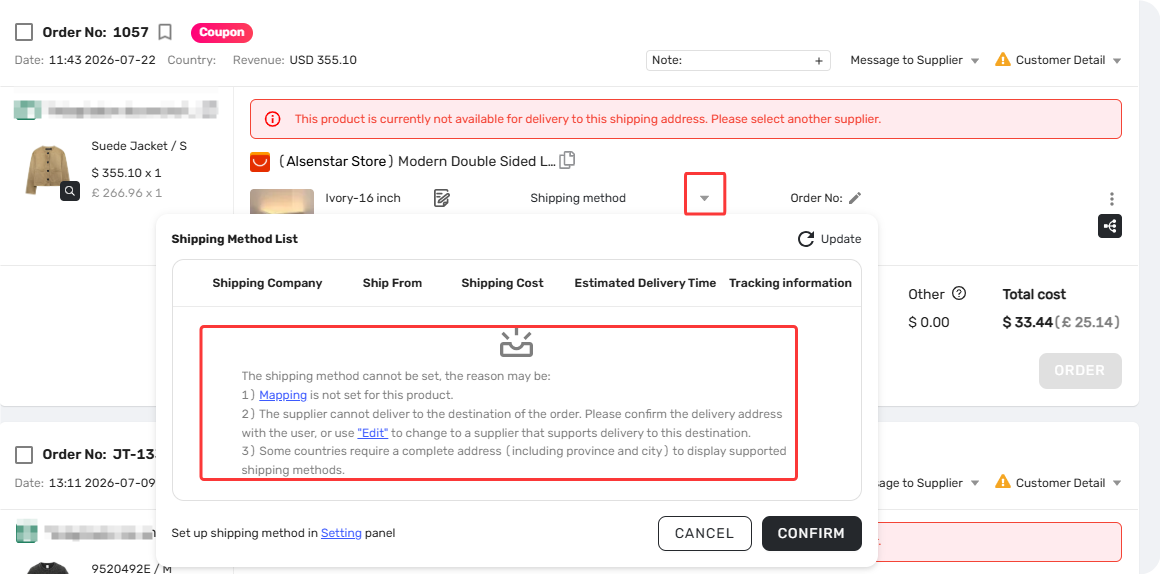
What to do:
- Click through to the supplier's product page and enter your customer's country, province, and city to check delivery availability.
- If support, click “Update” icon to update shipping methods, then select a shipping method to place order.
- If unsupported, use Supplier Optimizer to find the same product from suppliers that ship to that address.
- Use Action → Edit Suppliers on the order to remap to the new supplier.
- If no supplier is found, suggest a replacement product or refund the customer.
Related article:
[Order processing: Change Supplier for a Specific Order]
2. Variant Out of Stock or Product Unavailable
What's happening: The purchased variant is out of stock or the product listing has been removed by the supplier.
What to do:
- Search for the product in Supplier Optimizer.
- Remap the unavailable variant to the new supplier's corresponding variant.
- If no supplier is available, suggest a replacement product or refund the customer.
3. Product Mapping Has Become Invalid
3.1 Option or Value Names Changed
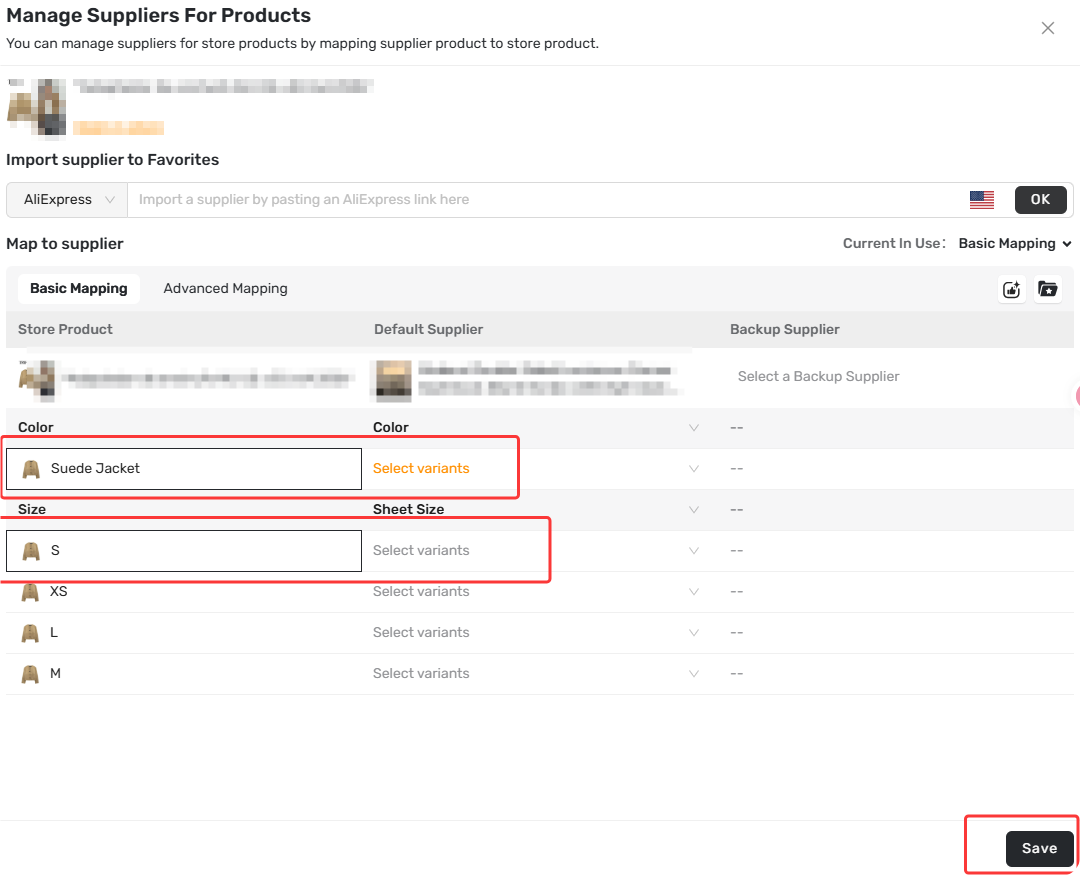
What's happening: The order shows as Unmapped or fails despite being mapped before—the supplier or your Shopify store changed option names (e.g., "Red" to "Crimson"), breaking the variant mapping.
What to do:
- Open the product's Mapping page, locate the purchased item (highlighted), and remap it.
3.2 "Not Applied" Mapping Method Selected
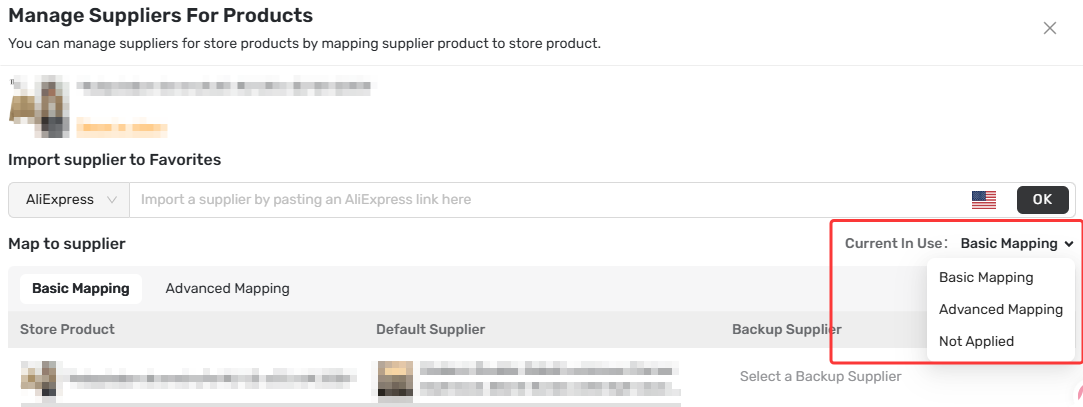
What's happening: The order shows as Unmapped even though each variant matches an AliExpress variant—the mapping method was set to incorrect one, such as 'Not applied'."
What to do:
- Open the Mapping page and select the correct method (Basic, or Advanced) under "Current in Use", then save.
4. Supplier Has Purchase Limits
4.1 Supplier Limits Per Account
What's happening: The order fails with an error about reaching a purchase limit—some suppliers restrict purchases per AliExpress account (e.g., 1 unit per account). If you've bought this item before or the quantity exceeds the limit, the order won't go through.
What to do:
- Find a new supplier without this restriction and remap the order.
Related article:
[How to Change a Product's Supplier Mapping for Awaiting Orders]
4.2 Supplier Limits Per Order
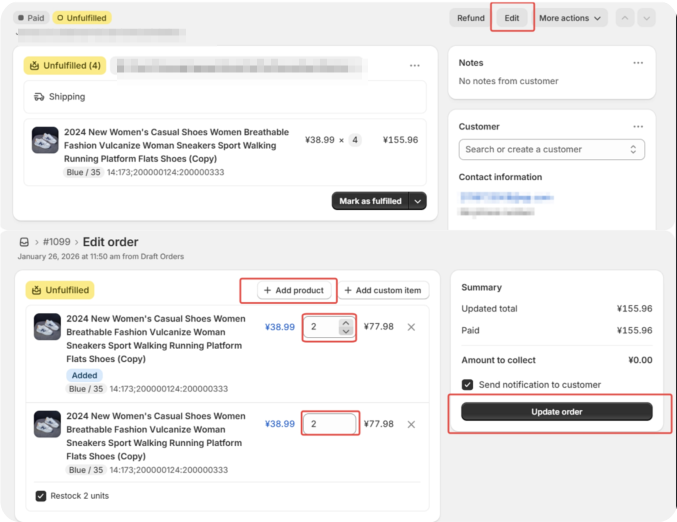
What's happening: The order fails when placing multiple quantities of a single item because some suppliers cap how many units you can buy per order (e.g., max 2 units). If your customer ordered 4, the order fails.
What to do:
- In Shopify admin, open the order and click Edit.
- Split the original line item from 4 units to 2 units.
- Add a second identical line item with the remaining 2 units.
- In DSers, fulfill one 2-unit line item.
- Once placed, roll back the other to the Awaiting Orders and place it separately.
Related article:
[How to Roll Back and Reorder Unfulfilled Orders]
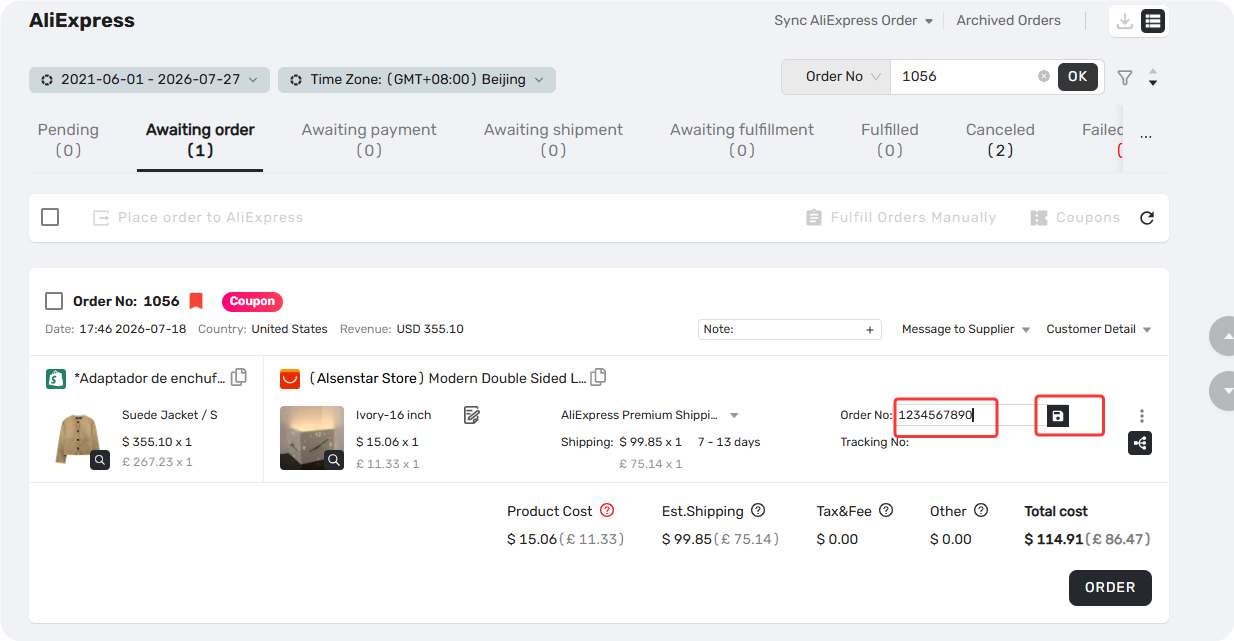
If you're unable to edit the order in Shopify, you can manually place the order on the supplier platform and upload the supplier's order number directly in DSers.
Related article:
[Manual Order on AliExpress? How to Sync It to DSers]
5. Mixed Local and International Shipping
What's happening: The order fails with no clear error about stock or mapping because some items ship locally while others ship internationally from AliExpress—these can't be processed together.
What to do:
- Confirm which items ship locally and which ship internationally.
- Fulfill the internationally shipped items first. Then place the local items.
- Roll back the internationally shipped items to Awaiting Orders. Place internationally shipped items.
Still Need Help?
If none of these solutions work, contact DSers support via 24/7 live chat or email support@dserspro.com for help.
Please provide:
- DSers account email
- Store name
- Store order number
Related Articles
- Supplier Optimizer: Find Better Suppliers in Seconds
- Action-Edit Supplier: How to Change the Supplier on an Existing Order
- How to Change a Product's Supplier Mapping for Awaiting Orders
- How to Roll Back and Reorder Unfulfilled Orders
- Manual Order on AliExpress? How to Sync It to DSers
- Basic Mapping Templates: Scale Your Product Library
- Shipping Address Issues: Customer Address Causing Errors
FAQ Section
Quick answers to the most common questions about DSers order failures and how to resolve them.

Get Started Now to Grow Your Online Business with the DSers!