

Quick Fixes for Common Order Failures
Note
Running into issues when placing orders through the DSers Chrome Extension? Most failures are easy to fix.Click here to start dropshipping now with DSers
This guide covers the most common reasons orders fail and how to resolve them quickly.
Why Did My Order Fail?
Here are the most common causes of order failure:
| Issue | Quick Fix |
|---|---|
| No available payment method | Set up payment info in Options (see below) |
| Currency not supported | Switch to USD or choose a supported currency |
| Extension outdated | Update to the latest version |
| Browser cache issues | Clear cache and cookies |
| Conflicting extensions | Disable other extensions (especially ad blockers) |
How to Fix Each Issue
1. No Available Payment Method
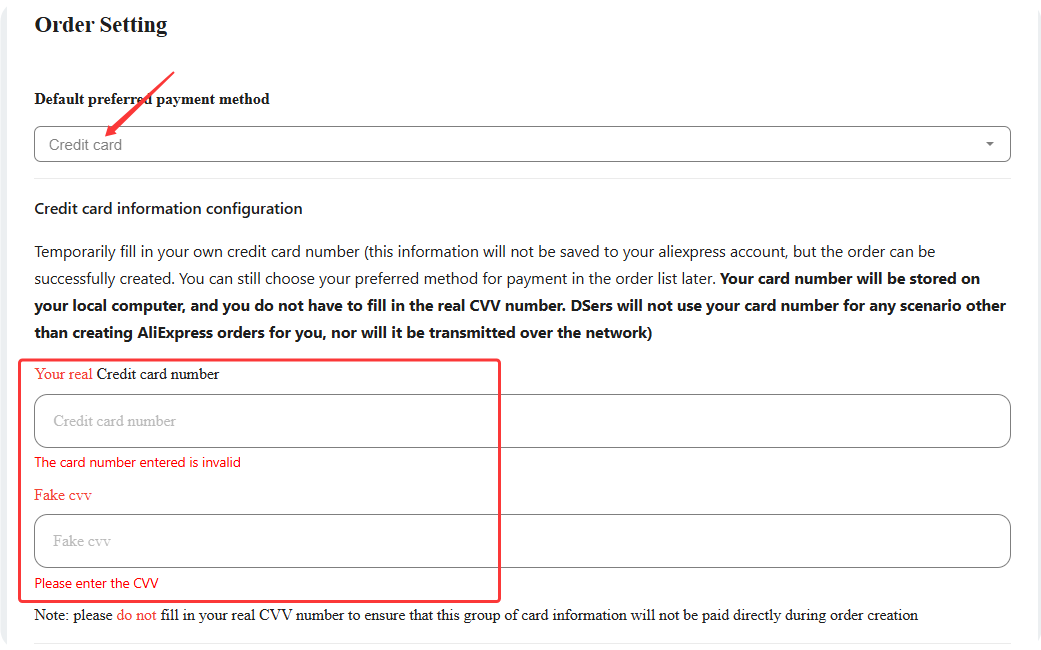
Some suppliers don't accept PayPal, and the extension can't automatically enter credit card details unless you've set them up in advance.
Fix it:
- Right-click the DSers extension icon → Options → Order Setting.
- Under payment method, select PayPal (default) or Credit card (enter your card number + fake CVV – stored locally, not transmitted online).
- Click SAVE.
2. Currency Not Supported
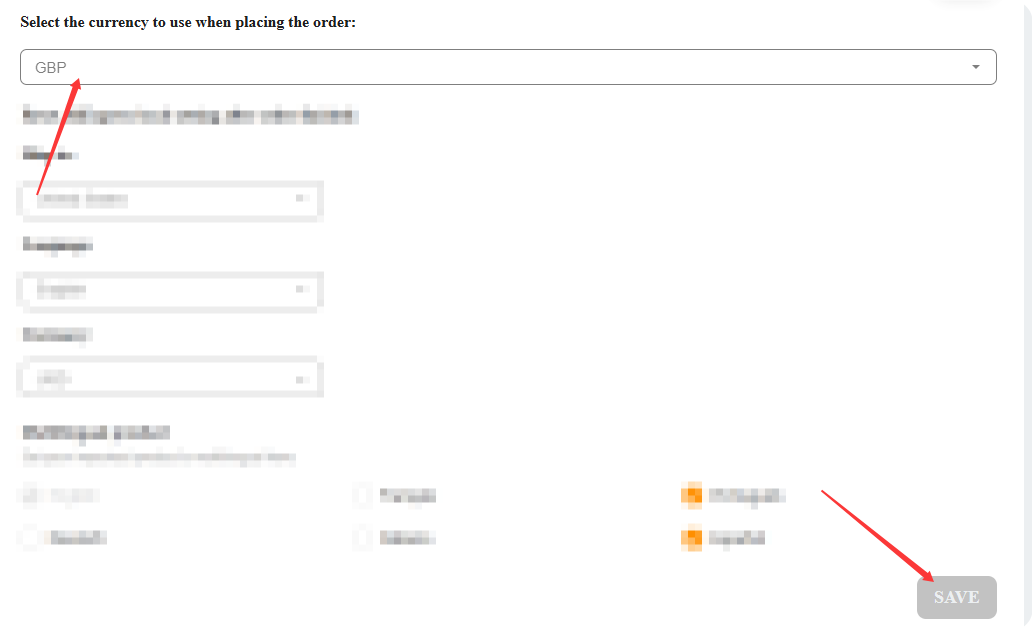
You set a non-USD currency in Options, but the supplier doesn't support it – the transaction defaults to USD, which may cause failure.
Fix it: Click the DSers extension icon → Go to Options → Order Setting → select Currency set on AliExpress or choose a currency the supplier supports.
3. Extension Outdated
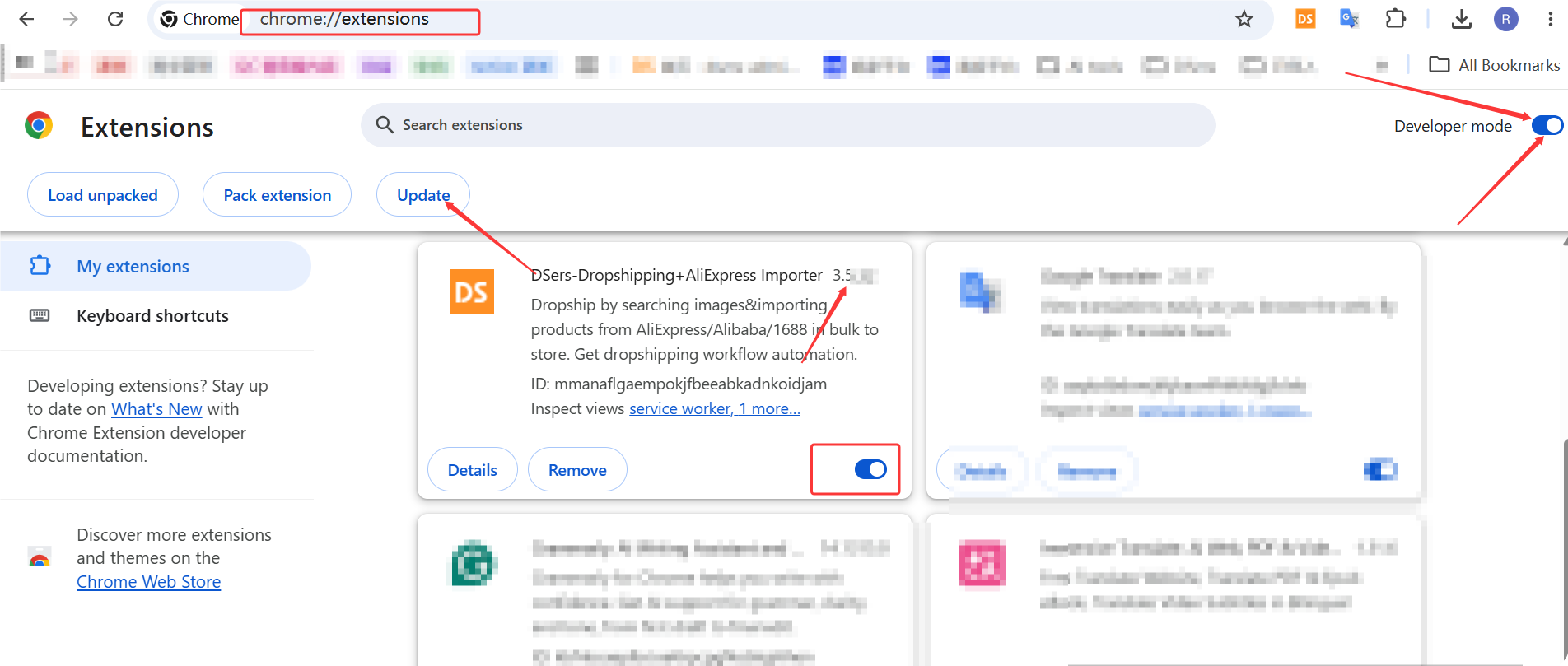
An outdated version can conflict with AliExpress page changes.
Fix it: Go to chrome://extensions/, turn on Developer mode, and click Update.
4. Browser Cache or Conflicting Extensions
Stored cache or other extensions (like ad blockers) can interfere.
Fix it:
- Clear your browser cache and cookies.
- Temporarily disable other extensions.
- Restart your browser.
5. Try a Manual Order on AliExpress
Since the extension simulates manual ordering, try placing a test order directly on AliExpress (you don't need to complete payment – just go through checkout).
- If manual order works: The issue is with the extension – check fixes 1–4.
- If manual order fails: AliExpress usually shows an error message that explains why – this gives you a clear direction to fix it.
Still Having Issues?
If you've tried everything above and orders still fail:
- Record a short video showing your ordering process and where it fails.
- Contact DSers Support with:
- Your DSers account email
- The order number(s) that failed
- A brief description of the issue
- The video recording
Our team will identify the issue and help you get back to fulfilling orders.
Related Articles
- How to Place Orders Using DSers Chrome Extension
- DSers Chrome Extension: Placing orders and Syncing Tools Guide
- Payment Failed: AliExpress Checkout Errors
- DSers Chrome Extension: Features and Capabilities Overview
- Fulfilling Customer Orders: How to Place & Pay for Supplier Orders
- Manual Order on AliExpress? How to Sync It to DSers
FAQ Section
Quick answers to the most common questions about DSers Chrome Extension order failures and troubleshooting.

Get Started Now to Grow Your Online Business with the DSers!