

Phone Number Optimization Helps Keep Control of Supplier Communication and Prevent Order Failures
Note
While most suppliers are professional, a small minority may occasionally contact your customers directly. DSers lets you replace customer phone numbers with your own to avoid this rare risk.Click here to start dropshipping now with DSers
Plus, automatically fill in missing numbers to help prevent order failures caused by incomplete contact information.
What Are Override and Default Phone Numbers?
- Override phone number: Replaces your customer's phone number with a number you specify during order placement. Acts as a safeguard against unwanted supplier or shipping carrier outreach to your buyers.
- Set default phone number: Provides a fallback number for orders where the customer didn't enter one. Prevents order failures due to incomplete contact information.
Both settings are configured by country, with a "Global" option as a catch-all for countries without specific rules.
How to Set Up
Go to DSers > Settings > Order Settings and scroll down to Phone Number Optimization.
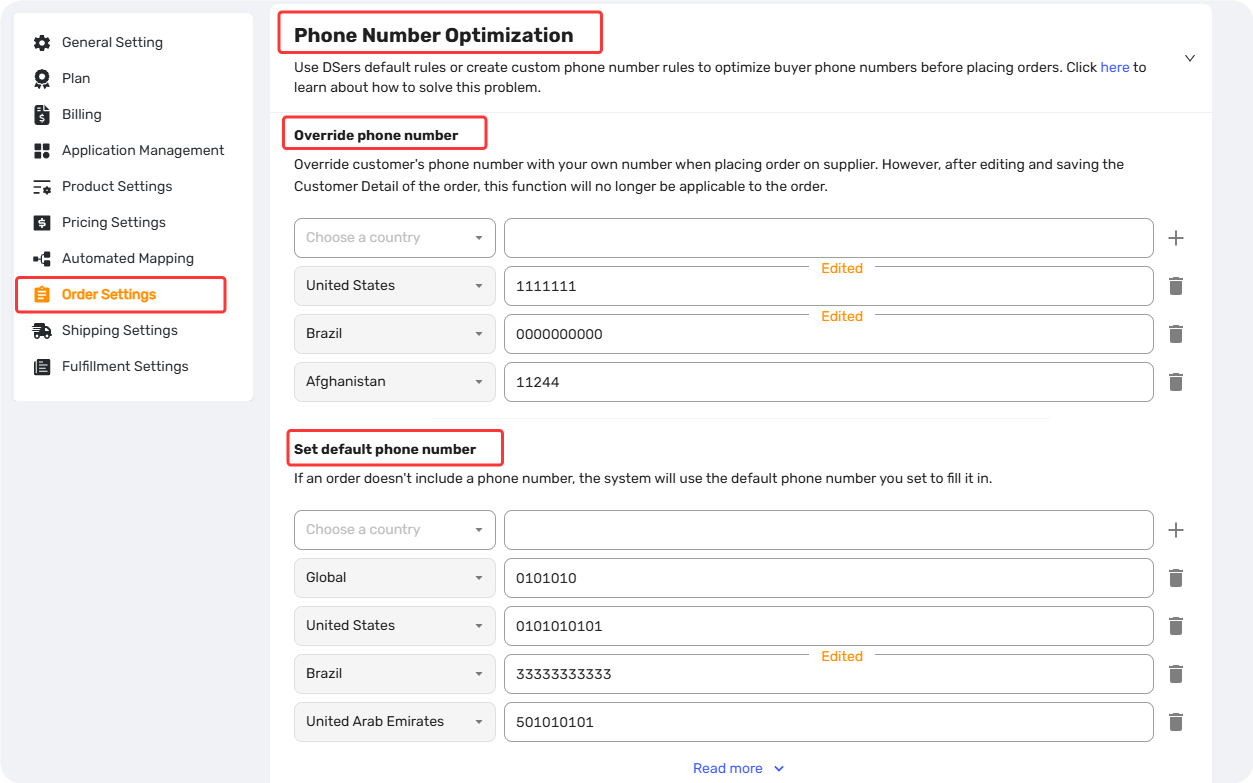
The setup process is the same for both Override and Default phone numbers — simply follow the steps below for whichever setting you're configuring.
- In either the Override phone number or Set default phone number section, click the country dropdown (Choose a country) and select a destination country
- Enter the phone number you want DSers to use
- Click SAVE — the rule will appear in your list with an "Edited" badge
- Repeat steps 1–3 to add rules for more countries
- To set a Global rule (applies to all countries without specific rules), select "Global" from the dropdown, enter your number, and click SAVE
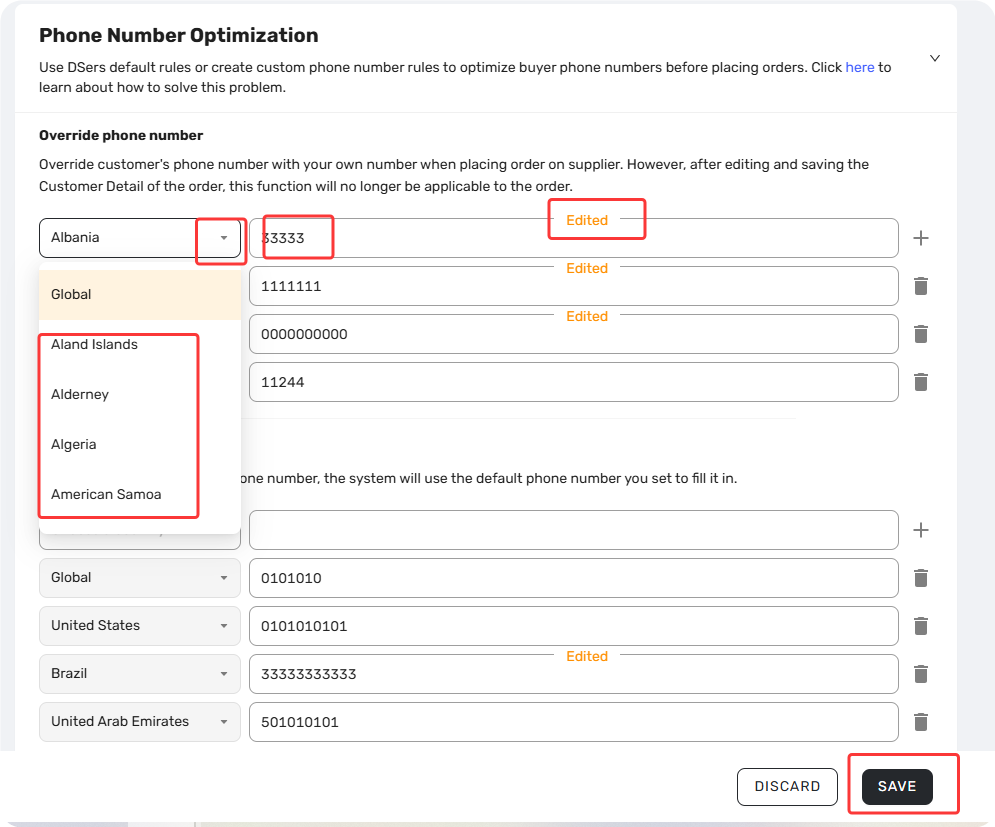
Tips:
- Delete a rule: Click the trash icon next to any rule to remove it. A confirmation pop-up will appear to prevent accidental deletions.
- Pre-filled default numbers: DSers automatically fills default phone numbers for common countries. You can modify or delete these — if deleted, they won't be re-filled automatically.
- One rule per country: Each country can only have one Override number and one Default number.
- Manual edits override everything: If you manually change a phone number in the Order Detail page and save it, DSers respects your change and won't apply override rules to that order.
Best Practices
- Use your own business number for override — if a supplier needs to reach out regarding shipping or customs issues, the call comes to you rather than your customer.
- Check your global fallback carefully — a number formatted for one region may not work for another. Make sure your global number fits the countries you actually ship to.
Related Articles
- Fulfilling Customer Orders: How to Place & Pay for Supplier Orders
- Bulk Order Processing: Handle Hundreds of Orders in Seconds
- Shipping Address Issues: Customer Address Causing Errors
- How to Roll Back a Fulfilled Order and Reprocess It
- How to Roll Back and Reorder Unfulfilled Orders
FAQ Section
Quick answers to the most common questions about DSers phone number optimization settings.

Get Started Now to Grow Your Online Business with the DSers!