

A tracking number hasn't appeared for your order. Here's why—and what you can do about it.
Note
The Dropshipper's Most Common Confusion:
You placed an order in DSers. You paid the supplier. Days pass. Still no tracking number.
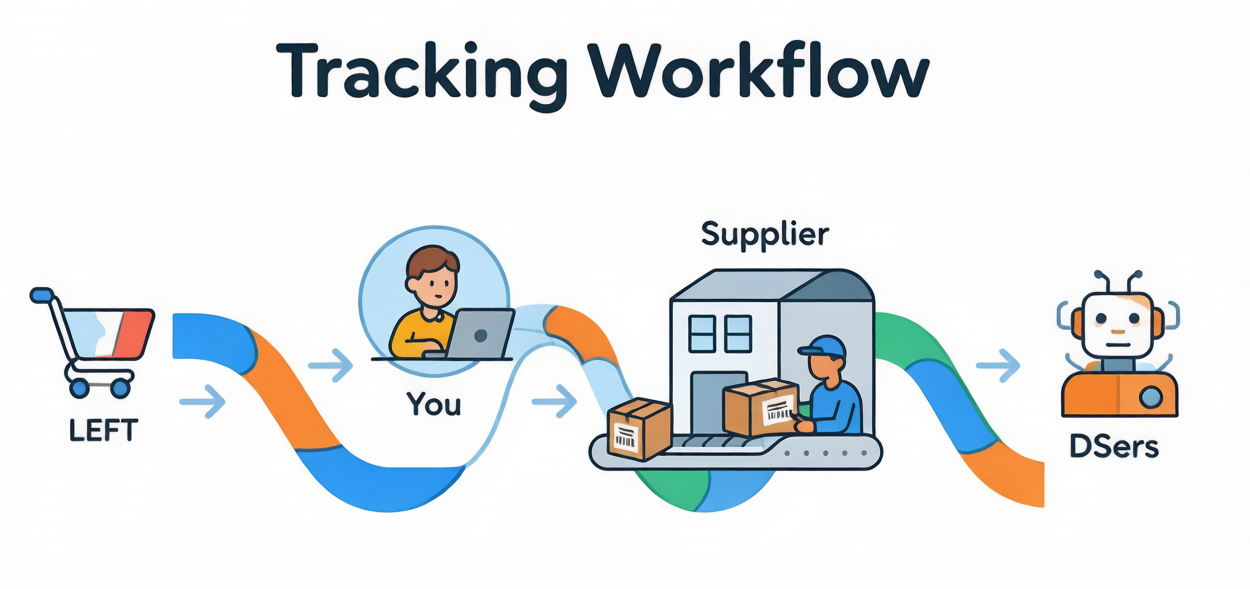
This confusion comes from a misunderstanding: DSers is a data transmission tool, not a shipping service. We connect your store to suppliers, but we don't pack or ship anything. The supplier does.
If your tracking number exists but isn't updating (stuck on same status), read our Tracking Status FAQ instead. This article covers missing tracking numbers only.Click here to start dropshipping now with DSers
The fulfillment workflow
Here is what happens from customer order to tracking number:
| Step | What happens | Who |
|---|---|---|
| 1 | Customer places and pays for an order | Customer |
| 2 | Order syncs to DSers Open Orders | DSers (auto) |
| 3 | You place the order to your supplier in DSers | You |
| 4 | You pay the supplier on AliExpress | You |
| 5 | Supplier processes and packs the order | Supplier |
| 6 | Supplier ships and generates a tracking number | Supplier |
| 7 | DSers syncs the tracking number from supplier to DSers | DSers (auto, up to 5 hrs) |
| 8 | DSers syncs the tracking number to your store | DSers (auto, up to 1 hr) |
Key takeaway: The tracking number doesn't appear until Step 6—when the supplier actually ships.
Why is my tracking number missing? 4 common reasons
1. The supplier hasn't shipped yet
What's happening: You paid, but the supplier hasn't processed and shipped your order.
What to do: Check the supplier's processing time on their AliExpress store page. If it's been longer than stated, message them through AliExpress.
2. The tracking number exists but hasn't synced yet
What's happening: The supplier shipped on AliExpress, but DSers hasn't pulled the tracking number yet.
Sync timing:
- DSers syncs from AliExpress 5 times per day
- Up to 5 hours for a new TN to appear in DSers
- Up to 1 hour to sync to your store
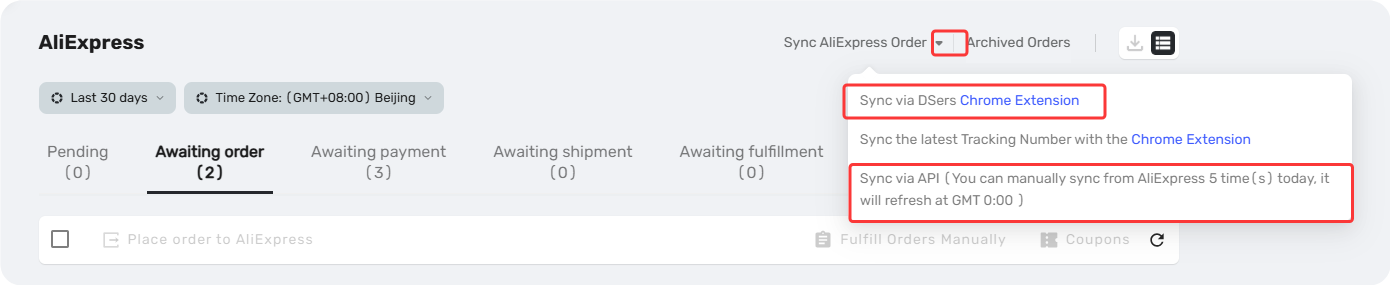
What to do: Wait for the next auto-sync cycle, or trigger a manual sync.
- Go to DSers → Open Order tab
- Find the order and click "Sync AliExpress Order"
- Click "Sync via API" – DSers will immediately pull the tracking number from AliExpress or "Sync via DSers Chrome Extension"
3. You manually fulfilled the order in DSers or Shopify (⚠️ critical mistake)
What's happening: You marked the order as "Fulfilled" before the supplier actually shipped.
Why this breaks tracking:
- DSers is designed to auto-sync tracking numbers from suppliers
- When you manually fulfill, you tell the system "This order is complete."
- DSers stops waiting for a tracking number
- The real tracking number never syncs to your store
What to do:
- Prevention: Never manually fulfill an order in DSers or Shopify unless you know exactly what you're doing
- If already done: You may need to manually add the tracking number on Shopify later
4. The order hasn't been paid on AliExpress
What's happening: You placed the order in DSers but never completed payment on AliExpress. No payment = no shipment = no tracking number.
What to do: Go to AliExpress → My Orders → complete payment, then wait for the supplier to ship.
How long should you wait if you have paid the supplier on AliExpress?
| Time since payment | What to do |
|---|---|
| 0-3 days | Wait. Most suppliers ship within this window. |
| 4-7 days | Check AliExpress. Contact supplier if no TN. |
| 7+ days | DSers flags this as Attention automatically. Message supplier. Consider cancel AliExpress order and replace with a new supplier. |
Related Articles
- Tracking Status FAQ: Troubleshooting Common Issues
- How to Auto-Sync Tracking Number Changes
- Auto-Sync Tracking Numbers to Your Store
- Manually Updating Tracking Numbers via the DSers Chrome Extension
- Tracking Status Explained: Know Where Every Package Is
- Supplier Performance Tracking: Spot Unreliable Suppliers Early
FAQ Section
Quick answers to the most common questions about tracking numbers and DSers fulfillment workflow.
| Get Started Now to Grow Your Online Business with the DSers! |
