

Restoring Deleted Products with a Single Click
Note
Accidentally deleted a product? DSers' Activity Log is your safety net. This guide shows you how to quickly restore deleted products and what data you can expect to recover.
Click here to start dropshipping now with DSers
Accessing Activity Log
- Log in to DSers
- Navigate to Account> Activity Log
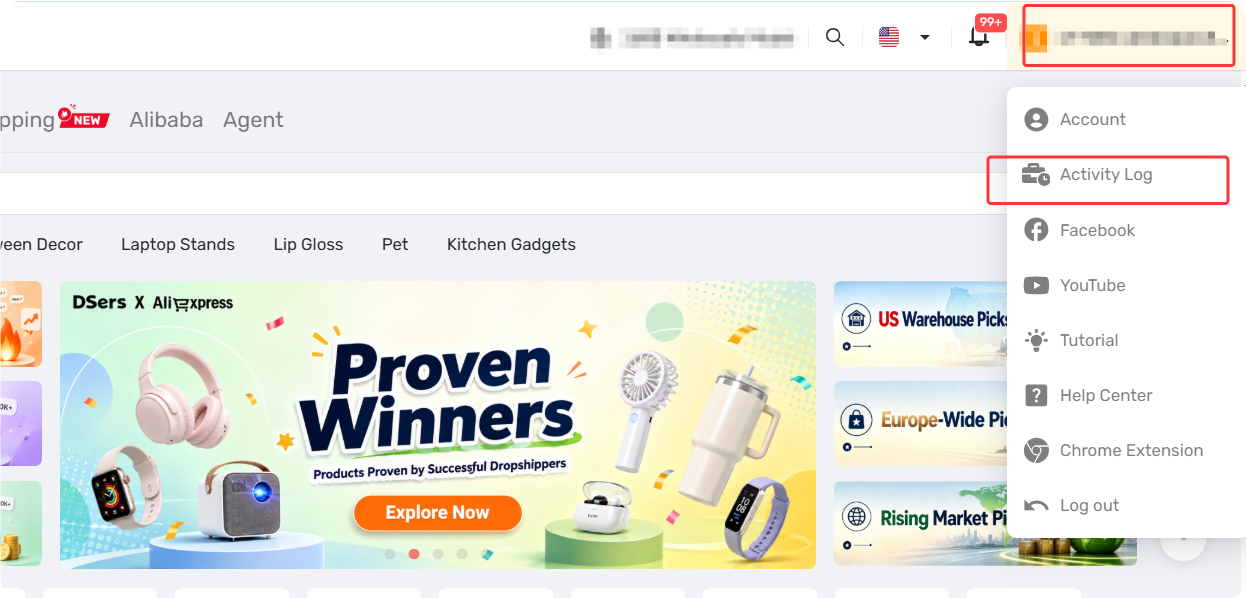
How to Revert a Deleted Product
Revert a Single Product
- Search or Filter the deleted product log to find it.
- Click Check Details to expand the deleted products list
- Locate the product you want to restore
- Click the Revert button next to the product
- The button will disappear after successful restoration
Tip: If multiple products were deleted in the same entry, click Revert All at the top of the list to restore all of them at once.
What to Expect When Restoring
The restore behavior depends on where the product was originally deleted. Here's what happens in each scenario:
Type 1: Deleted from Import List
What happens when you revert:
- Product information (specifications, descriptions, prices, images) is preserved
- DSers Tag information and Price for Country settings are retained
- Push records are kept
Important: Free plan users can manage 3000 products in the Import List. If restoring products would exceed this limit, DSers will block the restore and prompt you to upgrade.
Type 2: Deleted from My Products but Not Deleted in Store
What happens when you revert:
- Mapping relationships and ship-to country information are not preserved—you'll need to remap after restoring
- Hide Product status is not retained
Tips: If the product was manually re-imported from your store to DSers while deleted in DSers, the Revert button will not appear—the system treats it as already restored.
Type 3: Deleted from My Products and Store
What happens when you revert:
- The product restores as "removed from store"—it's in DSers but not active in your store
- Mapping relationships are not preserved
- You'll need to remap the product on the order card to fulfill existing orders
Important Info
- Log visibility depends on your DSers plan: Basic (3 days), Advanced (7 days), Pro (7 days), Enterprise (15 days)
- Both the Main account and all Staff accounts can view operation logs—permissions are not restricted by role
Related Articles
- Activity Log: Track Every Change in Your Account
- Bulk Import & Edit: Add Products in Batches
- Edit & Push: Customize Products Before Publishing
- Mapping Errors: Products Not Syncing Correctly
- DSers Plans and Billing: A Complete Overview
FAQ Section
Everything you need to know about the Activity Log and how to restore deleted products.

Get Started Now to Grow Your Online Business with the DSers!