

Register as a DSers developer to build your own custom app
Note
DSers has served over 1.2 million merchants and processed more than 150 million orders worldwide.Click here to start dropshipping now with DSers
While standard users connect DSers to pre-approved partner apps through their dashboard, some merchants need custom solutions that pre-built integrations can't address.
If you're a supplier, supply platform, sales agent, or channel owner, registering as a developer is the first step toward building your own app that integrates with DSers via Open API.
Who Can Register?
For Developers (Suppliers, Platforms, Sales Channels)
Registering a developer account requires technical knowledge. This process is for developers who can build applications using APIs.
This registration is for:
| User Type | What You Can Build |
|---|---|
| Suppliers or supply platforms | An app that lets DSers merchants source your products and process orders with you as the supplier |
| Sales agents or sales channels | An app that provides a platform for DSers merchants to manage sales and growth without worrying about fulfillment |
You'll need:
- Ability to build and maintain an application
- Understanding of API authentication and data flows
- Resources (time, team, and budget) to complete the DSers app review and launch process
For Store Owners (Not Developers)
You don't need a developer account to use DSers. Here's what you can do instead:
- Check available integrations — Go to Link to More Store in your DSers left-side navigation menu to see which sales channels DSers already supports. You can connect these directly with just a few clicks.
- Suggest a new integration — If the platform you're using isn't supported yet, contact DSers Support to submit a feature request.
- Use CSV import/export — You can also manage products and orders in DSers by uploading or exporting CSV files.
How to Register Developer Account
Step 1: Create DSers Developer Account
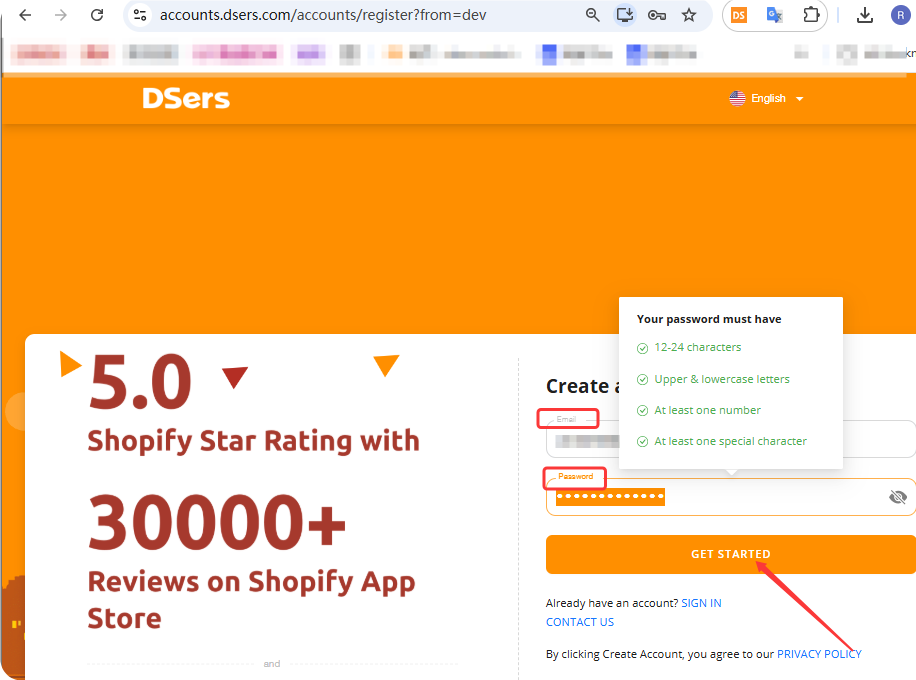
Go to https://www.dsers.dev/ and create your DSers Developer account with email&password.
Step 2: Complete the Registration Form
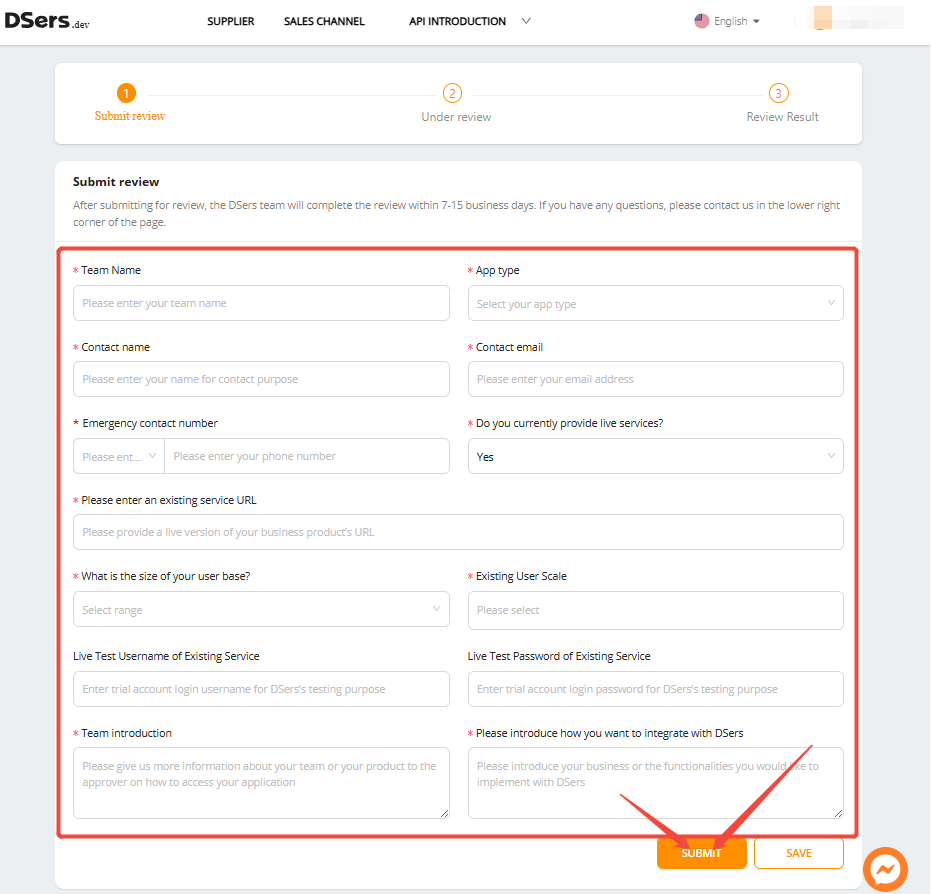
Fill out all required fields on the registration page.
Step 3: Submit Your Application
After completing the form, submit your developer registration. Your application will enter the review process.
Step 4: Wait for Approval
DSers reviews all developer applications. Approval timelines may vary—monitor your email for updates.
Step 5: Access Developer Resources
Once approved, you'll gain access to DSers API documentation, sandbox environment for testing, and app submission guidelines.
Tip: Still waiting after 15 business days? Reach out to support with your account email and a registration screenshot.
Related Articles
- What is DSers? — A Quick Overview for Beginners
- DSers Doesn't Support Your Platform? Use CSV Upload to Connect Your Store
- DSers Profile Management: How to Update Your Email and Password
- How to Register a DSers Affiliate Account and Track Your Referral Rewards
- Login Issues: Can't Access Your DSers Account
FAQ Section
Everything you need to know about the DSers Developer Program and how to build custom integrations with DSers.

Get Started Now to Grow Your Online Business with the DSers!