

Troubleshoot password errors, redirect loops, and blank screens to get back to your dropshipping business
Note
Time is money in dropshipping. If you're locked out of DSers, your orders aren't moving. Below are the three most common login issues dropshippers face. Jump to the scenario that matches your problem:
- Scenario 1 – You get an "Invalid Password" error (even when you're sure it's right)
- Scenario 2 – You log in but keep getting sent back to the registration page
- Scenario 3 – The login page won't load at all (blank screen or endless spinner)
Each scenario includes step-by-step fixes, from quick workarounds to contacting support.
Click here to start dropshipping now with DSers
Scenario 1: "Invalid Password" – Even When You Know It's Correct
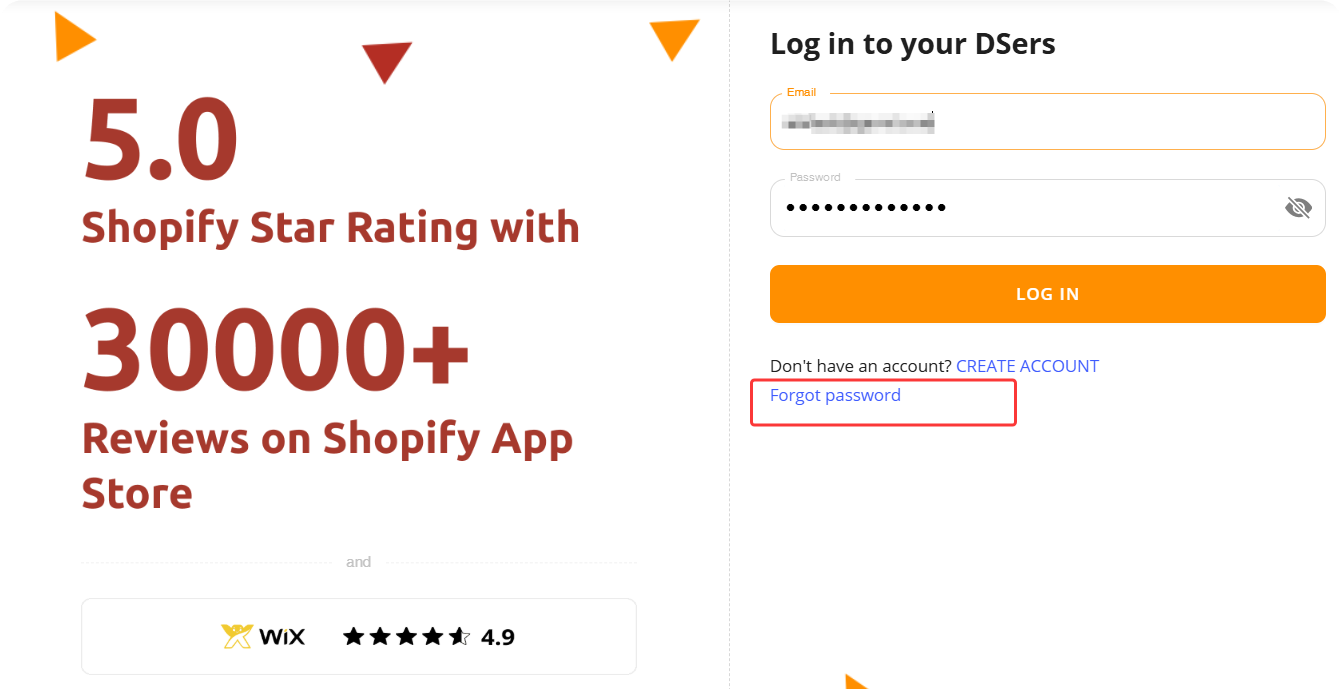
1. Reset your password
- Go to the DSers login page
- Click Forgot password
- Enter your email and click Email instructions
- Check your inbox (and Spam folder) for the reset link
- Create a new password and click RESET PASSWORD
2. Access DSers from Shopify (no password needed)
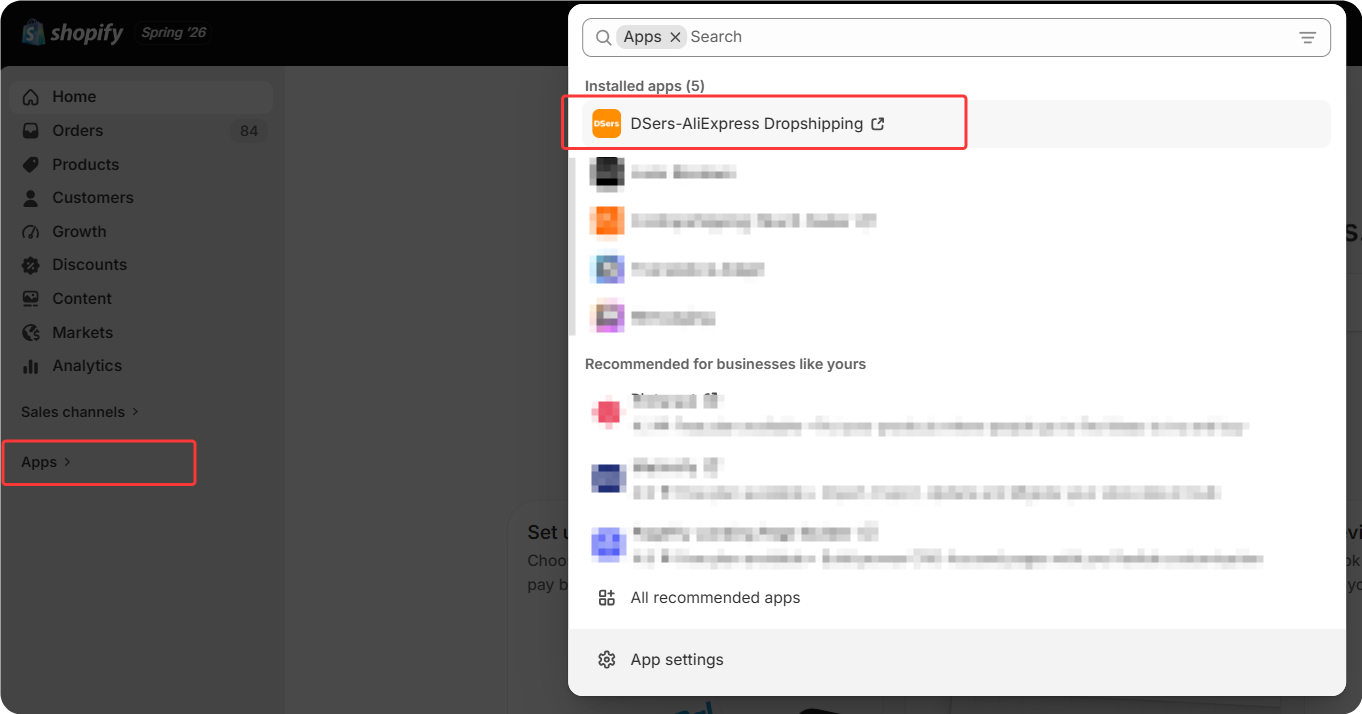
If you're already logged into Shopify, bypass the password entirely:
- Go to your Shopify admin - Apps
- Find and click DSers
- You'll be automatically logged in – no password required
3. Contact support
If you don't receive the reset email or forgot which email you used, reach out to DSers support via live chat or email (support@dserspro.com) for a manual reset.
Scenario 2: The Loop – Sent Back to Registration
You log in but keep getting redirected to the sign-up or "Add Store" page.
The most common cause: You're on the registration page, not the login page.
1. Use the correct URL
Make sure you're logging in here: https://accounts.dsers.com/accounts/login
(Not the sign-up page.)
2. Launch from Shopify Side
Go to Shopify admin - Apps - DSers. This bypasses the login page entirely.
Scenario 3: Blank Screen or Endless Spinner
Blank screen, endless spinner, or nothing happens when you click login.
1. Check your network & VPN
- If you're in a restricted country: Enable your VPN and connect to a server in the US, Europe, or Southeast Asia
- Try switching networks: Move from WiFi to cellular data (or vice versa)
- Corporate or public WiFi may block DSers – switch to a different network
2. Use Google Chrome
DSers works best in Google Chrome. Make sure you're on the latest version.
3. Clear your browser cache & cookies
Clear cached files and cookies for dsers.com (or for "All time" if needed).
4. Disable browser extensions
Ad blockers (uBlock, AdBlock Plus) and privacy tools can block DSers. Turn them off for dsers.com or test in an incognito window.
Related Articles
- Login Without Password: Can't Access Your DSers Account
- DSers Profile Management: How to Update Your Email and Password
- Not Getting Verification Code Emails from DSers? Here's How to Fix It
- Create Your DSers Account: Sign Up Step by Step
- Connection Failed: Why DSers Can't Bind to Your Store
FAQ Section
Quick answers to the most common questions about DSers login issues and troubleshooting.
| Get Started Now to Grow Your Online Business with the DSers! |
