

Accidentally fulfilled an order before placing it with your supplier? Here's how to undo it and get back on track.
Note
This guide covers situations where an order was marked as Fulfilled by mistake, preventing you from placing the supplier order through DSers. Common causes include store auto-fulfillment settings or sales channel shipping configurations. The solution is to roll the order back to Awaiting orders so you can process it normally.Click here to start dropshipping now with DSers
Why This Happens
There are three common scenarios that cause orders to be marked as fulfilled when they shouldn't be:
- Accidental manual fulfillment —The orders in DSers or on your connected store (Shopify, Wix, etc.) were fulfilled by mistake, even though no supplier order was placed. Note that once an order from eBay, Amazon, or Walmart is fulfilled this way, it cannot be rolled back in DSers.
- Shopify auto-fulfillment is enabled —Your Shopify store is set to automatically fulfill orders after an order has been paid. This moves orders to the Fulfilled tab in DSers before you can place the supplier order.
- TikTok "Shipping by TikTok" is selected —When TikTok Shop handles shipping, the order is marked as fulfilled on TikTok's side. DSers syncs this status and the order appears in the Fulfilled tab.
1-Minute Quick Fix: Roll Back via DSers
If the order was fulfilled by mistake on DSers or your connected store (Shopify, Wix, etc.), you can roll it back directly in DSers.
Step 1: Locate the Order
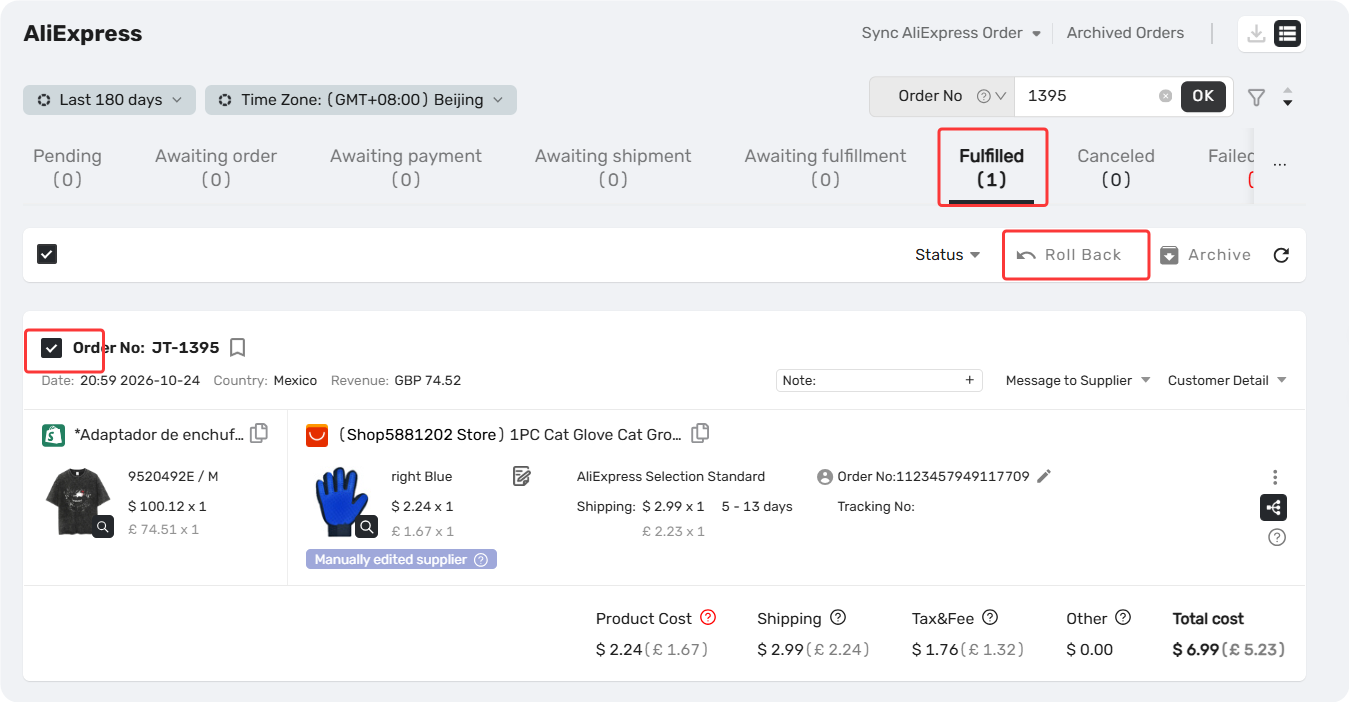
Go to DSers → Open Orders → Fulfilled tab. Find the order you want to roll back, click the order card, then click Roll back orders.
Step 2: Select Order Range
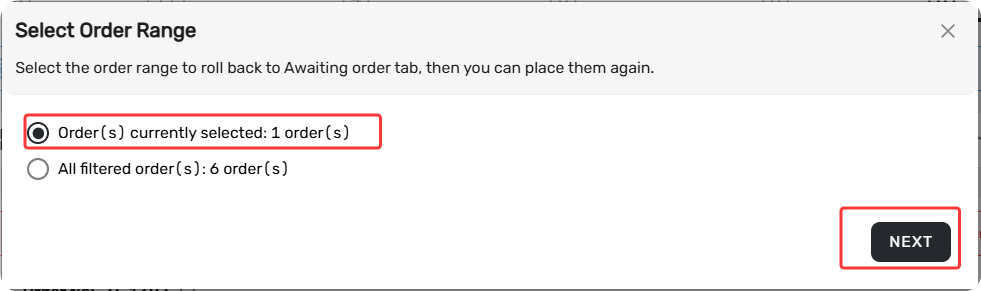
In the pop-up, choose which orders to roll back:
- Order(s) currently selected — Roll back only this order
- All filtered order(s) — Roll back all orders in the current tab (only use this if you need to reprocess every order)
Step 3: Check the Sales Channel Sync
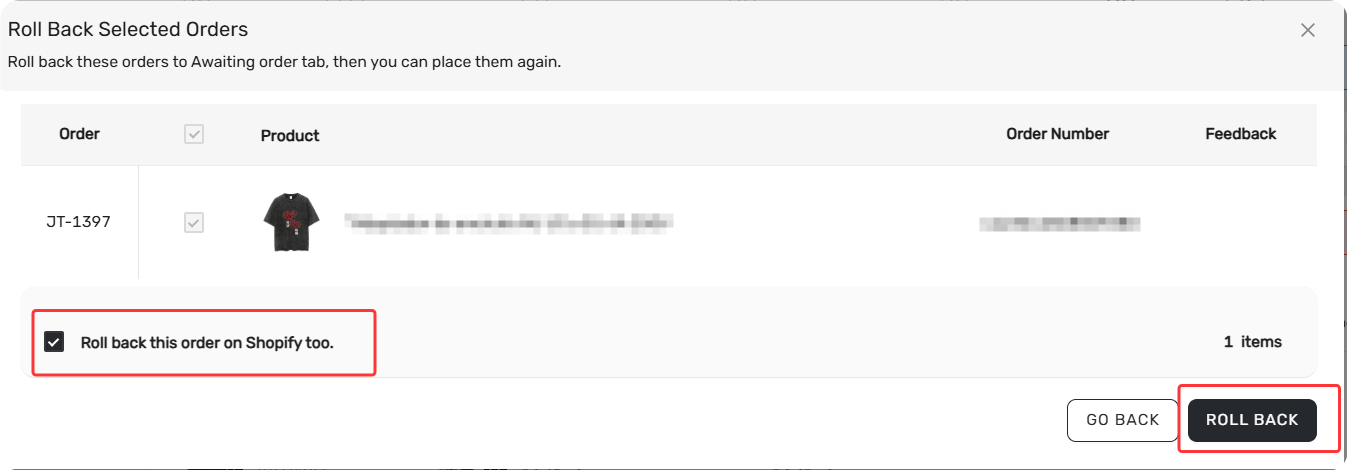
You will see the option: Roll back this order on Shopify too. Make sure this is checked when rolling back. If you only roll back in DSers, your sales channel will still show the order as Fulfilled, and DSers may automatically pull it back to the Fulfilled tab.
Step 4: Confirm Rollbacks
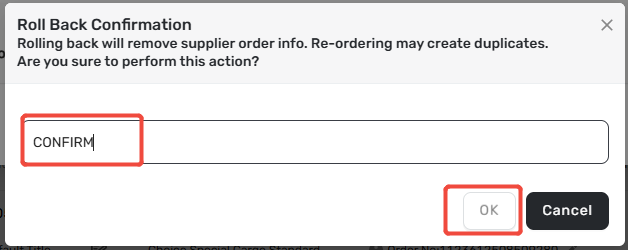
A confirmation pop-up will appear. Enter CONFIRM (case-insensitive) and click OK. The order moves to Awaiting orders, ready for you to reprocess.
Deep Dive: Scenario-Specific Solutions
Scenario A: Shopify Auto-Fulfillment Is Enabled
If your orders keep getting auto-fulfilled in Shopify before you can process them, you need to change your store settings. This is the root cause fix—otherwise, the problem will keep recurring.
Fix in Shopify:
- Go to Shopify Admin → Settings → Checkout
- Find the Order processing section
- Under "After an order has been paid," select Do not automatically fulfill any of the order's line items
- Click Save
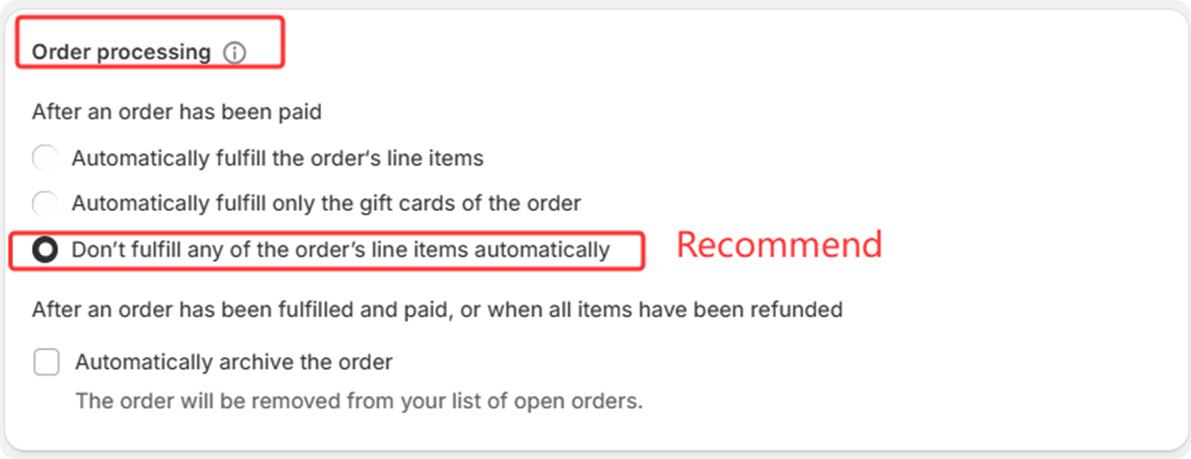
Once this setting is changed, new orders will remain Unfulfilled in Shopify and will appear in Awaiting orders in DSers for you to process manually.
Scenario B: TikTok "Shipping by TikTok" Orderss
When your TikTok Shop is set to TikTok Shipping, TikTok handles fulfillment and the order is marked as fulfilled on TikTok's side. DSers syncs this status, so the order appears in the Fulfilled tab.
Important: These orders can be rolled back in DSers, but they cannot be reprocessed through DSers. This is because TikTok controls the shipping label and fulfillment process—DSers doesn't have the supplier order workflow for these orders.
What you can do:
- Roll back the order in DSers using the standard steps above
- Process the order manually if needed
- To prevent this in the future, switch to Seller Shipping in your TikTok Shop settings: TikTok Seller Center → Orders → Fulfillment Settings → Shipping and Delivery → select Seller Shipping
Scenario C: eBay, Amazon, and Walmart Orders
Some sales platforms do not allow DSers to roll back fulfilled orders manually. These include:
- eBay
- Amazon
- Walmart
These platforms generally don't allow cancellation once an order is marked as fulfilled, so check the order status and follow that platform's own process.
Still Need Help?
If you've followed these steps and the order still won't roll back, or if you're dealing with eBay, Amazon, or Walmart orders that won't sync properly, contact DSers Support with the following information ready:
- Your DSers account email
- Store name
- DSers order number(s)
- Screenshot of the order showing its current status
Having these details on hand will help our support team resolve your issue much faster.
Related Articles
- How to Roll Back a Fulfilled Order and Reprocess It
- How to Roll Back and Reorder Unfulfilled Orders
- How to Roll Back Unpaid Orders Due to AliExpress Account Issues
- How to Roll Back Fulfilled Orders for After-Sales Reprocessing
- How to Roll Back Orders Due to Supplier Shipping Delays
- Fulfilling Customer Orders: How to Place & Pay for Supplier Orders
Frequently Asked Questions (FAQ)
Common questions about orders marked as Fulfilled before the supplier order was placed, and how to roll them back in DSers.

Get Started Now to Grow Your Online Business with the DSers!