

Stop guessing. Learn what each DSers tracking status means—and which ones need your action.
Note
In dropshipping, customer support requests spike when tracking is unclear. Refunds happen when packages get "stuck."
DSers centralizes tracking from hundreds of carriers into one smart dashboard. We classify statuses so you know exactly when to wait and when to act.
Auto-sync: DSers automatically syncs tracking numbers from suppliers. Once a tracking number is generated on AliExpress, it will appear in DSers within hours.Click here to start dropshipping now with DSers
Dashboard Overview
DSers displays tracked orders in a Table view organized by Tracking Number (newest first).
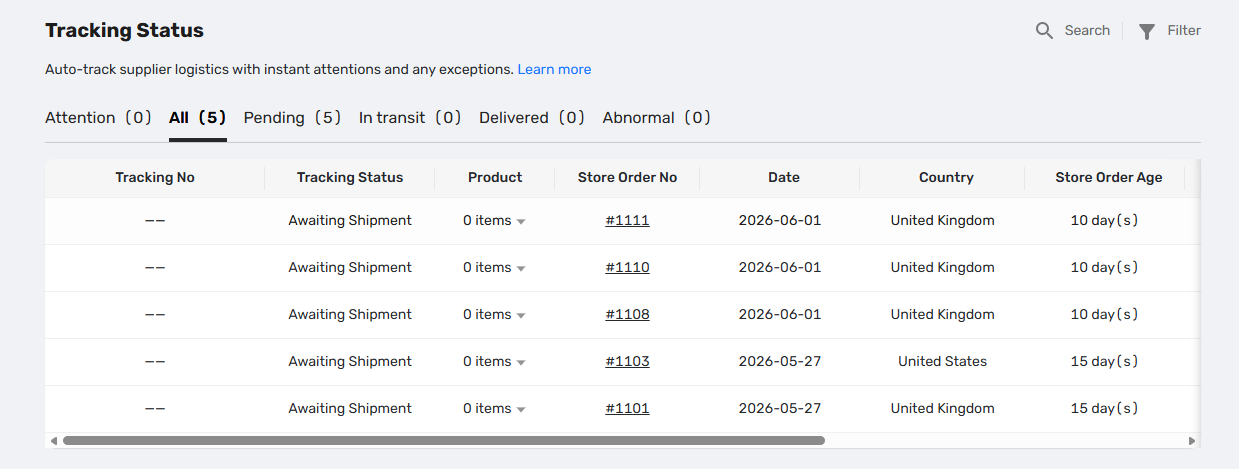
Yellow highlighting means DSers has flagged an order for your attention—usually because a package hasn't moved or a tracking number is missing.
🟡 Pending
Carrier hasn't picked up the package yet.
| Sub-status | Meaning |
|---|---|
| Awaiting Shipment | Supplier generated tracking number, but hasn't handed to courier |
| Awaiting Collection | Courier has the info, but hasn't physically scanned |
📌 Action: If an order stays here for over 7 days, DSers flags it Yellow. Message your supplier.
✅ In Transit
Package is moving through the delivery network.
| Sub-status | Meaning |
|---|---|
| Package Collected | Carrier has possession |
| In Global Transit | On a plane or ship between countries |
| In Domestic Transit | Landed in destination country |
| At Delivery Hub | At local delivery station |
| Awaiting Delivery | Out for final delivery to customer |
📌 Action: You can tell customers their order is "on track."
✅ Delivered
Carrier reports successful delivery.
📌 Action: If a customer claims non-receipt, ask them to check with the local post office first.
-- ⚠️ HIGH PRIORITY SECTION --
🔴 Abnormal
Carrier reported a confirmed delivery failure.
| Sub-status | Meaning |
|---|---|
| Delivery Failed | Attempted delivery but unsuccessful |
| Package Returned | Wrong address, refused by customer, or unclaimed |
| Other Exception | Customs hold, damaged in transit, or lost |
📌 Action: IMMEDIATE. Contact the supplier to check for you and decide whether to reship.
🟡 Attention (DSers Smart Alert)
Not a carrier status. DSers flagging risk before failure happens.
Triggers automatically when:
- No tracking number for 7+ days after customer payment
- Tracking number exists but no update for over 48 hours
📌 Action: Check this tab every morning. These are your "silent failures." Fix them before the customer complains.
Manual Override
Use this when DSers shows a status that doesn't match reality. Auto-sync stops after manual change.
The order moves to the tab matching your new status:
- Delivery Failed, Package Returned, or Other Exception → Abnormal tab
- All other statuses → their corresponding tabs
To resume auto-sync: Click Re-track in the tracking modal.
Related Articles
- Tracking Status FAQ: Troubleshooting Common Issues
- Why is my tracking number missing? Understanding the fulfillment workflow
- How to Auto-Sync Tracking Number Changes
- Auto-Sync Tracking Numbers to Your Store
- Supplier Performance Tracking: Spot Unreliable Suppliers Early
- Manually Updating Tracking Numbers via the DSers Chrome Extension
FAQ Section
Here are some common questions about DSers tracking statuses and how to handle order delivery issues.
| Get Started Now to Grow Your Online Business with the DSers! |
