

Understand who handles order refunds and what canceling an order really means in DSers.
Note
You received a refund request from a customer or want to cancel an order—but you're unsure where the money goes or who to contact.Click here to start dropshipping now with DSers
This guide explains the routing rules for refunds and the key steps to take before canceling.
Before You Start: What Do You Want to Do?
Your next step depends on your goal. DSers does not hold or issue product refunds—the money always goes through the platform you ordered from.
Who you contact for a refund depends on where the order was placed:
| Order Source | Who to Contact |
|---|---|
| AliExpress / Alibaba.com | Handle the refund directly on the respective platform. |
| 1688 Dropshipping / 1688 Wholesale | Contact DSers Customer Support (we act as the intermediary). |
| Agent | Contact your Agent directly (DSers generally does not intervene). |
| Your Customers | Follow your own sales channel's refund policy. |
Important: Canceling an order in DSers does not automatically refund you.
The refund is handled by the supplier platform (AliExpress, Alibaba) or requires contacting DSers Support (for 1688 Dropshipping/Wholesale).
Refund Flow by Platform
AliExpress (Self-Service)
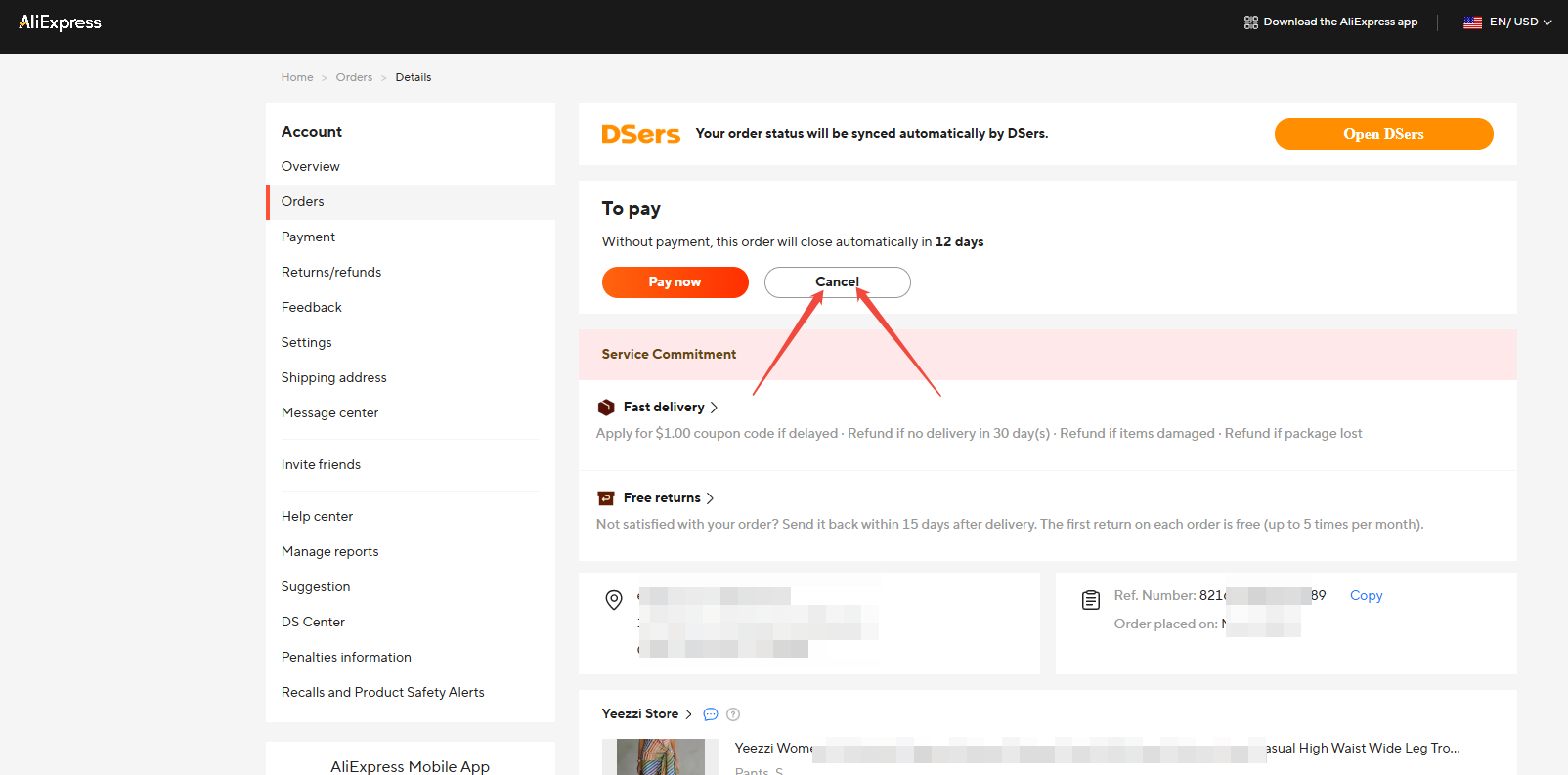
For unpaid orders:
- Go to Open Orders > AliExpress > Awaiting payment.
- Click the Ali Order No to jump to AliExpress(or log in to AliExpress Orders directly).
- Click Cancel and select the reason to confirm.
For paid orders:
- Go to Awaiting shipment and click the Ali Order No(or log in to AliExpress Orders directly).
- Click Request Order Cancellation on AliExpress and wait for seller approval.
Once shipped: AliExpress orders cannot be refunded or canceled. The shipped portion remains in Awaiting fulfillment.
Alibaba (Self-Service)
For unpaid orders:
- Go to Open Orders > Alibaba > Awaiting payment.
- Click the Alibaba Order No to jump to Alibaba.com (or go to Alibaba.com → Account → Orders).
- Find the unpaid order and click Cancel Order.
For paid orders:
- Go to Open Orders > Alibaba > Awaiting shipment.
- Click the Alibaba Order No to jump to Alibaba.com (or go to Alibaba.com → Account → Orders).
- Find the order and click Contact Seller.
- Send a message requesting cancellation. Wait for the supplier's approval.
Tip: Once a supplier order has shipped on AliExpress or Alibaba, it can no longer be canceled.
For AliExpress, wait for delivery and open a dispute if needed.
For Alibaba, contact the supplier to attempt an intercept, or open a dispute through Trade Assurance after the goods arrive.
1688 Dropshipping & 1688 Wholesale (Contact DSers Support)
Both 1688 Dropshipping and 1688 Wholesale are DSers-operated suppliers. You cannot process refunds directly on the 1688 side.
If you need to cancel or refund a paid 1688 order, contact DSers Customer Support. Our team will act as the intermediary and contact the supplier on your behalf.
Agent Orders (Contact Your Agent)
For Agent orders, refunds are generally handled directly by your Agent. DSers does not act as an intermediary for most Agent orders.
- If your Agent is unresponsive or cannot fulfill: You can switch to a direct AliExpress, Alibaba, or 1688 supplier for that product and reorder.
- For specific exceptions (Samtrinity / Gsquare teams): DSers Support can assist with communication.
If the order hasn't been paid yet, you can cancel it directly in DSers under Open Orders > 1688 dropshipping/Agent > Awaiting payment.
For the full step-by-step guide see: [How to Get a Refund for 1688 and Agent Orders on DSers: Policy and Steps]
What You Can Do Next
- Switch suppliers: If the supplier cannot fulfill, remap to a new supplier and reorder.
- Reorder: After cancellation syncs to the Canceled tab, you can edit the order and place it again.
Need Help?
If you're unsure which refund path applies to your order, contact DSers Customer Support via live chat. To help us resolve your issue faster, please have the following ready:
- Your DSers account email
- Your Store Name
- The Order ID
- A clear description of the issue
Related Articles
- Canceling an Order in DSers: What You Need to Know
- Cancelled Order Notification: How to Handle Supplier Cancellations
- Cancel a paid order
- DSers Billing and Refunds: How to Check Your Invoices and Refund Policy
FAQ
Here are some common questions about order refunds and cancellations in DSers.

Get Started Now to Grow Your Online Business with the DSers!