

Sync the latest tracking numbers instantly—even when your supplier changes them.
Note
In most cases, DSers automatically update tracking numbers from AliExpress to your store once your supplier ships the order.Click here to start dropshipping now with DSers
However, sometimes you may need to speed things up—for example, when a supplier modifies a tracking number after shipping, or when the automatic sync doesn't trigger due to network issues.
This guide walks you through the manual sync process step by step.
Why Suppliers Change Tracking Numbers
Suppliers sometimes change tracking numbers after an order is marked as shipped. Here's why:
- To meet shipping deadlines – Some suppliers upload a fake or temporary tracking number to comply with platform processing time requirements, then replace it with the real one once the order actually ships.
- To correct errors – The supplier may have entered the wrong tracking number by mistake and needs to update it.
- To switch carriers – The supplier changes to a different shipping carrier and generates a new tracking number.
When this happens, your store may still show the old or fake tracking number—confusing your customers. The manual sync feature lets you pull the latest tracking number instantly.
What You'll Need Before Getting Started
- The latest version of the DSers Chrome Extension installed in your browser
- Shiped Order tab-in AliExpress account that matches the one linked to your DSers account and placed orders with.
Important: This feature only works for orders that were successfully fulfilled with a tracking number in the first place.
Step-by-Step: Sync Your Latest Tracking Numbers
Here's how to manually pull the most up-to-date tracking information from AliExpress:
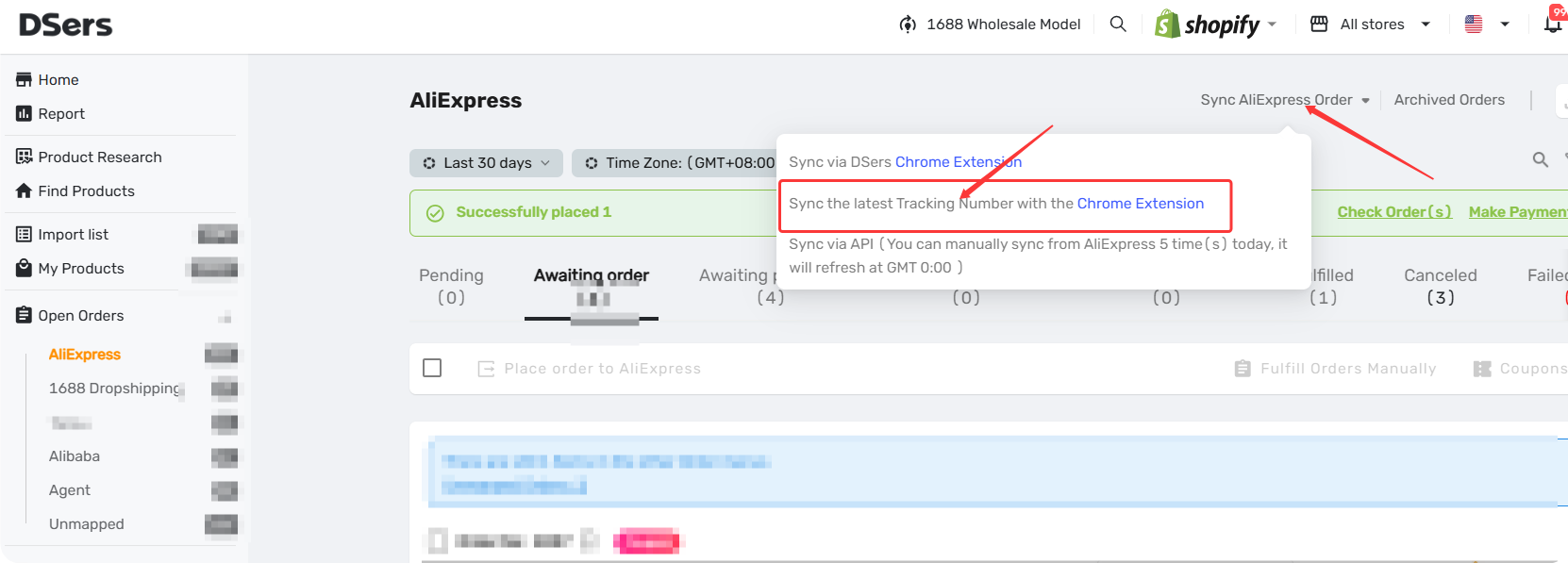
- Log in to DSers and navigate to Open Orders.
- Click on Sync AliExpress Order to open the dropdown menu.
- Select Sync the latest Tracking Number with the Chrome Extension.
- Select the date range to update Tracking Numbers
This will initiate a sync that pulls the newest tracking numbers for your selected orders. Once completed, DSers will automatically:
- Update the tracking number in your DSers dashboard
- Sync the updated tracking information back to your connected store (Shopify, WooCommerce, etc.)
- Trigger a shipping update email to your customer
(if you have this setting enabled in DSers Settings → Fulfillment Settings → Send an email when Tracking Number is updated)
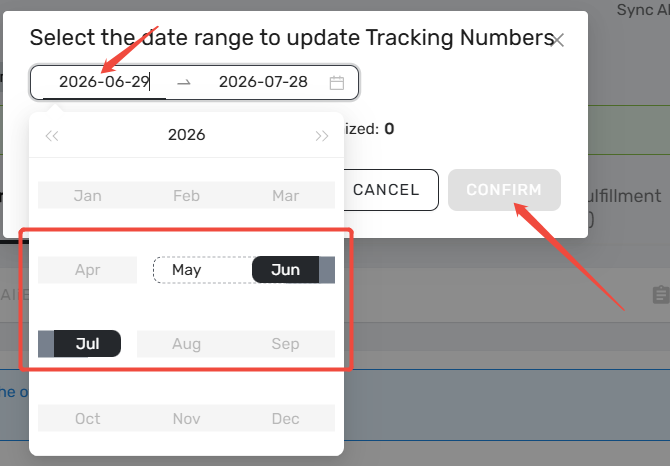
Tip: You can sync up to 60 days of past orders at once. The sync page will show you exactly how many orders can be updated and how long it might take.
What If the Sync Fails?
If you see a failure message, here are the most common reasons:
| Issue | How to Fix |
|---|---|
| The AliExpress account you're logged into doesn't match the one linked to your DSers account | Log out of AliExpress and log back in with the correct account the orders were placed to. |
| The order on Fulfilled tab without tracking number | You can roll back the order to Awaiting order tab, then place it to AliExpress or Alibaba. |
| There was a network interruption | Check your internet connection and try the sync again |
Why This Matters for Your Dropshipping Business
From a business perspective, accurate tracking numbers are non-negotiable. Here's why:
- Customer trust: When your customers can track their packages, they're less likely to file disputes or open chargebacks
- Fewer support tickets: "Where's my order?" emails drop dramatically when tracking updates are reliable
- Better supplier relationships: You'll know immediately if a supplier changed a tracking number, so you can keep customers in the loop
Think of this manual sync feature as your safety net – it's there when you need it, but ideally, you won't need it often because DSers handles most of this automatically.
Related Articles
- Tracking Status Explained: Know Where Every Package Is
- How to Auto-Sync Tracking Number Changes
- DSers Chrome Extension: Placing orders and Syncing Tools Guide
- Customize Shipping Confirmation Email Settings
- How to Place Orders Using DSers Chrome Extension
FAQ Section
Everything you need to know about manual tracking sync and how to instantly pull the latest tracking number from AliExpress.

Get Started Now to Grow Your Online Business with the DSers!