


Stay ahead of supplier changes — from price hikes to canceled orders. Free alerts for everyone, with higher frequency for growing stores.
Note
Suppliers change prices, remove variants, and cancel orders without warning. DSers notifications alert you the moment a supplier makes a change — so you won’t miss a critical update. Notifications are free for every user.Click here to start dropshipping now with DSers
What Are DSers Notifications?
Notifications alert you when suppliers change your products or orders. Alerts appear in the Bell icon (top of the dashboard) and on My Product - product cards.
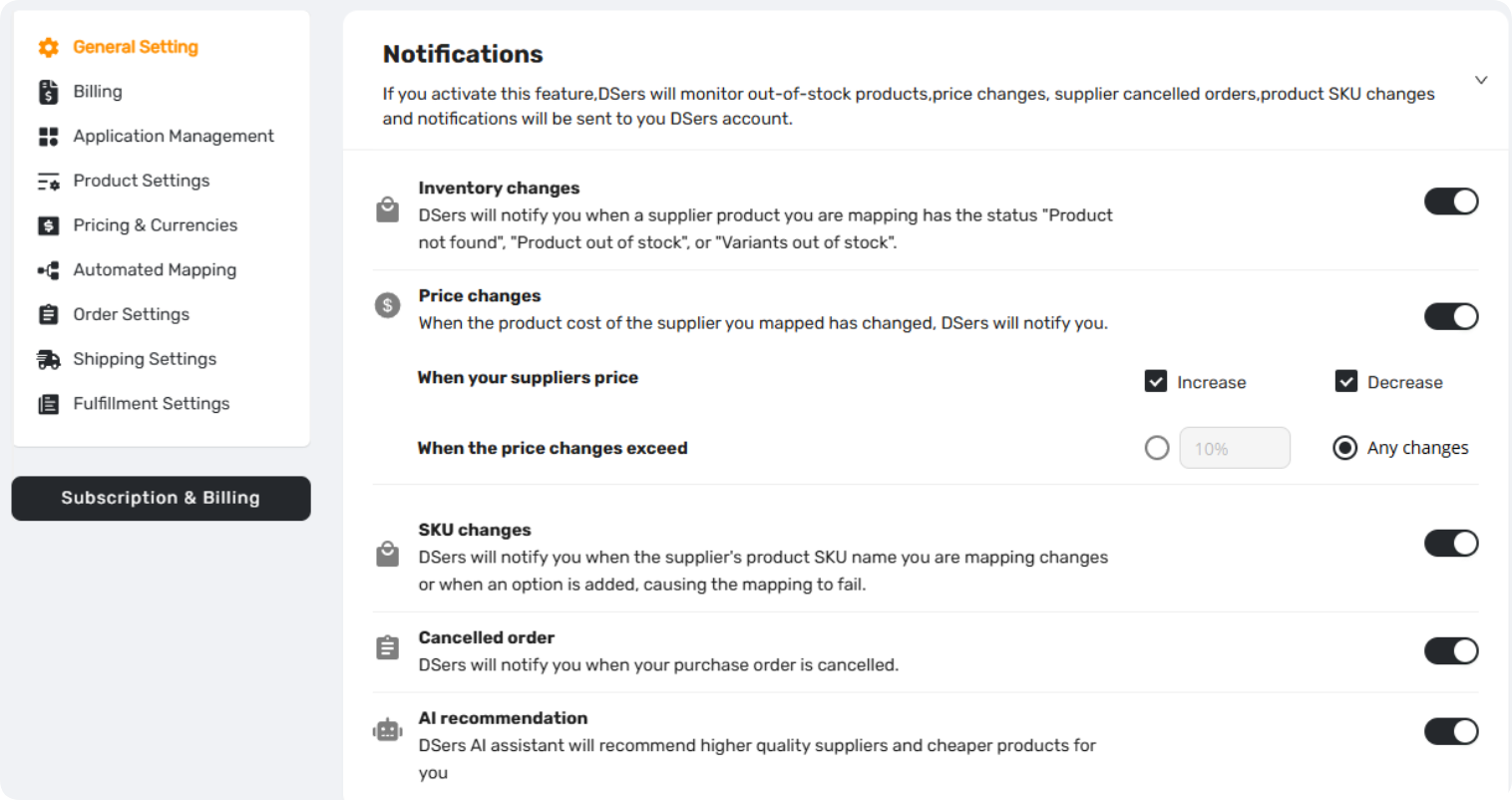
Setting location: Settings - General Settings - Notification
What Triggers Notifications
| Trigger | What Happens | Where You See It |
|---|---|---|
| Inventory Changes | "Product not found", "Product out of stock", or "Variants out of stock". | Bell + My Product |
| Price Changes | Supplier increases or decreases cost (customizable thresholds) | Bell + My Product |
| SKU Changes | Option/SKU added, deleted, or renamed | Bell + My Product |
| Order Canceled | Supplier cancels an AliExpress order | Bell only |
| AI Recommendation | DSers AI suggests higher quality suppliers or cheaper products | Bell + My Product |
For more detailed information on notifications and What to do next with receiving these notifications, please refer to the Related Articles.
How to Set Up Notifications
1. Go to Settings - General Settings - Notification
2. Toggle ON  the notifications you want:
- Inventory Changes
-
Price Changes: Set the preferences

- SKU Change
- Order Canceled
- AI Recommendation
3. Click Save 
Once enabled, DSers alerts you through the Bell icon and product cards whenever a supplier makes a relevant change.
Notification Frequency by Plan
DSers checks for supplier updates at different intervals based on your plan.
| Plan | Update Frequency |
|---|---|
| Enterprise | within 6 hours |
| Pro | 6–12 hours |
| Advanced | 12–24 hours |
| Basic (Free) | 24–36 hours |
Note: If a product has an existing store order, DSers prioritizes tracking its changes — so you never miss updates on products your customers have already purchased.
FAQ Section
Quick answers to the most common questions about DSers notifications and supplier change alerts.
| Get Started Now to Grow Your Online Business with the DSers! |



 Company
 Why Choose DSers
 Blog
Blog
 Help Center


