

Learn how to search, map suppliers, and manage product settings in DSers.
Note
My Products is a powerful feature in DSers that enables you to check, delete, hide and replace products with ease.Click here to start dropshipping now with DSers
Additionally, you can connect suppliers to products and even create BOGO or Bundle offers to promote sales. Explore the feature with the following content.
What is the source of products
Products will show up on the My Products page in three situations:
- You push or publish products to your stores from the Import List.
- A customer places an order for a product in your store.
- You manually import products from your stores.
How to use My Products
The main actions in My Products are divided into three parts: Search, Import, and Mapping.
Search for products
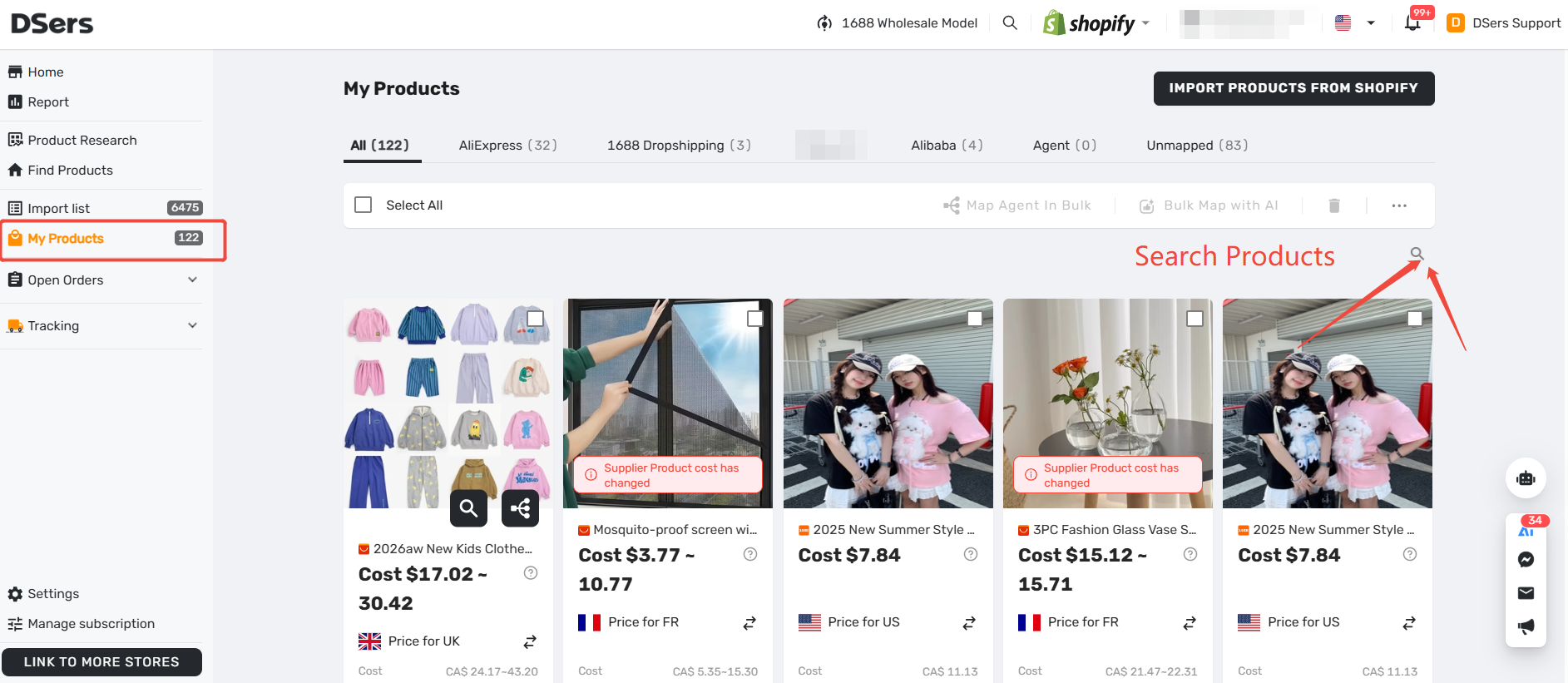
You can quickly locate a specific product using the search box. The search supports fuzzy search (partial matches) and is case-insensitive.
- Log in to DSers and go to My Products.
- Click the Search Product bar.
- By default, Store Product is selected. Enter part of the store product name. (Note: You cannot paste a supplier product link here).
- To search by supplier, switch the tab to Supplier Product. You can then enter the supplier product title (fuzzy search) or the supplier product link (exact search).
- Press Enter or click OK to search.
Import products
If you want DSers to help you manage products that are already live in your store, you can manually import them.
- Click the Import button on the My Products page.
- Select your store and the products you want to bring into DSers.
- Confirm the import.
Map products
You can map your store products with suppliers and manufacturers. Mapping helps DSers know exactly which supplier to place the order with when you receive an order.
You can also set up upsells by creating BOGO & Bundle products during the mapping process.
More available features
Here are some other useful tools you can use on this page:
| Features | What you can do with it |
|---|---|
| Hide/Unhide a product | Hide the product for which you don't want to process orders with DSers. |
| Replace product | Replace the product you pushed to your store without changing the product URL in your store. |
| Delete a product | Remove products that you no longer need to manage in DSers. |
| Change the destination country for your product cost | Change the destination country to display your product cost that considers the shipping distance. |
FAQ
Here are some common questions about the My Products feature in DSers.
Related Articles
- Importing: How to Bring Products from AliExpress
- How to Set Your Default "Price for Ship to Country"
- Mapping Explained: How DSers Knows Which Supplier to Order From
- Advanced Mapping: Route Orders to the Right Supplier by Country
- Mapping Errors: Products Not Syncing Correctly
- Master Pricing Settings: 2 Ways to Automate Your Product Pricing
Get Started Now to Grow Your Online Business with the DSers!