

Support:


If you want to charge taxes on your products, you normally need to enable the feature on each product variant one by one in your store. To save you from this repetitive work, DSers lets you mark products as taxable in bulk when pushing them to your store. The taxes will then be charged automatically when your customer checks out.
Click here to start dropshipping now with DSers
Part 1: Set products as taxable in DSers
- Login to DSers > Import List.
- Select the product(s) you want to push and click Push to Store.
- Under Channels & Status > Product Status, check Set products as taxable.
- Click PUSH TO STORES.
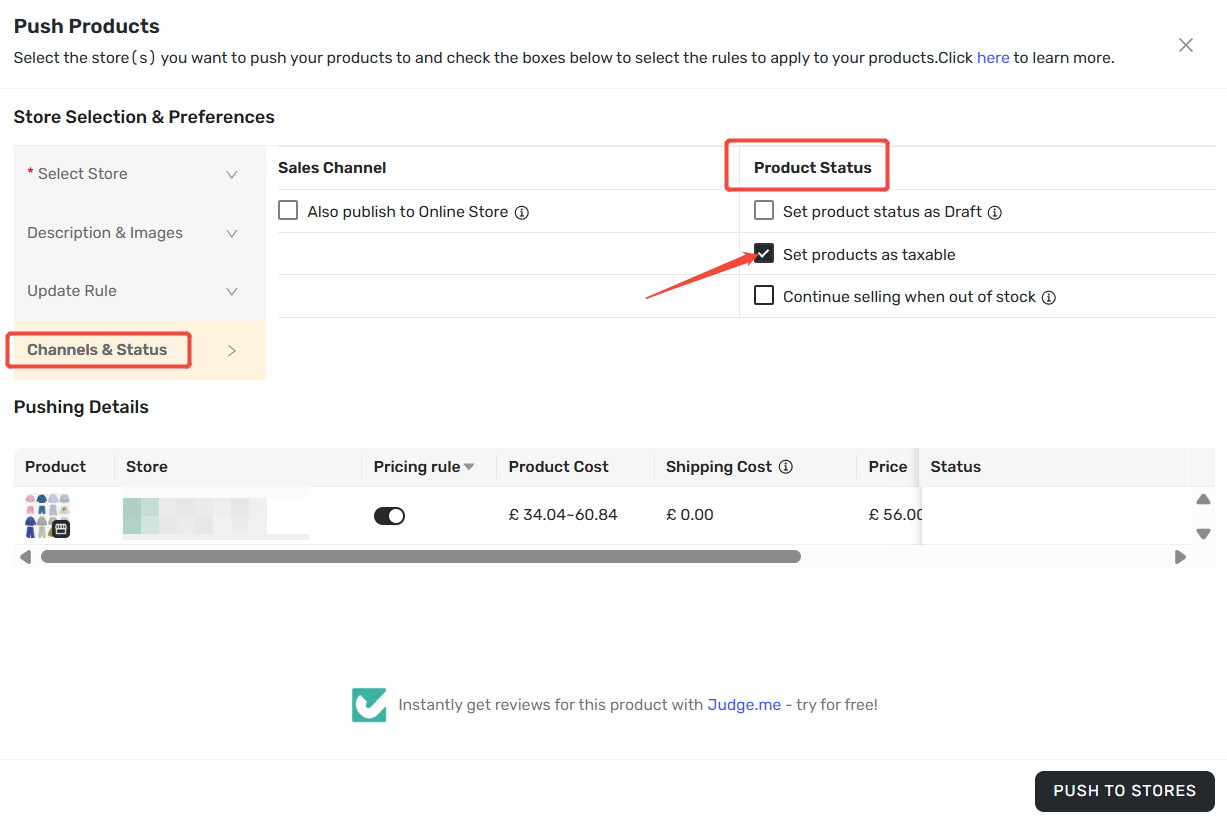
- Tip: Once checked, Charge tax on this variant will be enabled for the variants pushed in this batch.
Part 2: Configure taxes on Shopify
DSers marks your products as taxable, but it does not calculate taxes. To set up how taxes are calculated and displayed, go to Shopify.
- Login to Shopify admin, go to Settings > Taxes and duties.
- Under Tax regions, select your region and enter your tax registration information if required.
- Configure how taxes are displayed (included in price or added at checkout) based on your region.
- Click Save.
For detailed instructions, see Shopify Help Center: Setting up taxes.
Related Articles
- Edit & Push: Customize Products Before Publishing
- Auto-Sync Product & Shipping Costs to Your Store
- Master Pricing Settings: 2 Ways to Automate Your Product Pricing
FAQ
Here are some common questions about setting your products as taxable in DSers.

Get Started Now to Grow Your Online Business with the DSers!